
How to Show Up in Google AI Overviews: 7 Steps for Local Businesses

Most advice on getting into Google AI Overviews starts with a trick: a special file, a magic schema type, a "GEO-optimized" rewrite. Google's own documentation starts somewhere much less exciting. In its guide to AI features and your website, Google says "there are no additional requirements to appear in AI Overviews or AI Mode, nor other special optimizations necessary."
That doesn't mean there's nothing to do. It means the work is the ordinary kind, done with a clearer idea of what an AI Overview actually pulls from. This guide walks through it in order, from checking whether your searches even get an AI Overview to measuring what happens after you make changes.
First, know what you're aiming at
An AI Overview is the AI-written answer Google places above the regular results, with links to the pages it drew on. Google says these links come from pages that are "indexed and eligible to be shown in Google Search with a snippet," and that AI Overviews "are only shown when our systems determine that it is additive to classic Search, and as such, often don't trigger."
That last part matters for a local business, because how often an AI Overview shows depends heavily on the kind of search. Serplify fetched 494 US desktop results pages on October 9, 2026 and counted the ones with an AI Overview:
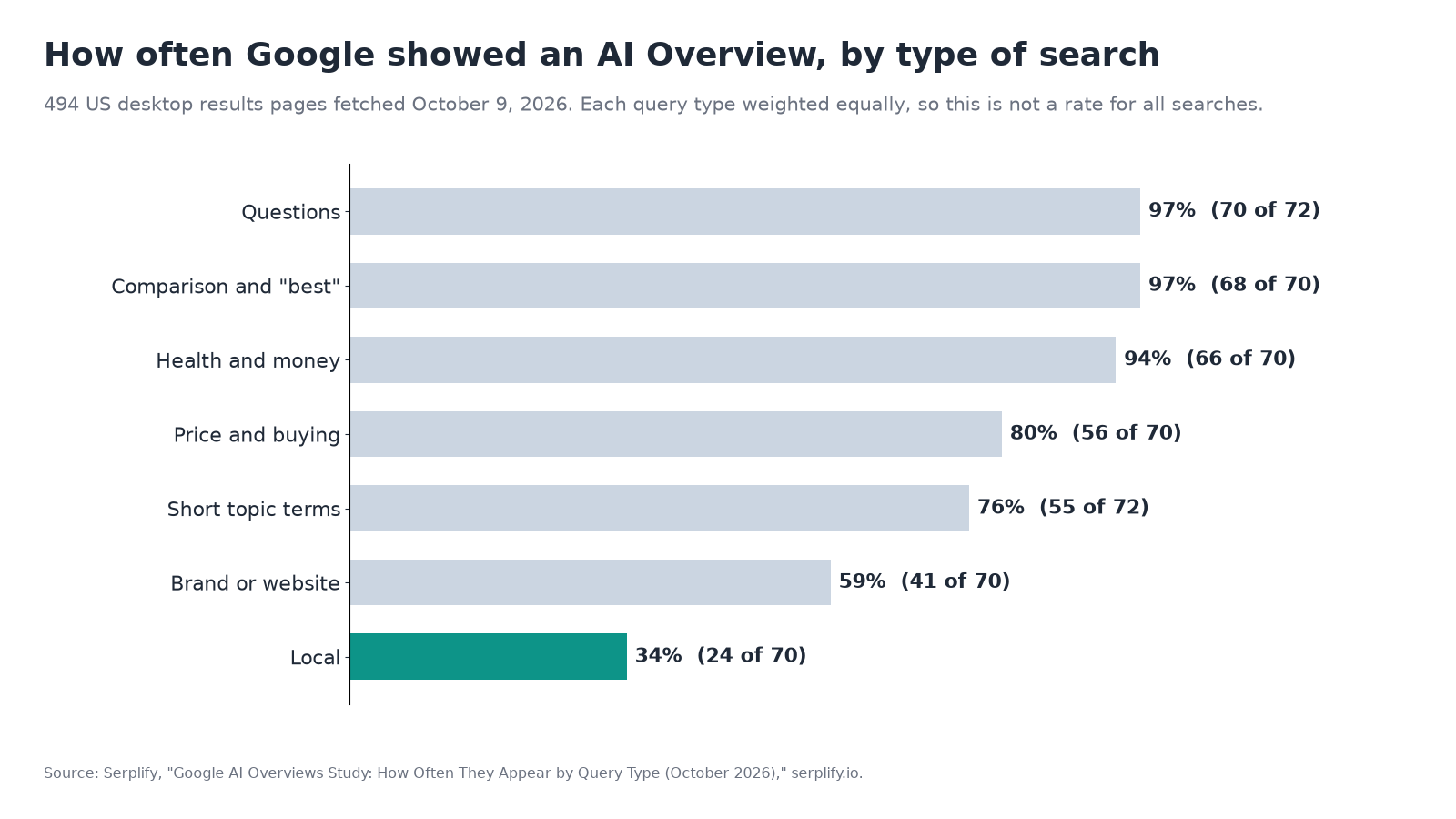
Questions and "best" or "vs" searches almost always had one. Local searches like "family dentist near me" had one only 24 times out of 70, because the map pack still answers most of those. (Serplify weighted every query type equally, so its 77% overall figure isn't a rate for all of Google; our post on what percentage of Google searches have AI Overviews compares it with the other studies.)
So for most local businesses, the realistic target isn't "near me." It's the questions customers ask before they're ready to pick someone: "how much does a panel upgrade cost," "do I need a permit to replace a water heater," "best way to move a piano." Those are the searches where an AI Overview sits at the top of the page.
Step 1: List the searches that actually show an AI Overview
Before changing anything, write down 15 to 25 searches a customer might type, mixing questions, comparisons, and local searches. Search each one in a private window and note three things: whether an AI Overview shows, which sites it links to, and whether your business or site appears anywhere.
This list does two jobs. It tells you which pages to work on, and it gives you a baseline, so later you can tell whether anything changed. Run it on both a phone and a computer if you can. Serplify found that 27 of 154 keywords had an AI Overview on only one of the two devices.
Step 2: Make sure Google can index and quote the page
This is the only hard requirement, and it's where a lot of pages quietly fail.
- The page must be indexed. Check it with the URL Inspection tool in Search Console.
- The page must be allowed a snippet. A
nosnippettag, or a very shortmax-snippetvalue, keeps text out of AI features as well as regular results. Google listsnosnippet,data-nosnippet,max-snippet, andnoindexas the controls for limiting what it shows. - Googlebot must be allowed in. Google says robots.txt rules for Googlebot are the control for AI features in Search, and it names CDN and hosting settings as places crawling can also be blocked. A security rule that challenges bots can lock Googlebot out without anyone noticing.
One common mix-up: Google points to Google-Extended for limiting AI training and grounding in "some of Google's other systems." It isn't the switch for AI Overviews in Search; Googlebot is.
Step 3: Answer the question, then the next five questions
Google says AI Overviews and AI Mode "may use a 'query fan-out' technique — issuing multiple related searches across subtopics and data sources — to develop a response." In plain terms, one search from a customer becomes several searches behind the scenes, and pages that answer those side questions can get pulled in.
That changes how a service page should be written. Take "how much does it cost to replace a water heater." The fan-out likely touches tank versus tankless, permit rules, how long the job takes, and signs the old one is failing. A page that answers each of these in its own clearly labeled section, with real numbers from your own pricing, gives Google more places to quote from than a page that says "call us for a quote."
A few habits help:
- Put the direct answer in the first sentence or two under each heading.
- Use the words customers use, not internal jargon.
- Keep important facts in text. Google lists "making sure that important content is available in textual form" as a best practice, so prices in an image or hours in a PDF don't count for much.
Step 4: Keep your structured data honest, and skip the magic files
Google is blunt here: "You don't need to create new machine readable files, AI text files, or markup to appear in these features. There's also no special schema.org structured data that you need to add."
Structured data is still worth having for other reasons, as long as it matches what the page shows. Google's best-practice list includes "making sure your structured data matches the visible text on the page." Our local business schema markup guide shows how to add and test it. An llms.txt file isn't on Google's list for AI Overviews at all.
Step 5: Update your Business Profile, because local answers lean on it
Google's best-practice list also includes "checking that your Merchant Center and Business Profile information is up-to-date." For local businesses, this may matter more than anything on your website. In Serplify's sample, 11 of the 24 local AI Overviews pointed to Google's own business or hotel listings instead of websites, and six AI Overviews that listed no web sources named local businesses with links to Google place listings.
Check your category, hours, service area, services list, and photos. If your Business Profile and your website disagree, fix whichever one is wrong.
Step 6: Show up on the sites AI Overviews already cite
Ranking helps, but it isn't the whole story. In Serplify's sample, only 26% of the links AI Overviews cited were also top 10 organic results for the same search.
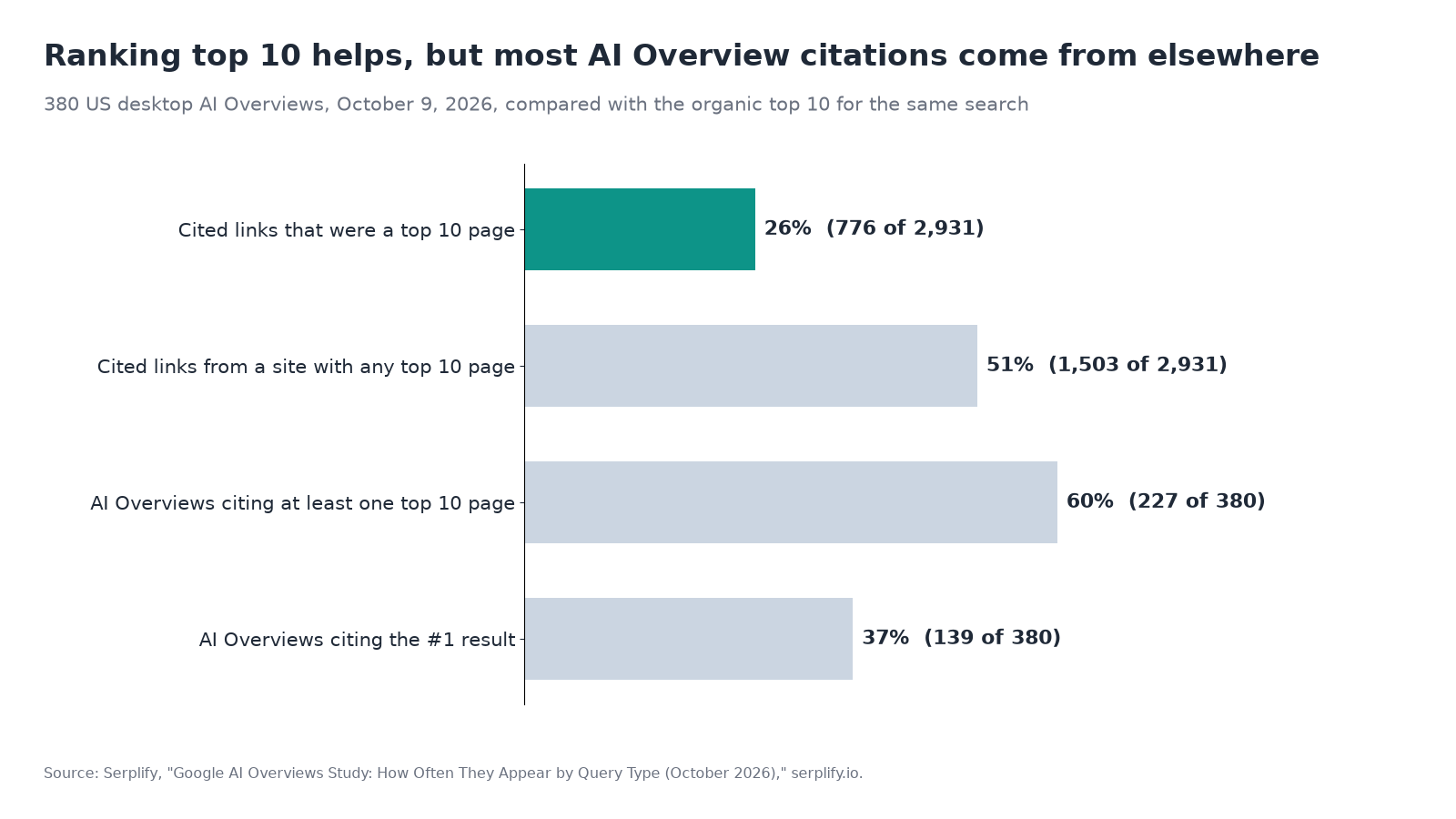
The rest came from a mix of sites, led by YouTube (cited in 54% of AI Overviews) and Reddit (22%), then Facebook, Wikipedia, and Instagram. That points to a few practical moves:
- Short videos that answer one customer question each. A two-minute "what a panel upgrade involves" video can be cited for a question your website already answers.
- Real answers in local forums and community groups, written as yourself and disclosed as your business.
- Mentions on sites that talk about your field: local news, industry associations, review sites, supplier directories. An Ahrefs study of 75,000 brands found branded web mentions had the strongest correlation (0.664) with brand mentions in AI Overviews of the factors it tested. That's a correlation, not proof of cause, but it matches what Serplify saw in the citations.
Step 7: Measure it the way Google reports it
Google says clicks from AI Overviews and AI Mode are counted in Search Console's Performance report under the "Web" search type, mixed in with everything else. There's no separate AI Overview filter. Our guide on how to track AI Overview traffic in Search Console and GA4 shows the workarounds, such as watching the pages you changed and the question searches from Step 1.
Then re-run your Step 1 list every few weeks. AI Overviews change often, so one check is a snapshot, not a result.
What you control and what you don't
| You control it | Google decides | |
|---|---|---|
| Whether the page can be crawled, indexed, and quoted | Yes: robots.txt, CDN settings, snippet tags | Whether it actually indexes and serves the page |
| What the page says | Yes: direct answers, follow-up questions, text over images | Which passages it quotes, and how it summarizes them |
| Your Business Profile facts | Yes: category, hours, services, photos | Whether a local search gets an AI Overview at all |
| Mentions on other sites | Partly: videos, forum answers, PR, directories | Which of those sources it cites |
| Whether an AI Overview appears | No | Google shows one only when it judges it adds something |
Google says even a page that meets every requirement isn't guaranteed to be crawled, indexed, or served. Use the table to put your time on the left column and stop worrying about the right one.
Checklist
- [ ] List 15 to 25 customer searches and note which show an AI Overview and who it cites
- [ ] Confirm each target page is indexed in Search Console's URL Inspection tool
- [ ] Remove any
nosnippetor tightmax-snippettags you didn't mean to set - [ ] Check that robots.txt, your CDN, and your security settings allow Googlebot
- [ ] Give each key question its own heading with a direct answer underneath
- [ ] Move prices, hours, and other key facts out of images and PDFs into text
- [ ] Make your structured data match the visible page, and skip special AI files
- [ ] Update your Business Profile category, hours, services, and photos
- [ ] Publish one short video or forum answer for a top customer question
- [ ] Re-check your search list and Search Console every few weeks
Check the other AI engines too
AI Overviews are one engine. Your customers also ask ChatGPT, Perplexity, and Copilot, and the answers often differ. In our Vancouver electricians study on October 21, 2026, Google AI Overview recorded an answer for 12 of 29 queries while Perplexity answered all 29, and only 6 of the 21 electricians named were named by both engines. Beket AI's free audit runs 25 prompts across 3 AI engines and shows which businesses each one names and whether yours is among them. Beket AI Pro is $49/month, starts at 50 prompts across 3 engines, and re-audits daily, so you can see whether the changes above move the answers.
Related posts
What Is Entity SEO? How Google and AI Engines Recognize Your Business
Entity SEO helps Google and AI engines know exactly which business you are. What it means, key terms, and six steps for local businesses.
Which Local Businesses Does AI Recommend? What 9 Studies in Seattle and Vancouver Show (2026)
Nine Beket AI studies of AI answers for Seattle and Vancouver businesses: how many names engines gave, how often they agreed, and which engine answered least.
Which Vancouver Realtors Does AI Recommend? 2026 Study
Oakwyn Realty led 237 AI mentions of Vancouver realtors on October 23, 2026. See who ChatGPT, Perplexity and Google AI Overview named, and how.