
Google Put the AI Overviews Off Switch Next to Noindex. Most Businesses Should Leave It Alone

On October 21, 2026, Google updated one of its help pages. Its list of ways to keep content out of Google Search now includes a site-wide setting that removes your site from AI Overviews and AI Mode. The setting is not new. But it now sits in the same table as noindex, which makes it look like a normal SEO choice. For most businesses, it is not.
What changed: Google updated its Search Central page "Control what you share with Google Search". The main table now lists seven methods, including a row for the robots meta tag, data-nosnippet and X-Robots-Tag, and a row for the Search generative AI control in Search Console. Google's documentation changelog for October 21 calls these "existing options" and says the update is meant "to keep the page fresh."
What did not change: nothing was switched on or off. The control itself reached every website worldwide on August 31, 2026, and its default is still "Include."
Our short answer: if you run a local business, a service company or a store, leave it on "Include." Read on for what the switch actually does, the cases where it can make sense, and what to check before you touch it.
What the switch removes, and what it leaves alone
The control lives in Search Console under Settings › Search generative AI. According to Google's help page for it, choosing "Exclude" does four things and leaves four things alone.
| If you choose "Exclude" | What Google says happens |
|---|---|
| AI Overviews | Your links and content stop appearing |
| AI Mode | Your links and content stop appearing |
| Generative AI features in Google Discover | Your links and content stop appearing |
| Grounding | Your pages can no longer be used as input for those AI answers |
| Classic search results | Not affected. Google says the setting "isn't used as a ranking or inclusion signal" for other parts of Search |
| AI training | Not affected. For training, Google points to the separate Google-Extended token |
| Merchant Center and Google Ads | Not overridden |
| Other sites | Their content "will still be available in those features, and it may appear similar to yours" |
That last line is the one to read twice. The AI Overview does not disappear when you leave. It gets written from someone else's pages.
Two practical details from the same help page:
- It is slow. Google says content is excluded within 1 to 2 days after the change goes live, and some content may take longer because of caching. Switching back is not instant either.
- It is inherited. A Search Console property follows its parent's setting unless someone overrides it. If an agency or a team member manages a URL-prefix property under your domain, check which setting it is really following.
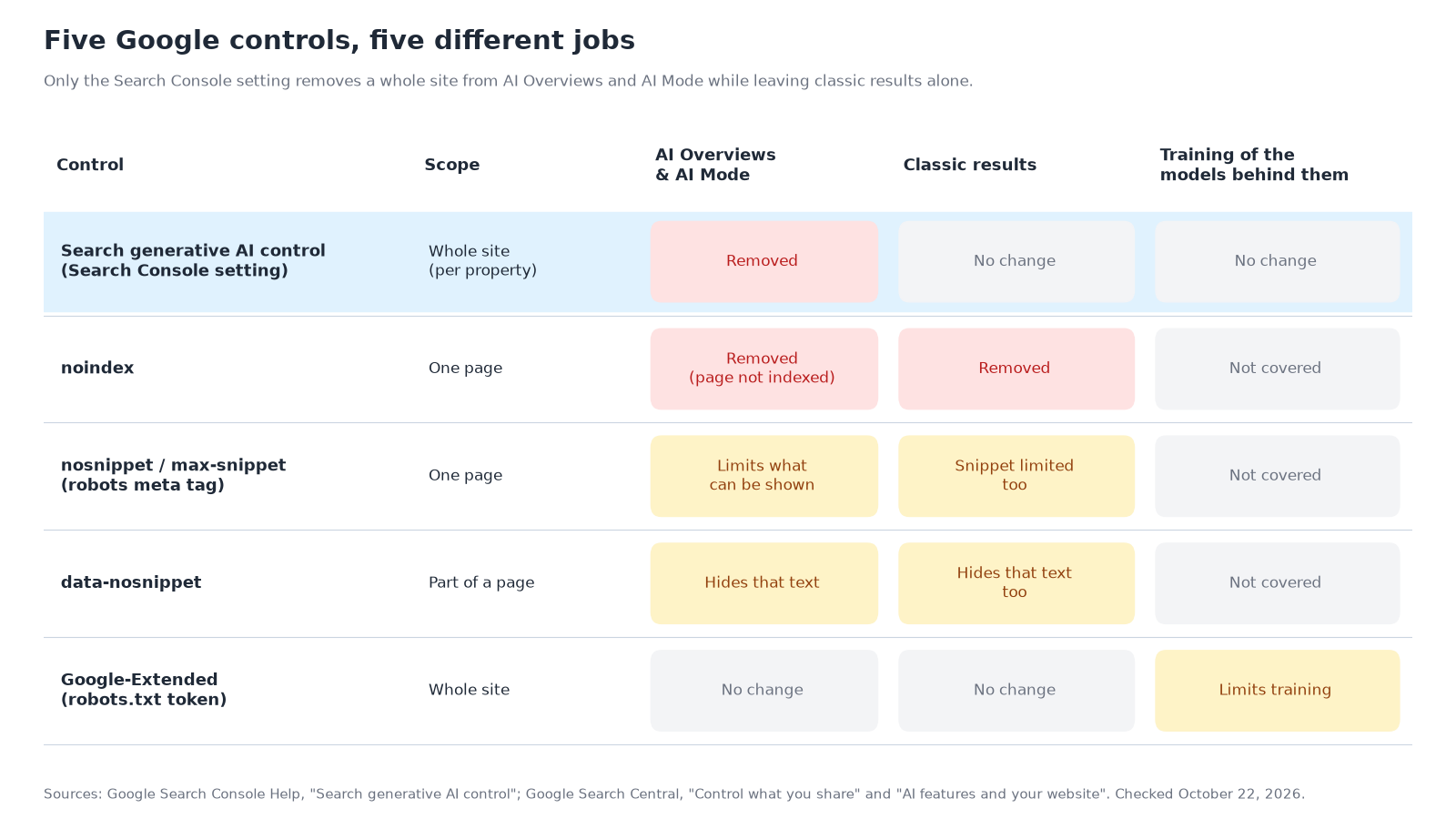
Five controls, five different jobs
Sources: Google Search Console Help and Google Search Central documentation, checked October 22, 2026.
The new table puts these controls side by side, and they are easy to mix up:
- The Search generative AI control is all or nothing for a property. It is the only control on the list built to remove a site from AI Overviews and AI Mode while leaving classic results alone.
- noindex removes a page from Google Search entirely. Google's AI features guide says a page must be indexed and eligible for a snippet to appear as a link in AI Overviews or AI Mode, so a noindexed page drops out of those too.
- nosnippet, max-snippet and data-nosnippet limit how much of a page, or which passage, Google can show. Google lists them as the way "to limit the information shown from your pages in Search," and they also trim your classic snippet.
- Google-Extended is about training, not appearance. Google's changelog has said since 2024 that it does not affect Google Search.
- robots.txt is not on this chart because, for web pages, it controls crawling, not display. Google's AI features guide calls robots.txt rules for Googlebot the control "to manage access to how their sites are crawled for Search."
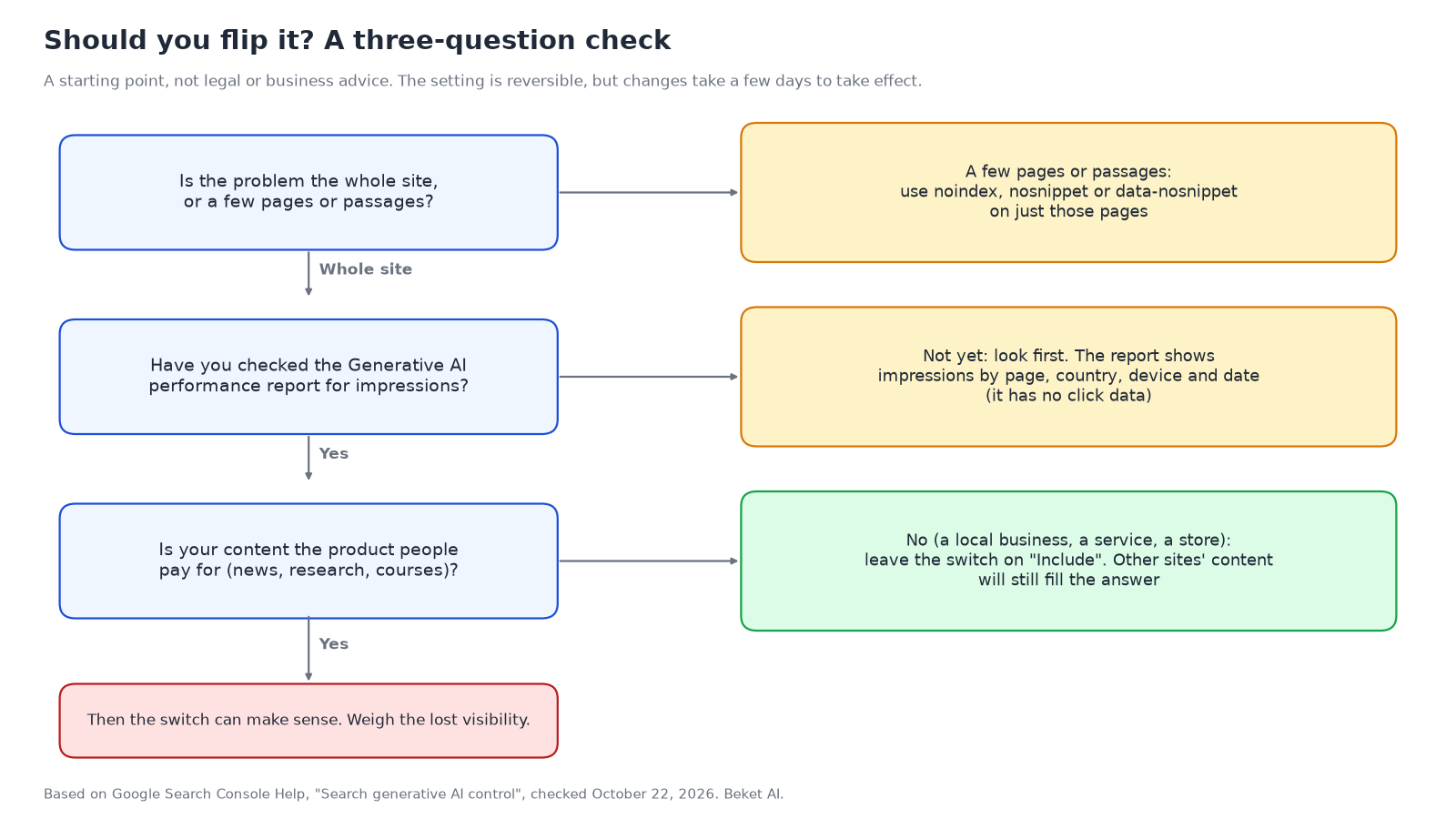
If your problem is one page (an outdated price list, a passage that keeps getting quoted out of context), a page-level or passage-level control does the job without taking your whole site out of AI answers.
The case for leaving it on
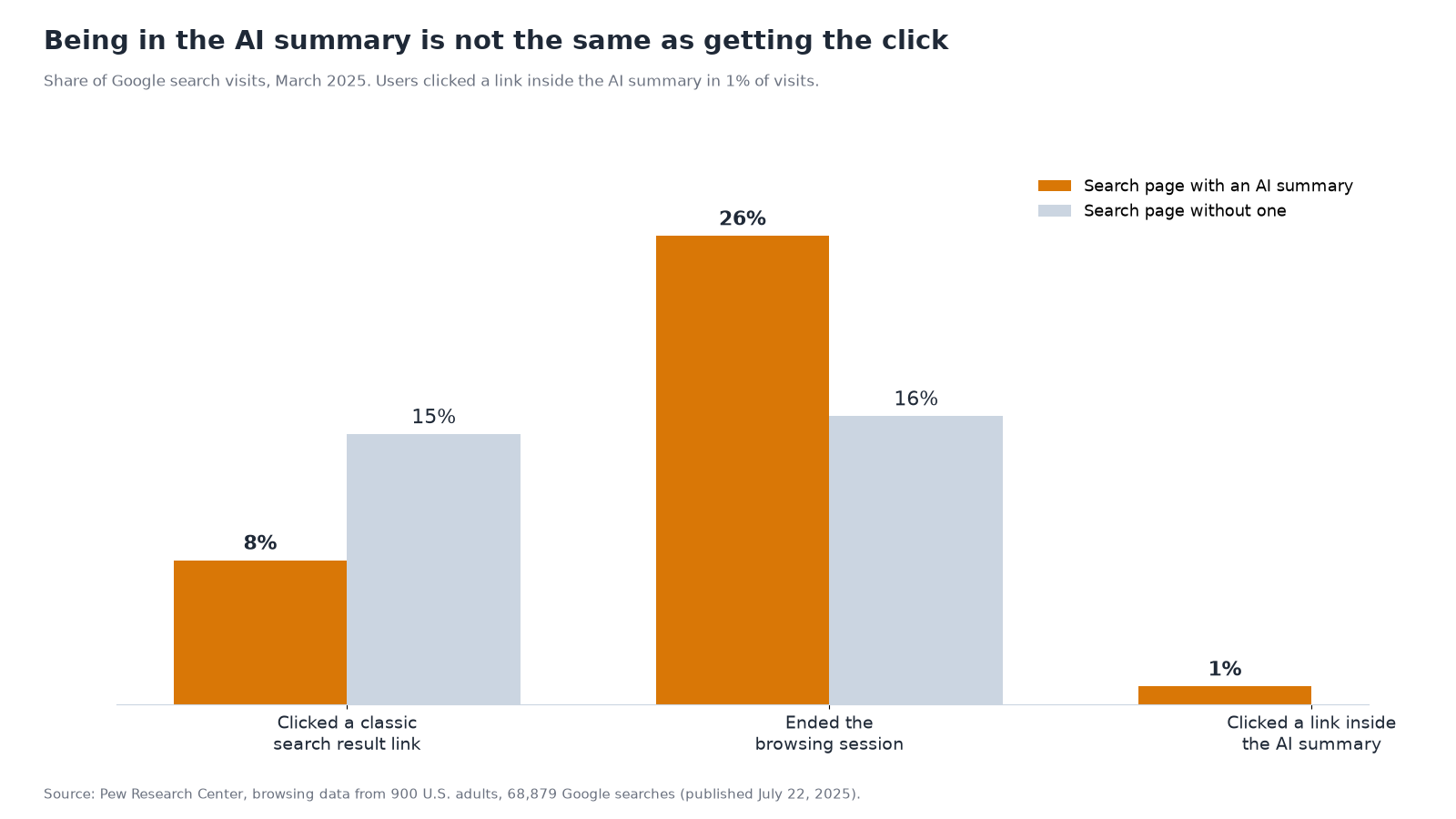
The honest argument for opting out is that AI answers send fewer clicks. That part is well documented.
Source: Pew Research Center, browsing data from 900 U.S. adults, March 2025.
In Pew Research Center's analysis of 68,879 Google searches, people who saw an AI summary clicked a classic result in 8% of visits, against 15% when there was no summary. They clicked a link inside the summary in just 1% of visits. We have written before about why more links in AI answers do not mean more visits.
But opting out does not bring those clicks back. An AI Overview can still appear on the same query. It just names, quotes and links someone else. For a business whose customers act on the answer itself (call, book, visit), that is the worst trade available: you give up the mention and keep the lower click rate.
Three more reasons to stay in:
- People ask AI for local businesses now. In BrightLocal's Local Consumer Review Survey 2026 of 1,002 U.S. adults, 45% had used AI tools for local business recommendations in the past 12 months, up from 6% the year before. 23% had used Google's AI Mode for it.
- Google is pushing more links into AI answers, not fewer. On October 15, Google announced that inline links will appear higher in AI Overviews and AI Mode responses more often, and that it is testing a section at the top of some responses that highlights official websites for a task. You can only be one of those links if you are included.
- The switch only covers Google. ChatGPT, Perplexity and Copilot are not affected by a Search Console setting. If your goal is to stay out of AI answers in general, this does not do it. If your goal is visibility, Google is only one of the engines you need to watch, which is why we keep saying you can't trust one AI engine to tell you how you're doing.
When the switch can make sense
There are real cases for "Exclude." They mostly involve businesses whose content is the product:
- Publishers and research firms whose revenue depends on people reading the article, not a summary of it.
- Course and training sites where the lesson itself is what customers pay for.
- Sites where AI answers repeatedly get something important wrong, and page-level fixes have not worked. Even here, try correcting the source pages first. Google says AI Overviews and AI Mode may use "query fan-out," running related searches across subtopics and data sources, so the wrong fact may come from another site entirely.
Even then, it is a trade. Google's help page tells site owners who exclude: "You won't receive any traffic or impressions from these features."
Check before you flip
A starting point, not legal or business advice.
- Open the Generative AI performance report first. It rolled out to all Search Console users on August 31 and shows impressions in AI Overviews and AI Mode by page, country, device and date. It does not show clicks, so it tells you how often you are seen, not how often you are visited.
- Check what your analytics can and cannot see. A lot of AI-driven visits never carry a clean referrer. We covered why in your AI traffic is hiding in Direct.
- Check who manages each Search Console property. Because of inheritance, one person's change on a parent property can apply to every child property under it.
- Look at what the AI answers actually say about you. If you are worried about how you are described, the fix is usually on the pages the engines read. In our Vancouver electricians study, Perplexity cited the provincial regulator's site 28 times and the City of Vancouver's site 17 times. Official and third-party pages shape these answers as much as your own site does.
- If you do opt out, write down the date. Changes take a few days to show, and you will want a clean before-and-after comparison.
The bottom line
Google moved a switch onto a more visible page. It did not change what the switch does. For a business that wants to be found, "Exclude" removes you from the answer without removing the answer. The better work is making sure that when AI Overviews, AI Mode and the other engines describe your category, they have accurate pages from you to describe.
Beket AI shows which of your customers' questions name your business, and on which engine. A free Beket AI audit covers 25 prompts across 3 engines. Beket AI Pro is $49/month and re-audits daily, starting at 50 prompts across 3 engines. Run a free audit at beket.ai.
This article reflects Google's documentation as of October 22, 2026. Google says it expects to update the list of features the control covers over time, so check the help page before you act.
Related posts
Vancouver Electricians in AI Search: Google AI Overview Named BC Hydro Most (2026 Study)
We asked Google AI Overview and Perplexity the same 25 questions about Vancouver electricians. Only 6 of 21 electricians were named by both engines.
Best SEO Conferences 2026: Dates, Prices and AI Sessions
The SEO and AI search conferences left in 2026 and dated for 2027, with official prices, venues, and which agendas name GEO or AI search sessions.
Ask Three AI Engines for a Vancouver Mover, Get Three Different Lists (2026 Study)
We asked ChatGPT, Google AI Overview and Perplexity 25 questions each about Vancouver movers. No moving company appeared in all three engines' results.