
Bing Is ChatGPT's Back Door: Why Bing Webmaster Tools Is the Cheapest AI Visibility Lever You're Ignoring
A hands-on guide to setting up and tracking Bing Webmaster Tools for AI search — plus the experiment that made ChatGPT start describing our startup.

On this page
Everyone optimizing for AI search is looking in the wrong place.
They’re rewriting content for “the model.” They’re arguing about schema. They’re waiting to see if ChatGPT ever learns their name. Meanwhile the thing actually deciding whether they show up is a free Microsoft dashboard almost nobody logs into.
I know because I ran the experiment on my own company.
The experiment
Before I did anything with Bing, I asked ChatGPT — signed out, incognito, no memory, no personalization — “what is beket.ai?” It had nothing. It couldn’t tell you what we do. Reasonable: we’re a young startup, and the model’s training data predates us.
Then I went into Bing Webmaster Tools and did the boring stuff. Verified the site. Submitted the sitemap. Requested indexing on our key pages.
A week later I asked the same question the same way. This time ChatGPT knew what beket.ai is. Signed out. Incognito. Cold.
The interesting part: it never told me where it learned that. No citation, no “according to.” It just knew.
So I did what you do with any single data point — I asked what changed. The only thing I’d touched was Bing. That’s the deduction, and I want to be honest that it is a deduction. One site, one window, no control group. It’s correlational, not a clean A/B. But it lines up exactly with how the plumbing is documented to work, and that’s the part worth understanding.
Why Bing decides what ChatGPT sees
ChatGPT doesn’t run its own web search index. When it browses the live web to answer a question, it retrieves results from Bing’s index. This comes out of the OpenAI–Microsoft partnership, and OpenAI has confirmed Bing as a primary source for ChatGPT Search. There’s also a dedicated crawler, OAI-SearchBot, that fetches specific pages — but Bing’s index is the pool it draws from.
The consequence is blunt: a page Bing hasn’t indexed can’t appear in a ChatGPT answer. Your Google rankings don’t save you here. You could rank beautifully on Google and be invisible to ChatGPT because Bing never crawled you.
And it’s not only ChatGPT. Bing’s index feeds Microsoft Copilot and DuckDuckGo too. One dashboard, several AI-adjacent surfaces.
This is why I keep calling Bing the back door. Nobody’s guarding it, and it opens straight into the room everyone’s trying to get into.
The distinction that trips people up: indexed ≠ ranked ≠ cited
Here’s the nuance most guides flatten.
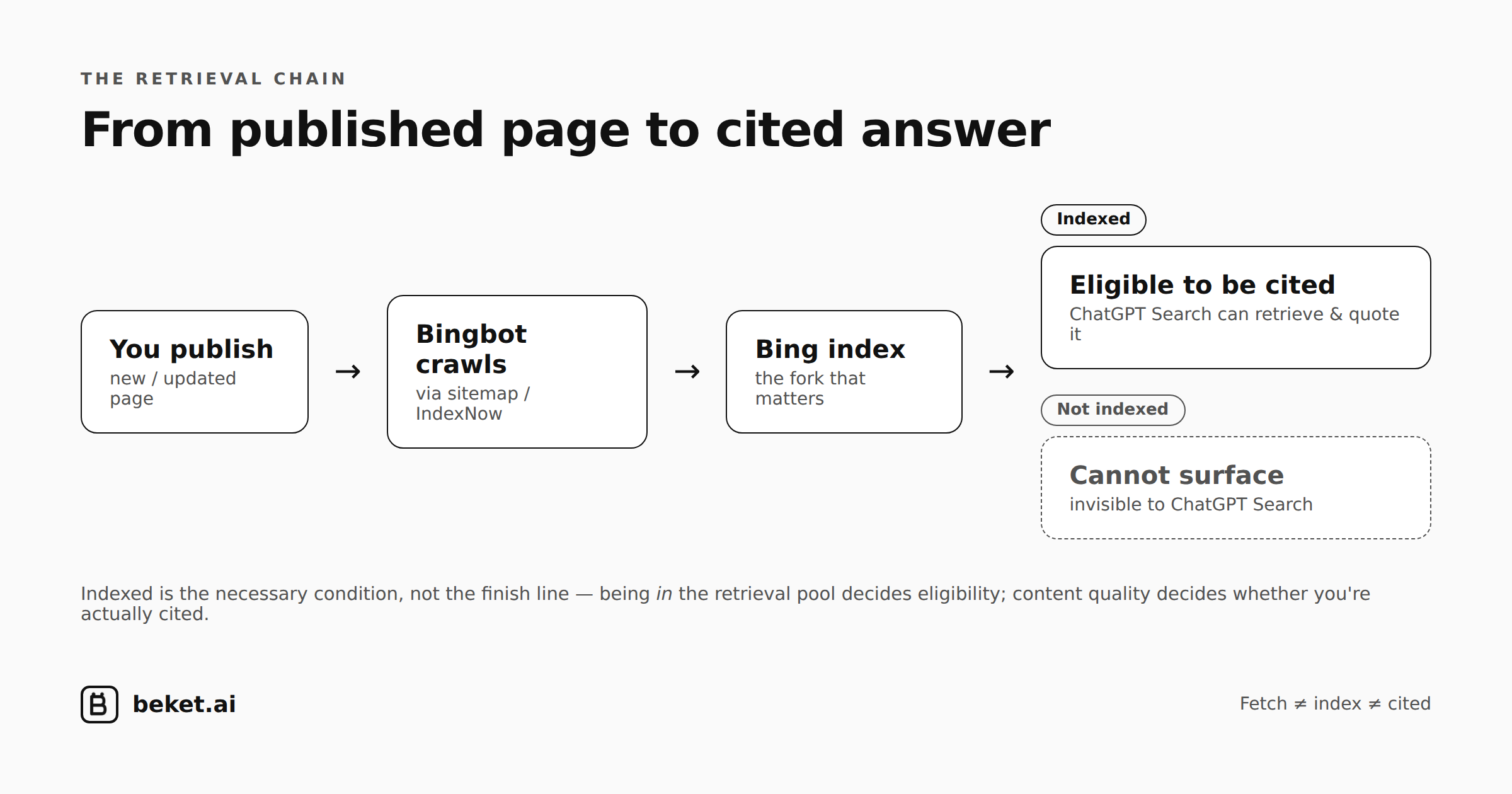
Being indexed by Bing is the necessary condition. It gets you into the retrieval pool — eligible to be pulled into an answer. That’s the fork in the diagram above: indexed, and you can be cited; not indexed, and you simply can’t surface.
But being indexed is not the same as being cited. Once you’re in the pool, whether ChatGPT actually quotes you depends on what the model judges valuable when it reads the page. Research on ChatGPT citations shows Bing rank is a surprisingly weak predictor of which page gets cited — being ranked #1 matters far less than being present with content worth pulling.
So the mental model is a chain, not a dial:
- Fetch — a bot can request your live page on demand.
- Index — your page is stored in Bing’s retrieval pool. This is the gate.
- Cited — the model chooses your page from the pool when answering.
Bing Webmaster Tools controls the middle link. It’s the one you have the most direct leverage over, and the one most teams never touch. Get indexed first. Everything downstream is moot until you’re in the pool.
How to set up Bing Webmaster Tools (about 10 minutes)
It’s free. There’s no paid tier. The whole thing takes about as long as a coffee break.
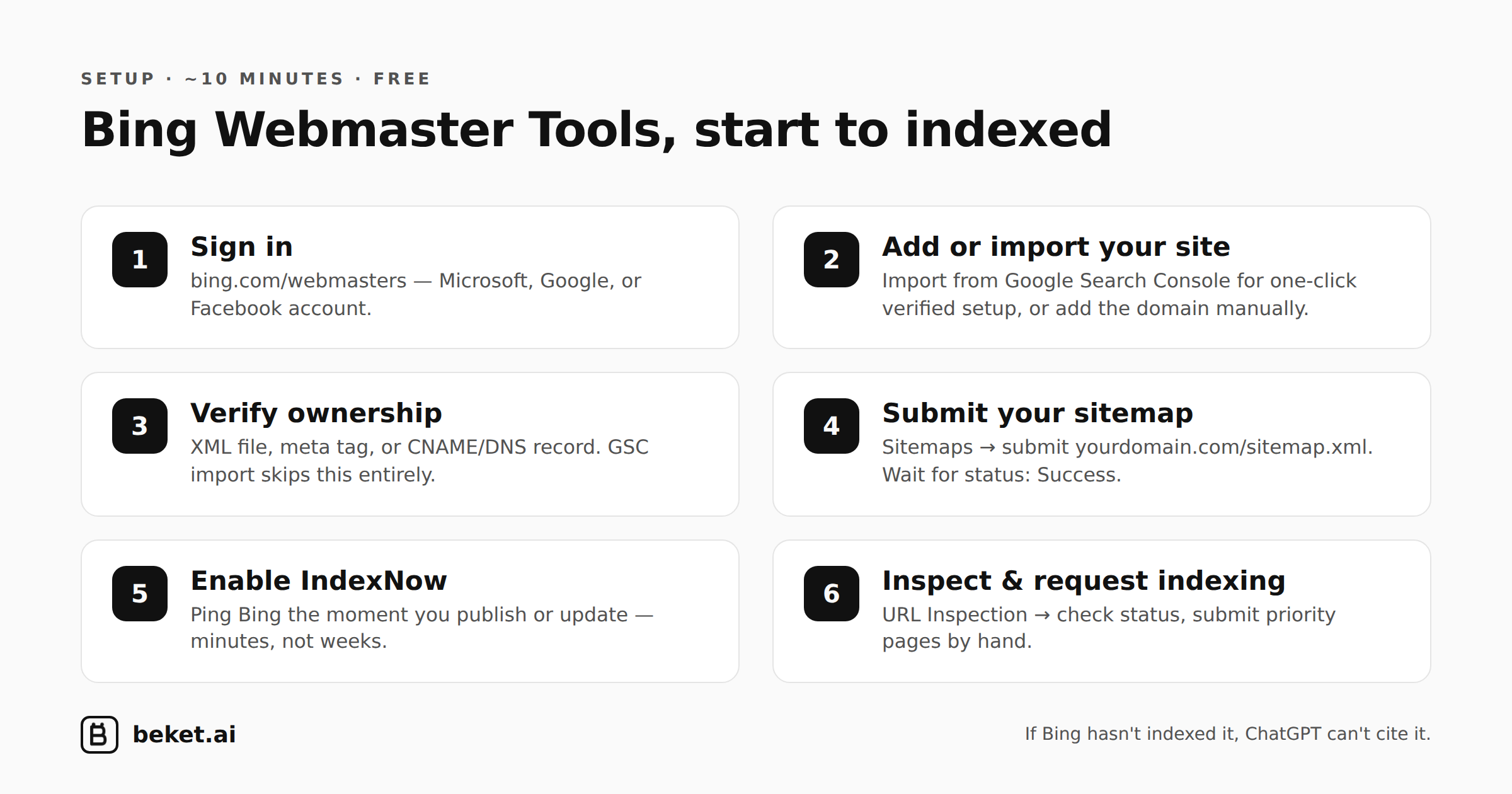
1. Sign in. Go to bing.com/webmasters and sign in with a Microsoft, Google, or Facebook account.
2. Add or import your site. You have two paths. The fast one: Import from Google Search Console. If your site is already verified in GSC, Bing pulls your sites, verification, and sitemaps automatically — often in under two minutes. The manual path: click Add a Site and enter your full domain including the protocol (https://yourdomain.com).
3. Verify ownership (skip if you imported from GSC). Three options:
- XML file — download Bing’s verification file and upload it to your site’s root directory.
- Meta tag — paste Bing’s tag into your homepage
<head>. - CNAME / DNS — add the record Bing gives you at your domain registrar. DNS can take up to 48 hours to propagate; the other two are usually instant.
One gotcha: https://www.yoursite.com and https://yoursite.com are treated as different properties. Verify the version you actually serve.
4. Submit your sitemap. In the left nav, go to Sitemaps → Submit sitemap and paste the full URL (https://yourdomain.com/sitemap.xml). Bing accepts XML, RSS 2.0, Atom, and plain text. If you have separate sitemaps for posts, pages, and images, submit each one. Wait until the status reads Success.
5. Enable IndexNow. This is the part people skip and shouldn’t. IndexNow is an open protocol that pings Bing the instant you publish or update a page, instead of waiting days for a crawler to wander by. Bing typically processes the URL within 24 hours.
- WordPress: plugins like Rank Math, Yoast, and All in One SEO have IndexNow built in — enable it in settings and it fires automatically on publish.
- Cloudflare: turn on Crawler Hints and it submits for you.
- Custom stack: generate an API key in the IndexNow section of Bing Webmaster Tools, host the key file at your root, and POST your URLs to the IndexNow API.
6. Inspect and request indexing. Use the URL Inspection tool on your highest-priority pages right after publishing. It tells you whether a URL is indexed, when Bing last crawled it, the HTTP status it saw, and the canonical it resolved. If a page isn’t in the index, click Request Indexing to push it into the crawl queue by hand. This is the exact step that flipped ChatGPT for me.
That’s the foundation. Sign in, import, sitemap, IndexNow, inspect. Everything else in the dashboard is upside.
What to track after setup
Setup is a one-time event. Visibility is a habit. A few things worth watching:
- Index coverage. Check that the pages you care about are actually indexed — not just submitted. Submitted and indexed are different states. Re-run URL Inspection on key pages monthly; a crawl date from months ago means the page has fallen out of rotation, so push it through IndexNow again.
- Search performance. Bing’s report is segmented by query, page, and country. Pull it alongside Google Search Console and look for queries where you rank page one on Google and page three on Bing. Those gaps are free AI-visibility wins.
- Site Scan / SEO Analyzer. A free crawl that flags missing titles, thin content, broken links, and absent alt text. Run it quarterly on your top pages. Bing often catches things GSC doesn’t.
- IndexNow status. Under Reports & Data → IndexNow, confirm your submissions are actually landing.
The point of tracking isn’t the vanity of a dashboard. It’s that AI visibility is not “set and forget.” Pages drop out. Crawls go stale. New content sits uncrawled for a week — a week in which a competitor’s page gets cited instead of yours.
The honest caveat, restated
I want to be careful here, because grounding claims in real data is the whole reason beket.ai exists.
My finding is one experiment on one site. ChatGPT starting to describe us the week after Bing indexing is consistent with the documented plumbing — but consistency isn’t proof of causation. There are confounders: the model updates, third-party mentions accumulate, our name propagates across the web independently. I didn’t isolate Bing with a control.
What I’ll say confidently is the weaker, better-supported claim: Bing indexing is a documented prerequisite for ChatGPT Search visibility, it’s free, it takes ten minutes, and almost nobody does it. The expected value of setting it up is absurdly high relative to the cost. You don’t need my anecdote to be airtight to justify a ten-minute task with that asymmetry.
The takeaway
If you’re spending energy trying to influence what AI models say about you, start with the least glamorous lever: make sure Bing can see you. It’s the gate to ChatGPT’s retrieval pool, it’s free, and your competitors are ignoring it. Get indexed before you optimize anything else — you can’t be cited from a pool you’re not in.
beket.ai audits how ChatGPT, Gemini, and Perplexity actually describe your business — checking not just whether you’re indexed, but whether what these models say about you is accurate — and fixes what’s automatable before a wrong answer costs you a customer.
Related guides
Your Analytics Can't See AI Crawlers. Cloudflare Can: A Guide to beket.ai's Cloudflare Integration
How to connect Cloudflare to beket.ai in three steps, and how to read the AI crawler and AI referral data it returns.
How to Choose AI Search Optimization Software in 2026: A Buyer's Guide
A plain guide to AEO and GEO software — what the tools do, how the leaders differ, and the one question that sorts them.
Click Signals Feed AI Answers: How Behavioral SEO Shapes What ChatGPT Cites
Clicks move rankings. Rankings shape the pages AI models retrieve. Here is how behavioural SEO and AEO connect, and where the chain breaks.