 beket.ai
beket.ai tracks how ChatGPT, Gemini, Perplexity, Microsoft Copilot, Google AI Overviews, and Google AI Mode represent your business. The Beket AI Search Visibility Monitor plugin for WordPress logs visits from AI crawlers, tells beket.ai when your content changes, and shows your AI search visibility right in wp-admin.
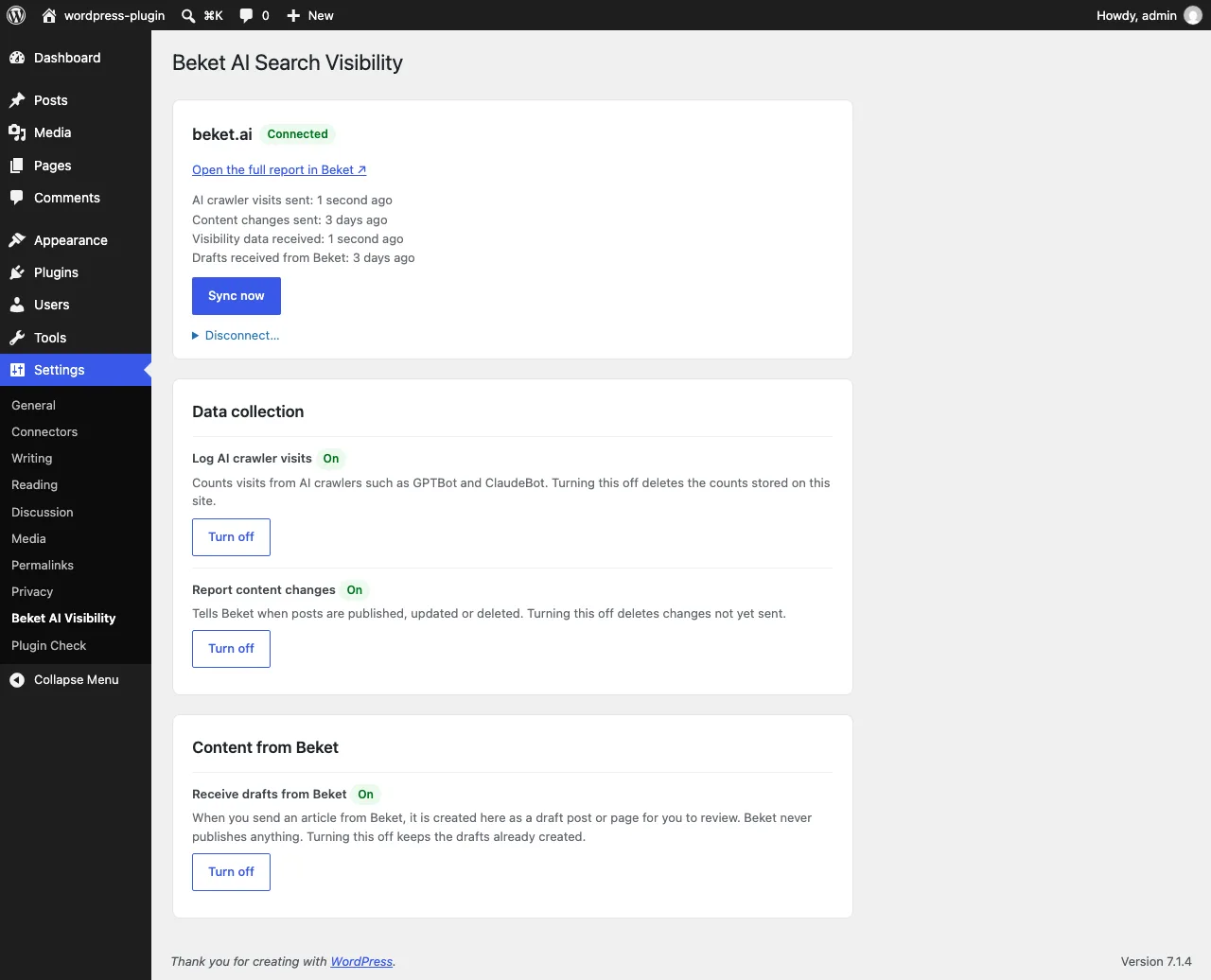
Four features, each with its own switch in wp-admin.
Counts visits from known AI crawlers such as GPTBot, ClaudeBot and PerplexityBot, per day and per page. It stores the bot name, the page path, a daily count and the last HTTP status.
Switch: Log AI crawler visits
When a public post or page is published, updated, unpublished, trashed or deleted, its URL is reported to beket.ai. You can then read your visibility trend against your own content changes.
Switch: Report content changes
Your visibility score, its change and your top issues appear in the "AI Search Visibility" dashboard widget, next to your AI crawler visits for the last 7 days.
Articles you send from beket.ai arrive as WordPress drafts for you to review and publish. The plugin only creates or updates drafts. It never publishes, and it never changes a post you already published.
Switch: Receive drafts from Beket
The plugin makes no request to beket.ai until an administrator connects the site. After that, this is everything it sends.
When you connect
Your site address, the plugin and WordPress versions, and a one-time authorization code.
Once a day
Daily AI crawler counts: bot name, page path and number of requests.
Every 15 minutes, only when content changed
The URL, post type, title and time of each public post that was published, updated, unpublished or deleted.
Every 6 hours
A request for your visibility summary.
Once a day
A request for the current list of AI crawler user agents.
Every 15 minutes, only when "Receive drafts from Beket" is on
A request for article drafts you sent from beket.ai. For each draft, the plugin reports back the ID of the WordPress draft it created, or the reason it could not create one.
When you disconnect or uninstall
A request to revoke the site token.
If your site uses a page cache or CDN, some crawler visits never reach WordPress, so the real number of visits may be higher than the plugin shows.
Read the full details in our privacy policy and terms of service.
The plugin is in review for the WordPress.org plugin directory. Once it's listed, you install it from your own wp-admin like any other plugin.
Go to Settings → Beket AI Visibility and click Connect to Beket, then approve the connection in beket.ai. You can also create a site token in beket.ai and paste it under "Have a site token from Beket?"
The plugin confirms you own the site automatically. Data starts flowing on the next sync, or click Sync now.
No. For regular visitors, the plugin only does a quick check against a short list of AI crawler names. When an AI crawler visits, the plugin records it after the page has already been sent, so pages load just as fast.
Pages served from a page cache or CDN never reach WordPress, so the plugin cannot count them. Its counts are a lower bound.
If the site address changes, for example on a staging clone of the database, syncing pauses until an administrator confirms the new address.
Not in version 1. beket.ai confirms ownership by calling /wp-json/beket/v1/verify (or /?rest_route=/beket/v1/verify) at the root of your domain, so WordPress must answer at https://example.com/ and cannot sit at https://example.com/blog/.
No. With "Receive drafts from Beket" switched on, articles you send from beket.ai are saved as drafts only, and their HTML is filtered with WordPress's own post sanitizer. You review and publish them yourself. A post you already published is never changed.
The crawler table and every beket_ option, transient and scheduled event. The site token is revoked at beket.ai.
Yes, a free one. Until you connect the plugin to a Beket AI account, it does nothing: it neither logs visits nor sends any data. Your visibility score also comes from that account.
Questions about the WordPress plugin? We reply within two business days, and you don't need an account.
AI disclaimer: beket.ai audits are built from responses generated by third-party AI models (large language models). Those models can produce inaccurate, incomplete or inconsistent answers, and parts of beket.ai's analysis and recommendations are also AI-generated and may contain errors. Treat scores and recommendations as guidance and review them before acting on them or sharing them with clients.