
Bing AI Mode vs Google AI Mode: Same Name, Different Engine (2026)

If a client tells you "we showed up in AI Mode," your first question now has to be: which one?
On November 1, 2026, Search Engine Watch reported that Microsoft's Search with AI FAQ now describes "two distinct AI experiences on Bing: AI Mode and AI Overview." What used to be called Copilot Search has been split and renamed, and both names are the same ones Google uses. Microsoft says the underlying Copilot technology hasn't changed. Only the labels did.
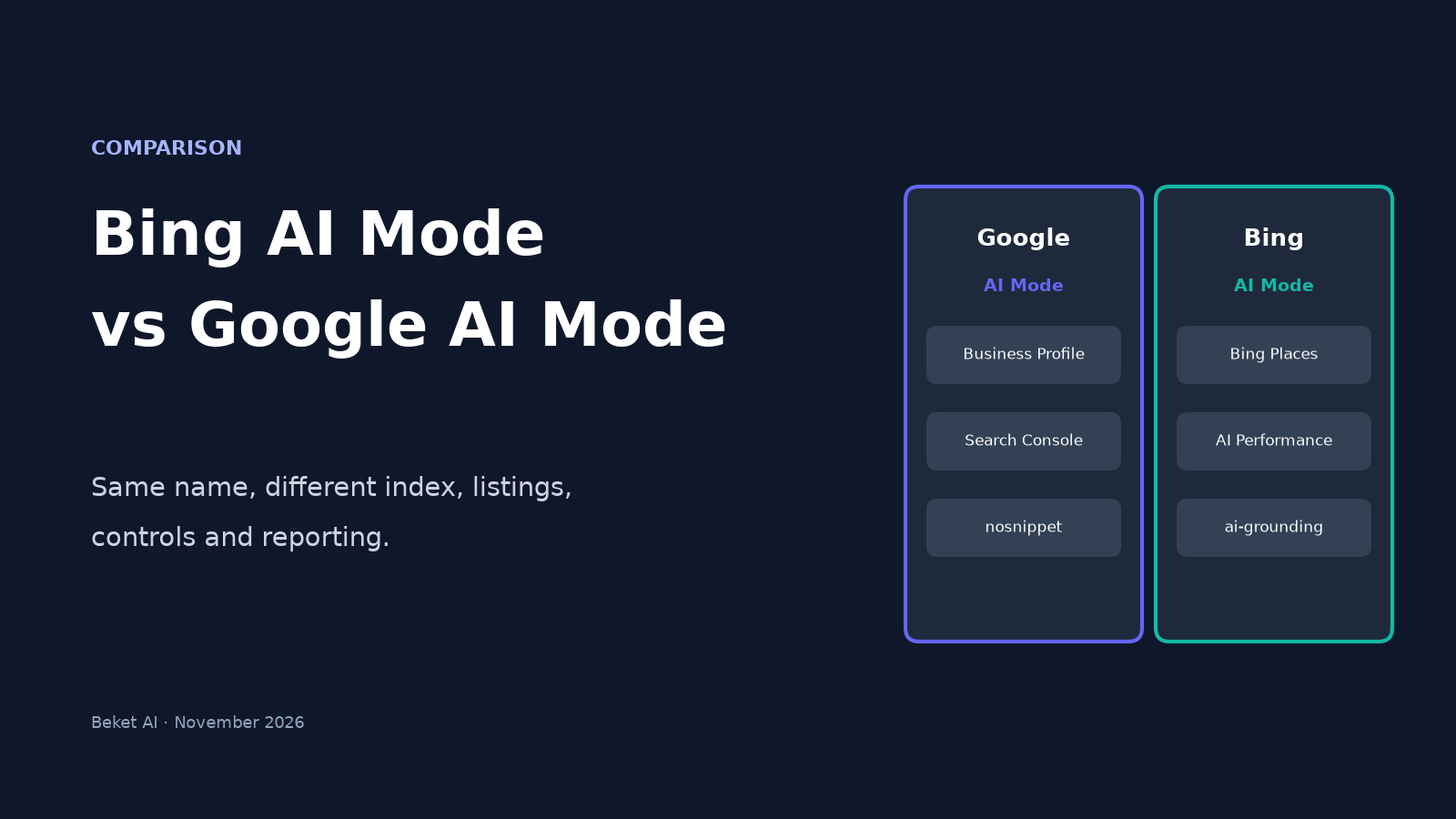
So Bing and Google now each have an AI Mode and an AI Overview. They look alike from the outside, but they run on different indexes and different business listings, and site owners get different controls and different reporting for each. This post puts the two AI Modes side by side and covers what actually changes for a business that wants to be named in either one.
What Microsoft actually changed
According to Search Engine Watch's reading of the FAQ, Microsoft now describes:
- Bing AI Overview as AI-generated summaries shown alongside regular Bing search results.
- Bing AI Mode as a conversational experience for researching a topic in depth and comparing options through back-and-forth follow-ups. Microsoft says AI Mode answers draw on information from the web and include source links.
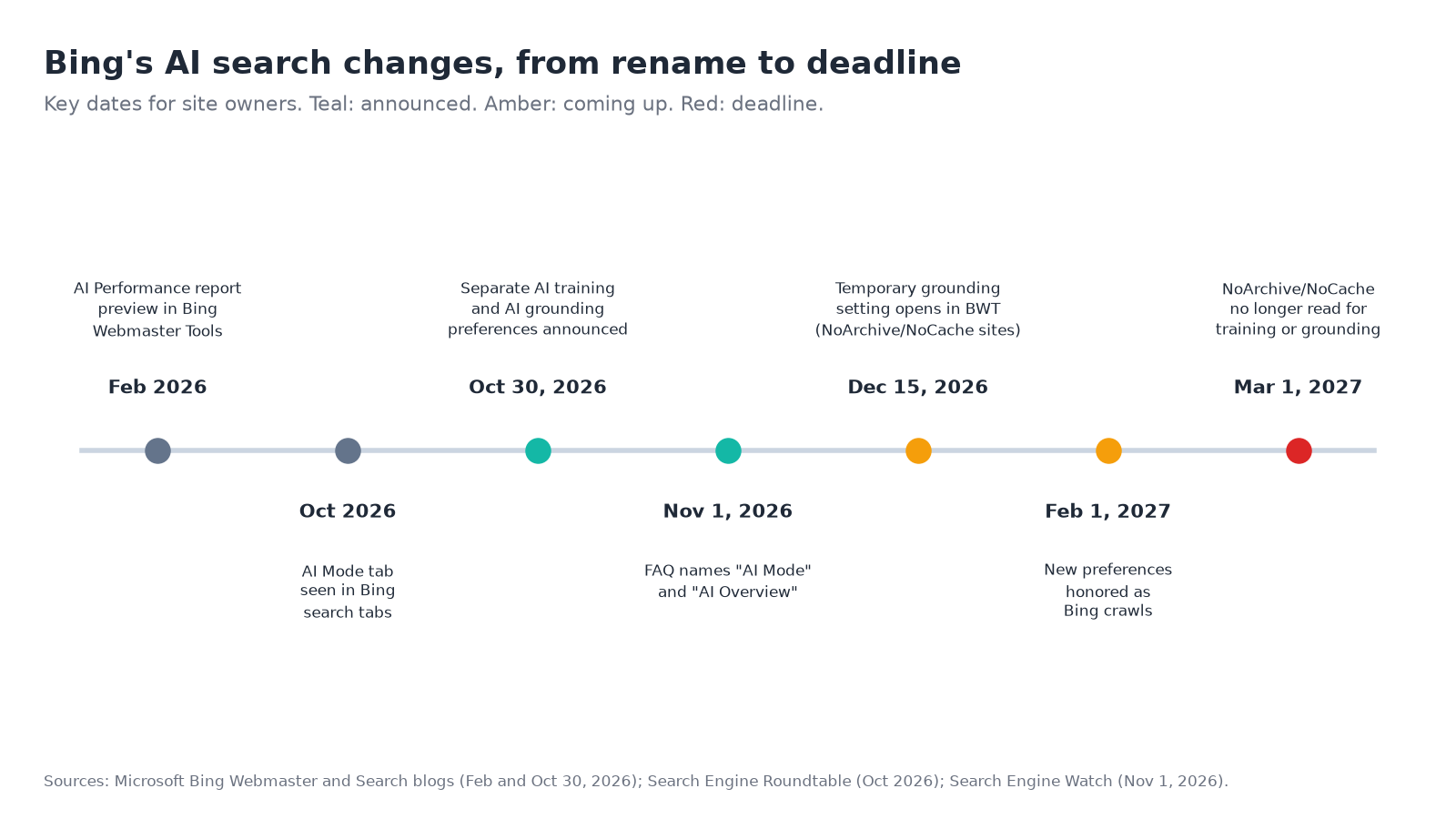
Both are powered by Copilot. Users can start a conversation in Bing, but Microsoft points them to the Copilot app for chat history. The Bing Android app now greets users with "You're now in Bing AI Mode" when they tap the Copilot icon. Microsoft had been testing an AI Mode tab in Bing's search tabs since at least October, per Search Engine Roundtable.
Microsoft's own documentation already uses the new names. Its October 30 post on training and grounding preferences lists "AI Mode, AI Overview, Copilot, and Microsoft 365" as Microsoft-operated experiences that use web content to inform answers.
Google's two features work the same way on paper. Google's AI features documentation says AI Overviews give "the gist" of a question and only show when Google decides they add something beyond classic results, while AI Mode is for "further exploration, reasoning, or complex comparisons." We compared Google's two in AI Mode vs AI Overviews.
Bing AI Mode vs Google AI Mode at a glance
| Google AI Mode | Bing AI Mode | |
|---|---|---|
| What powers it | A custom Gemini model for Search, per Google | Microsoft's Copilot technology (unchanged by the rename) |
| Where answers come from | Google's index. Both Google AI features may use "query fan-out," running several related searches to build one answer | The web, per Microsoft's FAQ, with source links in each answer |
| Business listing that feeds it | Google Business Profile (and Merchant Center for products) | Bing Places for Business |
| Requirement to be a source | Indexed and eligible to show with a snippet. Google says there are no extra requirements | Crawlable by Bingbot, and not opted out of AI grounding (see below) |
| Page-level controls | nosnippet, data-nosnippet, max-snippet, noindex |
New ai-grounding preference (Disallow or DisallowExtended), taking effect from Feb 1, 2027 |
| Reporting for site owners | Counted inside Search Console's Performance report ("Web" search type), with no separate AI line | Bing Webmaster Tools AI Performance report counts citations in Copilot and Bing's AI summaries |
| Ads | Ads in AI Mode expanded to Canada and other countries in late October 2026 | One sighting of sponsored results inside Bing's AI Overviews, not reproduced by the reporter |
Sources: Google Search Central, Google, Oct 2025, Microsoft Bing blog, Search Engine Watch, TechCrunch, Search Engine Roundtable.
Difference 1: They read different listings
For a local business, this is the one that matters most. Google tells site owners to check "that your Merchant Center and Business Profile information is up-to-date" as part of appearing in its AI features. Bing's equivalent is Bing Places. Microsoft's guidance for improving citations in its AI answers points local businesses to keeping address, hours and contact details current in Bing Places for Business, as we covered in our Bing AI Performance report guide.
Many small businesses have a polished Google Business Profile and a Bing Places listing they've never opened, or never claimed. With Bing's AI answers now carrying the same names as Google's, that second listing is easy to forget and just as easy to fix. Our Bing Places vs Google Business Profile comparison walks through which listing feeds which AI answer.
Difference 2: Bing gives you a grounding switch, Google doesn't
Google treats its AI features as part of Search. Its documentation says robots.txt rules for Googlebot are the control for crawling, and nosnippet, data-nosnippet, max-snippet or noindex limit what's shown from a page. Google-Extended limits AI training and grounding in some of Google's other systems, not AI Overviews or AI Mode in Search.
Microsoft is splitting the two uses apart. Its October 30 announcement adds a page-level AI Grounding preference, separate from AI training:
Allowis the default when nothing is set, so your pages can inform AI answers.DisallowExtendedkeeps your content in Microsoft's own experiences, including AI Mode, AI Overview, Copilot and Microsoft 365, but not in grounding services Microsoft sells to third parties.Disallowkeeps the page out of generated answers entirely.
Microsoft warns that choosing either restriction will "significantly reduce your content's visibility in AI-generated experiences," while regular Bing search eligibility stays the same. For a business that wants to be recommended, the right setting is usually to do nothing. The exception is sites still using the old NoArchive or NoCache tags, which Microsoft will stop reading as training and grounding preferences after March 1, 2027. We explained the training side in The AI Training Opt-Out Is Coming to robots.txt.
Difference 3: Only Bing shows you citations
Google's documentation says traffic from AI Overviews and AI Mode is included in Search Console's Performance report under the "Web" search type. There's no separate filter that tells you which AI answers cited your page.
Bing Webmaster Tools has a free AI Performance report, in public preview since February 2026, that counts how often your pages were cited across Copilot, AI-generated summaries in Bing, and some partner integrations. It shows citations, not clicks, and Microsoft's report documentation still uses the Copilot naming, so check whether that changes as the new labels roll out.
The practical upshot: Bing is the one search engine where you can see first-party citation data at all. If you've only ever looked at Search Console, adding your site to Bing Webmaster Tools takes a few minutes and gives you a second, very different view.
Difference 4: Audience size, and a new door into Bing's AI
Bing is the smaller engine. In October 2026, StatCounter measured Google at 85.03% of search engine market share in Canada and Bing at 10.46%. In the United States, the split was 85.45% and 9.78%.
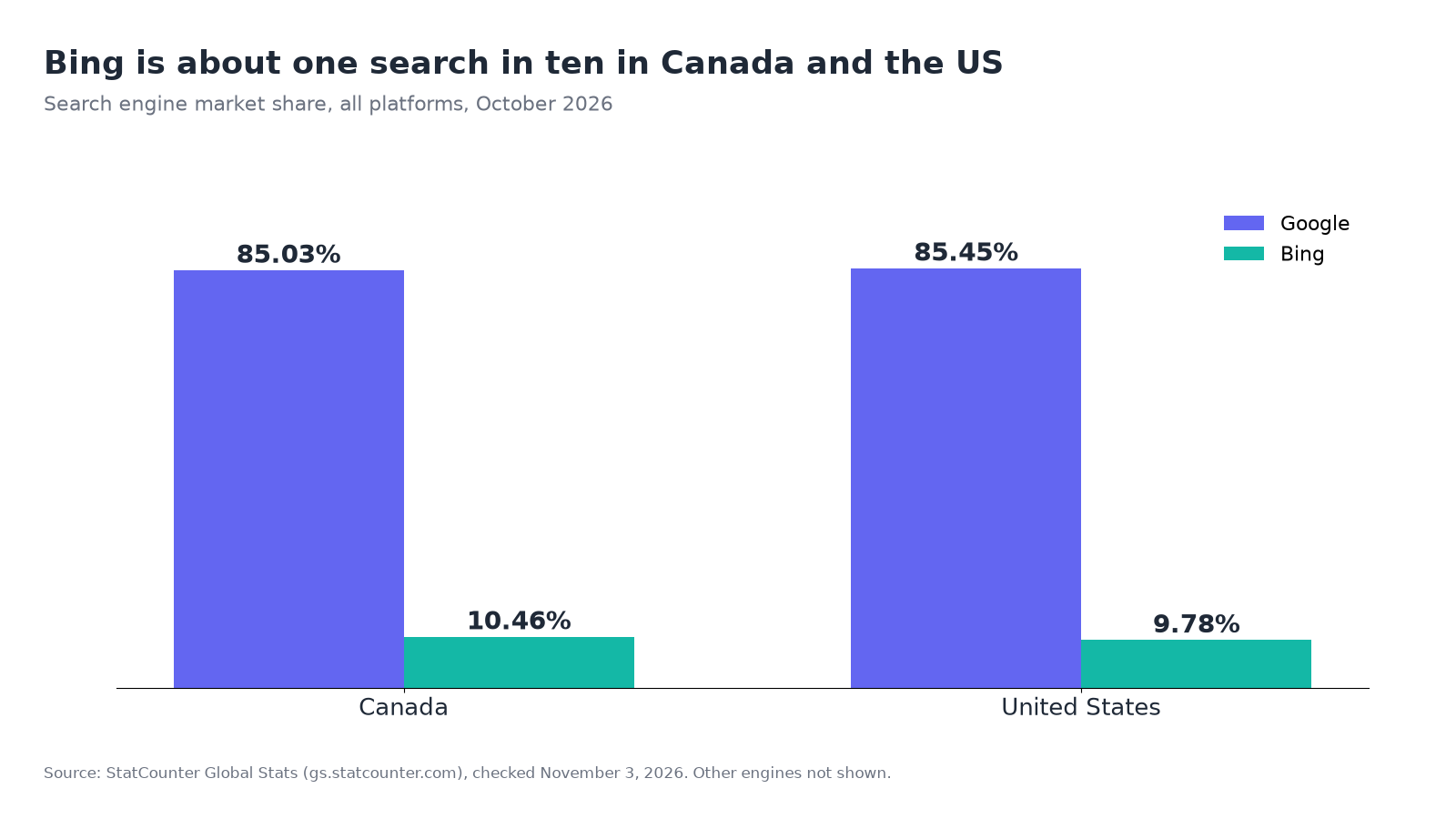
Roughly one search in ten is still a lot of customers for a local business, and Bing's reach doesn't stop at bing.com. Microsoft's grounding post says its preferences cover web-grounded answers in Bing, Copilot and Microsoft 365, and it also sells grounding services to third parties.
Access may grow too. Google has confirmed that Chrome will show an AI chat button in the address bar for supported third-party default search engines, rolling out gradually with Chrome 151 on desktop, per Search Engine Watch. In its testing, Chrome showed an "AI Mode for Microsoft Bing" button when Bing was the default, though the button didn't yet open Bing's AI chat.
What stays the same in both
The rename doesn't change how you get named. In both AI Modes, the answer is built from pages the engine can crawl and index, and from the business listings it trusts. The work overlaps almost entirely:
- Clear service and location pages that state what you do, where, and for whom.
- Matching name, address, phone and hours across your site, Google Business Profile and Bing Places.
- Local business schema that repeats those facts in a format search engines read reliably.
- Mentions on the third-party pages each engine leans on for your category, such as local guides, directories and review sites.
Checklist: covering both AI Modes
- Search your main service plus your city in both Google AI Mode and Bing AI Mode, and note who gets named
- Claim or update your Bing Places listing so it matches your Google Business Profile
- Make sure robots.txt and your CDN or firewall allow both Googlebot and Bingbot
- Check your pages for old
NoArchiveorNoCachetags and decide on a grounding preference before March 1, 2027 - Leave Bing's AI Grounding preference at its default unless you have a reason to opt out
- Add your site to Bing Webmaster Tools and open the AI Performance report
- Keep using Search Console for Google, knowing AI Mode traffic is folded into "Web"
- Recheck the same questions monthly, since AI answers change
Checking what each engine says about you
Neither Google nor Bing shows you the actual answer text for your category. To see which businesses an engine names, and how it describes yours, you have to ask it. Beket AI's free audit runs 25 prompts across 3 engines and shows which businesses each one names. Beket AI Pro is $49 a month and re-audits daily, starting at 50 prompts across 3 engines. Run a free check.
Product details are from Microsoft's Bing blog, Google Search Central, and reporting by Search Engine Watch, Search Engine Roundtable and TechCrunch, checked November 3, 2026. Microsoft's naming change is recent, so labels and features may change.
Related posts
What Is Parametric Knowledge Optimization (PKO)? How to Influence What AI Knows Without Search
PKO shapes what AI models learn about your brand in training, not what they find in search. How it differs from GEO and AEO, tactics, and how to measure it.
How to Fix Wrong Information About Your Business in ChatGPT
ChatGPT has your hours, address or services wrong? Find where the error comes from, fix the sources behind it, and use OpenAI's feedback options correctly.
How to Rank in Perplexity: 6 Steps to Get Your Business Cited (2026)
How Perplexity picks the pages it cites, plus six steps to get your business cited, with data from 301 Perplexity answers in Seattle and Vancouver audits.