
Claude.ai Referral Traffic in GA4: How to Find It and Track It

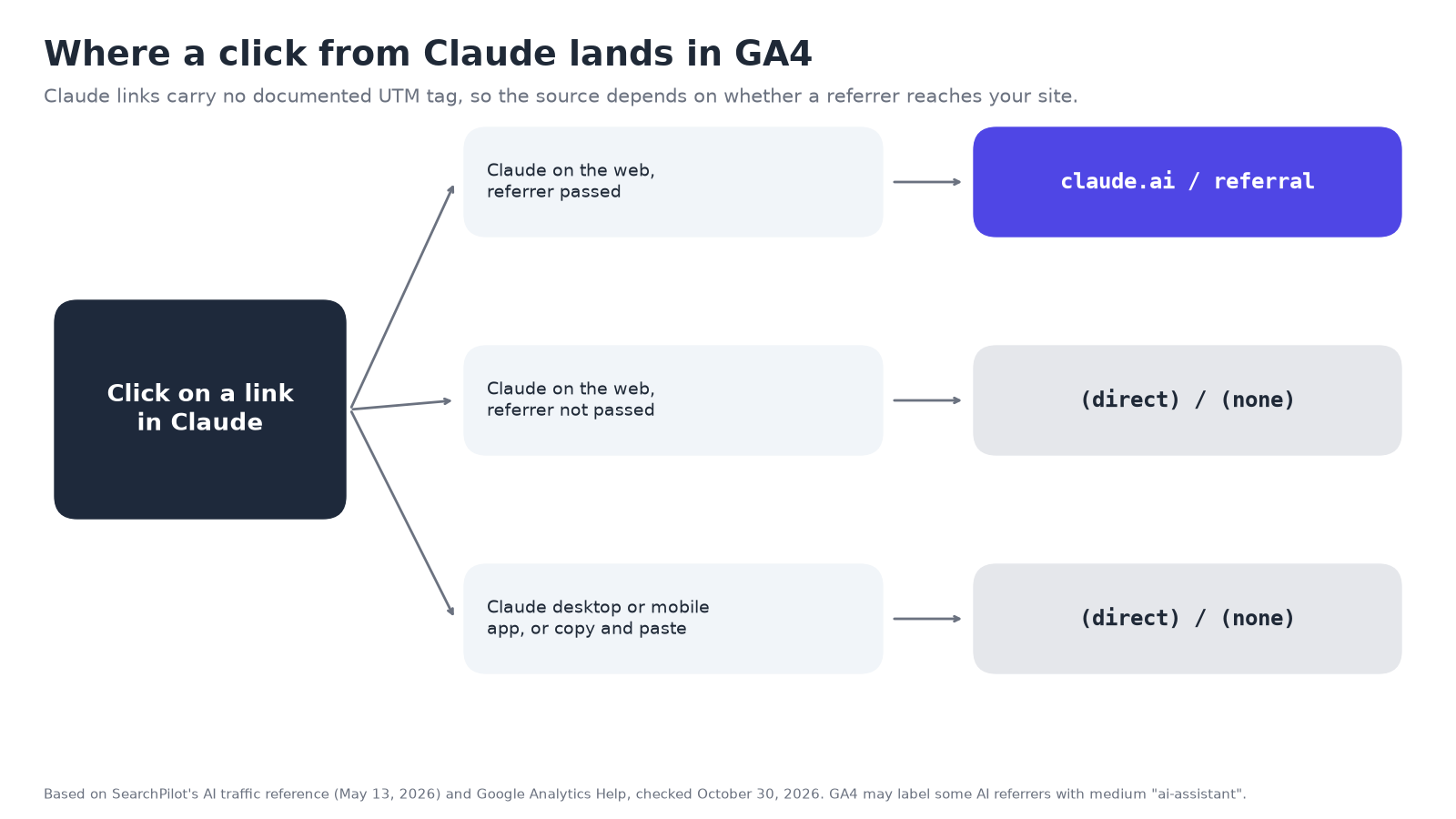
If you see claude.ai / referral in Google Analytics 4, someone clicked a link to your site inside Claude, and their browser passed Claude’s address along as the referrer. That row is real Claude traffic. It is also only part of it: Anthropic doesn’t document adding UTM tags to links, and clicks from Claude’s desktop and mobile apps often arrive with no referrer at all, so they land in Direct.
This guide shows how Claude visits appear in GA4, how to find them in a report and an exploration, and how to set up a custom channel group that counts Claude alongside ChatGPT, Perplexity, Gemini and Copilot.
How does Claude traffic show up in GA4?
GA4 names a traffic source from one of two clues: a UTM tag in the link, or the referrer the browser sends. Claude visits depend almost entirely on the second.
| Where the click happened | What GA4 usually records | Default channel |
|---|---|---|
| Claude in a web browser, referrer passed | Session source / medium: claude.ai / referral |
Referral (see the note on GA4’s AI Assistant channel below) |
| Claude in a web browser, referrer not passed | (direct) / (none) |
Direct |
| Claude desktop or mobile app | Usually (direct) / (none) |
Direct |
| Someone copies a link from Claude and pastes it | (direct) / (none) |
Direct |
Based on SearchPilot’s AI traffic reference (May 13, 2026), which compiles published tests and describes Claude’s referrer as passed “inconsistently” with “no UTM params from Anthropic”. Behavior can change, so check your own data.
Two things to know about that table:
- No UTM tag. ChatGPT tags its links: in a Beket AI audit export from October 29, 2026, all 107 ChatGPT citation URLs carried
utm_source=chatgpt.com. We found nothing from Anthropic saying Claude does the same, and third-party tests report it doesn’t. That makes Claude traffic more fragile to measure than ChatGPT’s: if the referrer is lost, nothing in the link says where the visit came from. - Claude’s crawlers are not visitors. Anthropic runs three bots: ClaudeBot (training), Claude-SearchBot (search indexing) and Claude-User (fetching pages when a user asks) (Anthropic). Their requests show in server logs, not as GA4 sessions, and they aren’t clicks.
What about GA4’s AI Assistant channel?
GA4’s default channel group now includes an AI Assistant channel. Google defines it as traffic “from sources like ChatGPT, Gemini, Deepseek, Copilot, or Grok”, and says the medium is set to ai-assistant “if the referrer matches a list of AI Assistants” (Analytics Help). Google doesn’t publish that list, and its description doesn’t name Claude.
So in your property, Claude visits may appear as claude.ai / referral in the Referral channel, or as claude.ai / ai-assistant in the AI Assistant channel. Check which one you see before you build reports on it. The custom channel group below works either way, because it matches on the source, not the medium.
Find Claude visits in a standard report
- Go to Reports > Acquisition > Traffic acquisition.
- Change the primary dimension to Session source / medium.
- Type
claudein the search box above the table. - Add Landing page + query string as a secondary dimension to see which pages Claude sent people to.
If nothing shows up, that doesn’t mean Claude never mentions you. It means no visit from Claude arrived with a referrer in that date range.
Build a Claude exploration with a filter
An exploration lets you see Claude visits next to the pages and outcomes they led to.
- Go to Explore and start a Blank exploration.
- Add the dimensions Session source, Session source / medium, Landing page + query string and Page referrer.
- Add the metrics Sessions, Engaged sessions and Key events.
- Drag Session source / medium to Rows and the metrics to Values.
- Under Filters, add Session source > matches regex >
claude\.ai. - Swap Rows to Landing page + query string to see which pages Claude visitors entered on.
To compare Claude with the other assistants, use the regex from the next section in the filter instead.
Set up an AI assistants custom channel group
A custom channel group puts every AI assistant in one row of your acquisition reports, including Claude. Google’s own help page walks through an “AI assistants” example (Analytics Help). Here is a tighter version:
- Go to Admin > Data display > Channel groups and click Create new channel group. This starts as a copy of the default group.
- Click Add new channel and name it AI assistants.
- Add the condition Source > matches regex, and paste:
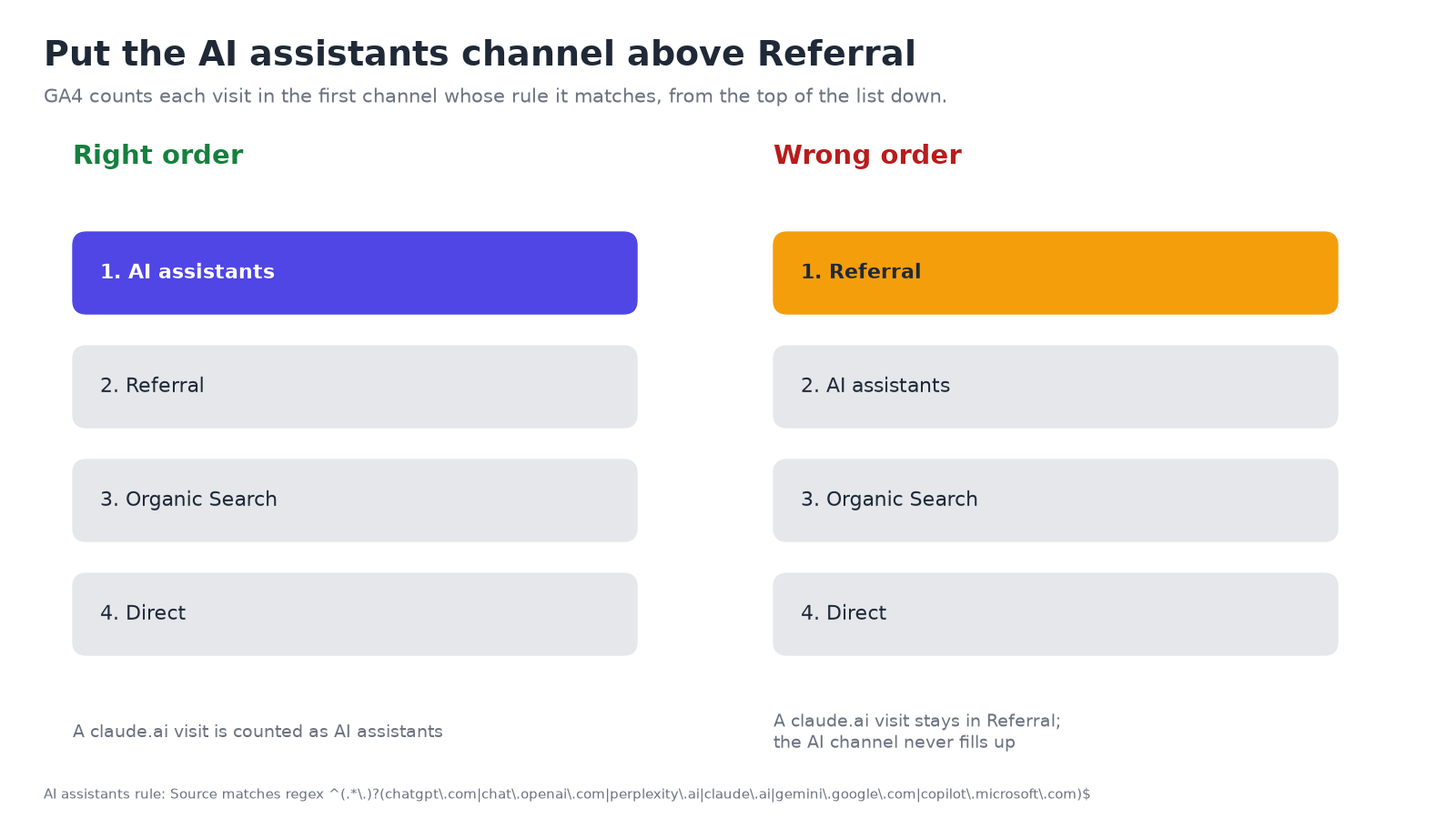
^(.*\.)?(chatgpt\.com|chat\.openai\.com|perplexity\.ai|claude\.ai|gemini\.google\.com|copilot\.microsoft\.com)$
- Save the channel, then click Reorder and drag AI assistants above Referral. Google says traffic “is included in the first channel whose definition it matches”, so below Referral the new channel would never fill up.
- Save the group. In Traffic acquisition, switch the primary dimension to your new channel group.
Notes on the pattern:
(.*\.)?also matches subdomains, such aswww.perplexity.ai.chatgpt\.comcatches both ChatGPT’s referrer and itsutm_source=chatgpt.comtag, since both set the source tochatgpt.com.- Check your own Session source report for AI sources the pattern misses, such as Copilot visits under a different Microsoft hostname, and add them.
- Custom channel groups apply to past data, so you can check the result right away. Standard properties can have two custom channel groups.
What this setup can’t see
Even with a perfect channel group, some Claude influence won’t appear in GA4:
- App clicks without a referrer land in Direct. A rise in Direct sessions to deep pages, such as a specific guide rather than your homepage, with no campaign behind it, is a hint, not proof.
- Answers without a click. Someone reads Claude’s answer, remembers your name and searches for you later. That visit shows up as branded search or Direct.
- Answers that don’t mention you. GA4 can’t tell you what Claude said to people who never visited.
We covered these gaps across all AI assistants in your AI traffic is hiding in direct, and the Google side in how to track AI Overview traffic.
Two other places to look:
- Server or CDN logs keep the raw referrer on each request and show Claude’s crawlers by name. If your site runs on Cloudflare, our Cloudflare AI crawler guide shows where to find them.
- The answers themselves. Ask the questions your customers ask and see whether you’re named. With Cloudflare connected, Beket AI shows which AI crawlers visited your site and which AI surfaces sent visitors. Beket AI’s integrations are Webflow, Google Analytics and Cloudflare.
A free Beket AI audit covers 25 prompts across 3 engines (ChatGPT, Perplexity and Google AI Overview). Beket AI Pro is $49/month, re-audits daily and starts at 50 prompts across 3 engines. Run a free audit at beket.ai.
About the author: Nur Rysbek is the CEO of Beket AI.
Sources checked October 30, 2026. GA4 menus and Claude’s link behavior change; confirm in Google’s Analytics Help and your own reports.
Related posts
Does Bing Webmaster Tools Help ChatGPT Visibility? What's Documented and What Isn't
Does Bing Webmaster Tools help you show up in ChatGPT? What OpenAI and Microsoft document, what IndexNow does, what is speculation, and what to do.
Local AI Visibility: How to Benchmark AI Answers by City and Country
AI engines answer differently by location. How to benchmark AI visibility by city or country, and what a GEO or AEO tool needs for regional LLM benchmarking.
AEO Workflow: A 6-Step Process to Get Your Content Cited by AI
A practical AEO workflow: research prompts, check what AI engines cite, find gaps, write the brief, publish, re-check. Where free tools and Beket AI fit.