
How to See Which AI Crawlers Visit Your Site with Cloudflare (and Which Ones to Allow)

Most advice about AI crawlers starts with a rule to paste into robots.txt. This guide starts one step earlier: finding out which AI crawlers actually visit your site, what your site says back to them, and whether any of them send people your way. If your domain runs through Cloudflare, you already have a free tool for that. It’s called AI Crawl Control, and it sits in your dashboard whether or not you’ve ever opened it.
This matters more than it did a few months ago. On September 15, 2026, Cloudflare changed what its “Block” setting does for AI training: it now also stops Googlebot, Bingbot and Applebot, the crawlers behind Google Search, Bing and Apple’s search features. A setting chosen to keep your content out of AI training can now take you out of regular search too. The walkthrough below shows how to check for that, and how to decide crawler by crawler.
If you want the background on what each crawler name means first, read our comparison of AI training bots vs. search bots in robots.txt. This post is the hands-on part: seeing the traffic and acting on it inside Cloudflare.
What you need before you start
- A domain on Cloudflare that is proxied. Cloudflare’s setup guide lists this as a prerequisite: AI Crawl Control only sees requests that pass through Cloudflare. If your DNS records show “DNS only” instead of proxied, Cloudflare isn’t seeing the crawler traffic.
- Access to the dashboard for that domain. Cloudflare also offers an AI Crawl Control Read Only role, added in January 2026, if a colleague or agency only needs to look.
- Ten minutes, then a calendar reminder. The first look is quick. The value comes from checking again.
One limit to know up front: on the free plan, Cloudflare identifies AI crawlers by their user agent strings, so it catches well-known crawlers that identify themselves. The Metrics tab only shows the past 24 hours, and referral data needs a paid plan. Cloudflare’s plan comparison lays this out. Everything below works on the free plan unless marked otherwise.
Step 1: Open AI Crawl Control and read the Overview
Log in to the Cloudflare dashboard, pick your domain, and select AI Crawl Control. The Overview tab opens by default. According to Cloudflare’s Analyze AI traffic docs, it shows:
- An executive summary: total requests, change in volume, the most common status code, the most popular path, and any high-volume crawler activity.
- Trend charts for total, allowed and unsuccessful requests, plus total referrals on paid plans.
- Crawlers grouped by operator, the company behind them, such as OpenAI, Microsoft, Google, ByteDance, Anthropic and Meta.
- Filters for date range, crawler, operator, hostname and path.
Write down three things from this screen: which operators show up, the most common status code, and the most popular path. A bakery might find that most AI requests go to its menu page. A law firm might find them going to an old blog post rather than its practice pages. Either way, the most popular path tells you what AI systems are reading about you.
Step 2: Sort the crawlers by what they do
Open the Crawlers tab. Each row shows the crawler, its operator, a category, its request count, any robots.txt violations, and the current Action (Allow or Block), per Cloudflare’s Manage AI crawlers docs.
The Category column is the one to read first. Cloudflare’s glossary gives each crawler one of four: AI Crawler, AI Search, AI Assistant or Search Engine. In practice, they map to different decisions:
| Cloudflare category | Examples from Cloudflare’s bot reference | What it’s doing | Default call for a business that wants to be recommended |
|---|---|---|---|
| Search Engine | Googlebot, BingBot | Building the regular search index (Google’s and Bing’s AI answers draw on it too) | Allow |
| AI Search | OAI-SearchBot, Claude-SearchBot, PerplexityBot, Applebot | Building the index an AI assistant searches when it answers | Allow |
| AI Assistant | ChatGPT-User, Claude-User, Perplexity-User, DuckAssistBot | Fetching a page because a person asked about it | Usually allow |
| AI Crawler | GPTBot, ClaudeBot, CCBot, Bytespider, Meta-ExternalAgent, Amazonbot | Collecting content, mostly for model training | Your call (see Step 6) |
Examples and categories from Cloudflare’s bot reference, checked October 29, 2026.
Use the Category and Operator filters to look at one group at a time. If a crawler you don’t recognize appears, the row’s three-dot menu has View on Cloudflare Radar, which opens Cloudflare’s public profile of that crawler.
Two columns are easy to skip and worth a glance. Data transfer shows how much bandwidth each crawler used, which helps if a crawler is costing you more than it’s worth. Robots.txt violations shows which crawlers requested pages your robots.txt told them to avoid (more on that in Step 7).
Step 3: Check what your site says back to each crawler
Seeing a crawler in the list doesn’t mean it got your pages. Open the Metrics tab and find the Status code distribution chart. Cloudflare’s docs describe it as the HTTP responses AI crawlers received over time: 2xx for success, 3xx for redirects, 4xx for client errors (including 403 blocked and 402 payment required), and 5xx for server errors.
Filter the chart to one crawler at a time, starting with the ones you want to keep:
- Filter to OAI-SearchBot. Mostly 2xx is what you want. A wall of 403s means something is blocking the crawler ChatGPT search uses to find pages, which we explain in how ChatGPT search works.
- Repeat for PerplexityBot, Claude-SearchBot, Googlebot and BingBot.
- Note any crawler with lots of 404s. That usually means it’s following old links, and a redirect to the current page helps humans too.
A 403 isn’t always AI Crawl Control’s doing. Cloudflare notes that unsuccessful requests “may come from any rule or response error, not just the block action in AI Crawl Control.” If a search crawler is blocked but shows Allow in AI Crawl Control, check your other security rules and your AI bot policies (Step 5).
Step 4: See which crawls turn into visits
This is the step most site owners never get to, and it’s where AI Crawl Control is most useful. Crawls tell you who reads your site. Referrals tell you who sends people back.
On a paid plan, the Metrics tab adds Top referrers (domains such as chatgpt.com and perplexity.ai that send visitors), Referrals over time by operator, and a Referrals column in Most popular paths. Put the two side by side: an operator that crawls a lot and refers some visitors is behaving like a search engine. One that crawls a lot and never refers anyone is taking content without sending traffic.
On the free plan, you can approximate the same check. Note the operators from Step 1, then open the referral report in your analytics tool and look for visits from chatgpt.com, perplexity.ai, claude.ai, copilot.microsoft.com and gemini.google.com. Expect an undercount: Cloudflare notes that visits from AI apps, such as Claude’s native app, often arrive without a referrer.
Don’t expect AI crawlers to match Google. Cloudflare Radar publishes a network-wide “crawl-to-refer” ratio: HTML pages crawled by each platform’s bots for every visit its users click back to a site. In September 2026, those ratios looked like this:
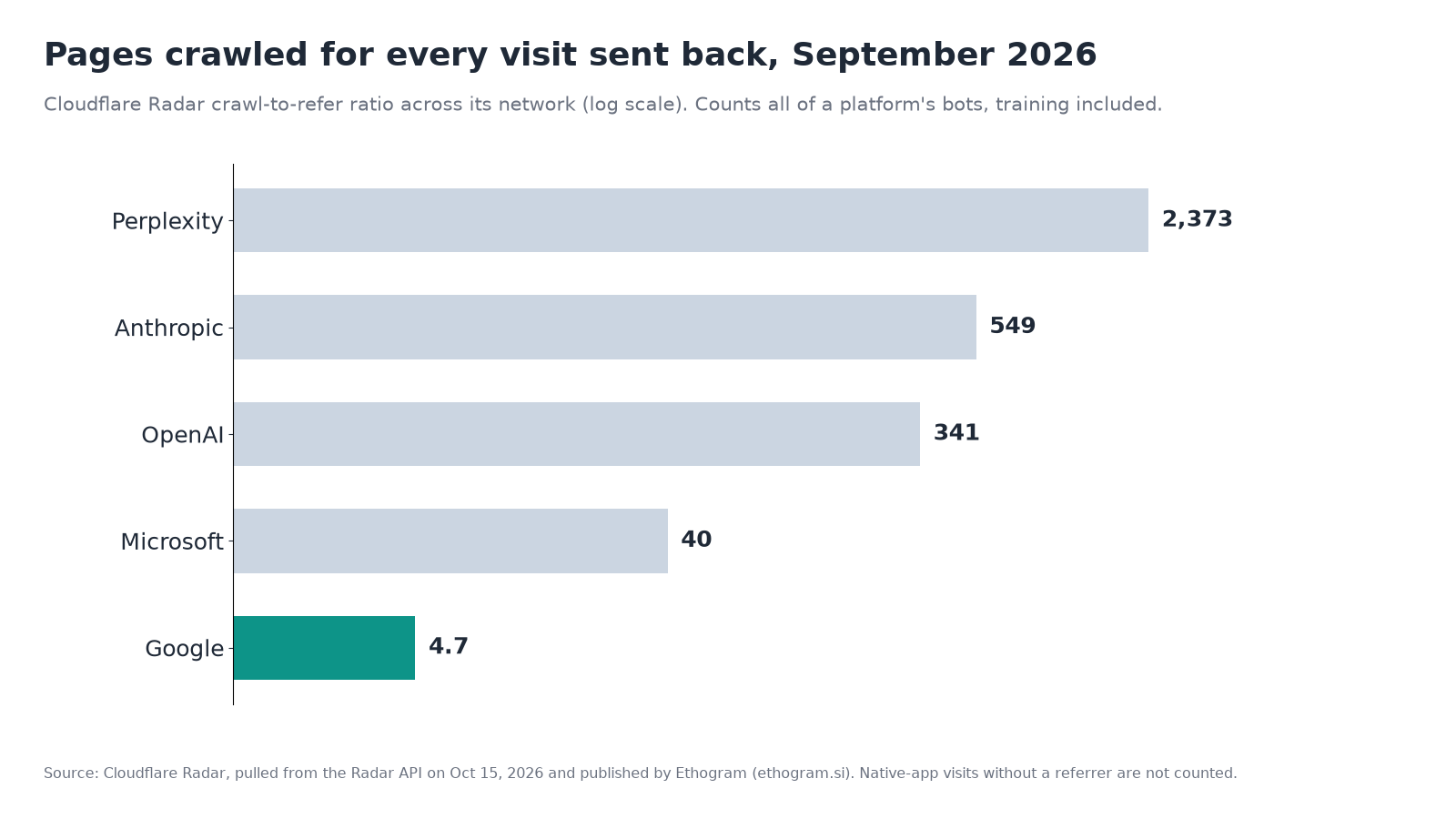
Cloudflare Radar data for September 2026, as pulled from the Radar API on October 15, 2026 and published by Ethogram. Ratios count all of a platform’s bots, training included.
Google’s bots crawled about 4.7 pages for every visit Google sent. OpenAI’s crawled 341, and Perplexity’s 2,373. These are network averages that move fast: by the same pull, Anthropic’s ratio fell from 47,779 in January 2026 to 549 in September. Your own site’s numbers will differ, which is why Step 4 is worth doing on your own data.
There’s also a reason to look past the training crawlers when you read these numbers. At Cloudflare Connect in October, Cloudflare presenters said OpenAI’s search crawler activity was up 116% year over year while its training crawler activity rose 7%, according to Search Engine Land. If that holds, more of what OpenAI fetches from your site is about answering questions now, not just training.
Step 5: Check your AI bot policies, especially after September 15
AI Crawl Control isn’t the only place AI crawlers get blocked. Cloudflare also has domain-wide AI bot policies, under Security Settings: filter by Bot traffic and select Configure AI bot policies, per Cloudflare’s robots.txt setting docs. They work by behavior rather than by crawler name, with three controls: Search, Training and Agent.
Here’s what changed on September 15, 2026, according to Cloudflare’s announcement:
- Block and Block on pages with ads now also apply to mixed-use crawlers, those that do both search and training. Cloudflare names Applebot, Bingbot and Googlebot as examples. So setting Training to Block now stops Google and Bing from crawling your site for search too.
- A new option, Disallow AI Training, was added for the Training control. It publishes a no-training preference in your robots.txt, keeps Google, Bing and Apple crawling for search, and blocks training-only crawlers such as those run by Amazon, Anthropic, Meta and OpenAI.
- The old Block AI bots toggle and Managed robots.txt were deprecated in favor of these controls and a feature called Bot Preference Sync.
- Existing settings were migrated. Cloudflare says previous Training choices of Block or Block on pages with ads became Disallow AI Training, so most sites don’t need to change anything. If you changed these settings after September 15, check them again.
What to do:
- Open Configure AI bot policies and read the three values.
- If Training says Block, decide whether you really want Googlebot and Bingbot out. Most local businesses don’t. Switch to Disallow AI Training if your goal is only to opt out of training.
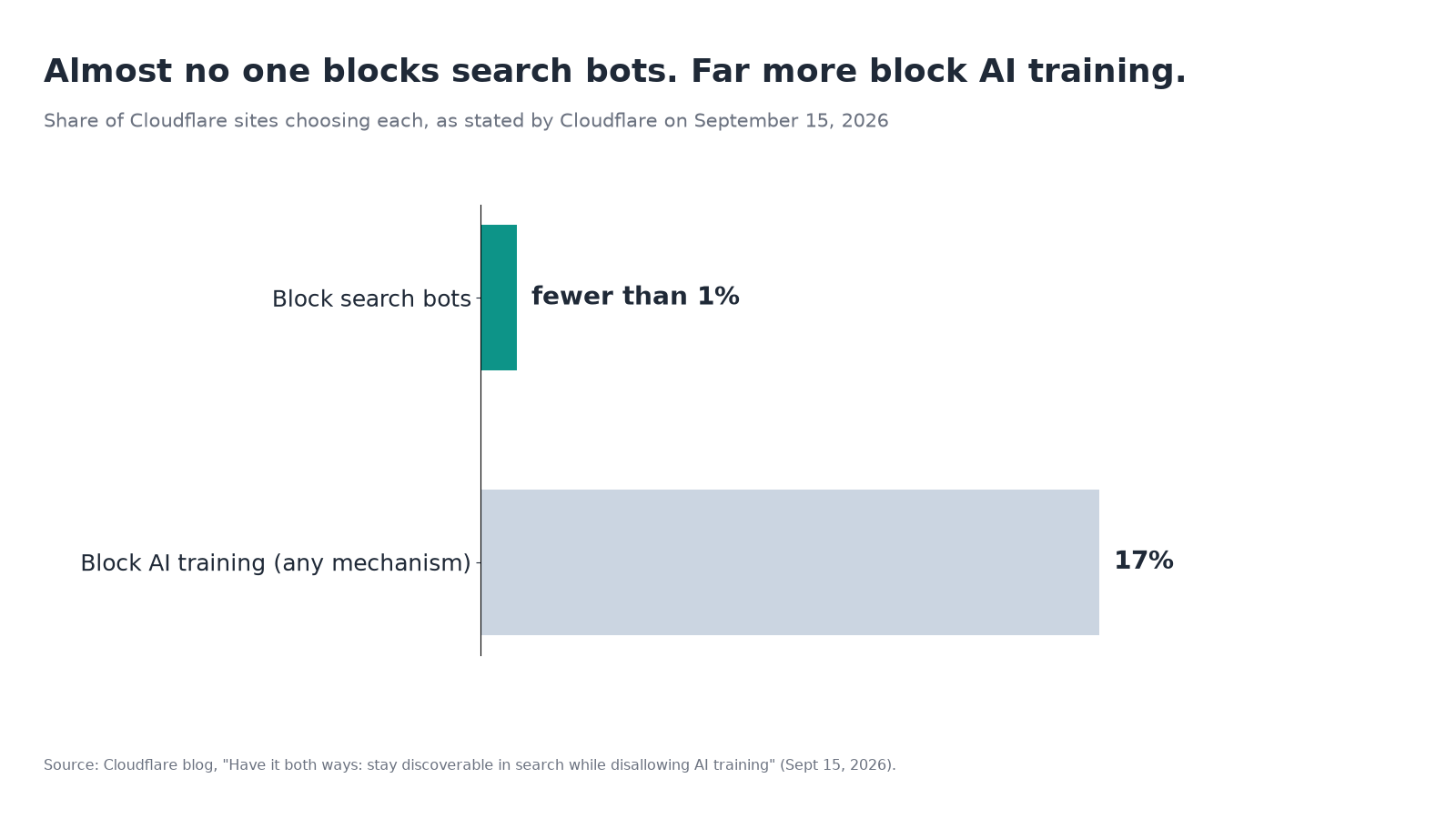
- Leave Search on Allow unless you have a specific reason. Cloudflare says fewer than 1% of its sites block search bots, while 17% use some way to block training.
- Reload
yourdomain.com/robots.txtafterward. With Bot Preference Sync on and a policy set to block or disallow, Cloudflare adds its managed lines to the top of your file within a few seconds, and you should see them there.
One more Bing-specific note from the same announcement: until Microsoft supports a robots.txt no-training preference (targeted for early 2027), Disallow AI Training won’t pass a no-training signal to Bing. Bing’s NOARCHIVE meta tag is the current way to do that. Bing’s own reporting is covered in our Bing AI Performance report guide.
Step 6: Make crawler-by-crawler calls
With the policies checked, go back to the Crawlers tab for individual decisions. In the Action column, choose Allow or Block for each crawler. Cloudflare’s docs say a block here creates or updates a WAF custom rule on your domain. That makes it an actual block, not a request like robots.txt. You can extend that rule in WAF, for example to block a crawler only on one folder. On paid plans, you can also choose the response a blocked crawler gets (403 Forbidden or 402 Payment Required) and add a message.
A reasonable starting point for a small or local business:
| Crawler type | Suggested action | Why |
|---|---|---|
| Googlebot, BingBot | Allow | Regular search, plus Google’s and Bing’s AI answers |
| OAI-SearchBot, Claude-SearchBot, PerplexityBot, Applebot | Allow | These decide whether you can be found and cited in AI answers |
| ChatGPT-User, Claude-User, Perplexity-User | Allow | A person asked about a page; blocking can mean the assistant can’t open it |
| GPTBot, ClaudeBot and other training crawlers | Allow or Block, your call | They don’t send visitors by design; the visibility effect is debated (see below) |
| Crawlers you don’t recognize, with high data transfer and no referrals | Look them up on Radar, then consider Block | Cost without return |
The training trade-off. Blocking training crawlers is a reasonable choice, and OpenAI, Google and Apple say it doesn’t remove you from their search results. But there’s early evidence that it can have a cost. A Graphite analysis of logged-out ChatGPT comparison prompts, covered by Search Engine Journal, found that brands ChatGPT rarely named without search reached only 11% median visibility with search, even when they were substantially mentioned on at least 15% of the pages it cited. In other words, what a model already knows about a brand appears to shape what it finds when it searches. Graphite sells AEO services, the study covered comparison prompts only, and it didn’t fully control for brand popularity. So treat it as a reason to weigh the choice, not as a rule. If being named by AI assistants matters more to your business than keeping your content out of training, allowing training crawlers is the safer bet.
Step 7: Check the Directives tab
The Directives tab (formerly Robots.txt) shows how crawlers interact with your robots.txt file, per Cloudflare’s Directives docs. Check three things:
- Robots.txt availability. Each hostname’s file, its request count and status. A
404means you don’t have a robots.txt file. Lots of unsuccessful requests to a file that does exist suggests a security rule is blocking it. - Robots.txt violations. Crawlers that requested paths your robots.txt disallows, with the exact line they ignored. Cloudflare warns that violations are calculated against your current file, so a rule you added yesterday will flag older requests that were fine at the time. Give new rules a few days before you judge a crawler.
- Agent Readiness. Select Check readiness score to scan your site for a valid robots.txt, Markdown for Agents and Content Signals. The scan is powered by isitagentready.com.
If a crawler ignores your robots.txt, Cloudflare’s suggestion is to block it in the Crawlers tab. That’s the difference between asking and enforcing. If you’re unsure your robots.txt says what you think it says, our post on how robots.txt files end up blocking AI crawlers by accident covers the usual culprits.
Step 8: Export a baseline and repeat
Before you close the dashboard, use Download CSV in the Metrics tab. Cloudflare says downloads keep whatever filters you applied. Save one export with no filters and one filtered to AI Search crawlers. On the free plan, the 24-hour window makes this a snapshot, so take it on a normal weekday and repeat it at the same time each month.
Then put a monthly reminder in your calendar. Crawler names change, operators launch new bots, and Cloudflare keeps adding to this product. Check its changelog when something looks different.
Two newer Cloudflare features, still in early access
Both were featured at Cloudflare Connect in October. Neither is generally available yet, so treat them as optional extras:
- AEO Visibility is in early access. Cloudflare describes it as testing likely customer prompts in your category with Anthropic’s Claude and OpenAI’s GPT, then reporting citation rate, mention rate, prominence and share of voice. You can request access from the Overview tab of your Cloudflare dashboard.
- AI Index is a private beta. Cloudflare says it builds an AI-optimized search index of your site that you control, with an MCP server, LLMs.txt and a search API, and that you can opt out. Site owners apply through Cloudflare’s signup form.
Checklist
- [ ] Your domain is proxied through Cloudflare, so AI Crawl Control can see crawler traffic
- [ ] You’ve noted which operators crawl you, your most common status code and your most popular path (Overview)
- [ ] You’ve sorted crawlers by category: Search Engine, AI Search, AI Assistant, AI Crawler (Crawlers tab)
- [ ] OAI-SearchBot, PerplexityBot, Claude-SearchBot, Googlebot and BingBot get mostly 2xx responses, not 403s (Metrics, Status code distribution)
- [ ] You’ve compared crawls with referrals, in Cloudflare on a paid plan or in your analytics on free
- [ ] Your AI bot policies say Allow for Search, and Training is Disallow AI Training or Allow, not Block, unless you mean to leave Google and Bing search
- [ ] Your live robots.txt shows the managed lines you expect
- [ ] You’ve made a deliberate allow-or-block call on training crawlers, knowing the trade-off
- [ ] Your robots.txt loads on every hostname, and you’ve reviewed any violations (Directives)
- [ ] A baseline CSV is saved, with a monthly reminder to repeat
What AI Crawl Control can’t tell you
Cloudflare can show you who reads your site and who sends people back. It can’t show you what AI assistants say about your business when a customer asks “who’s the best electrician near me.” That’s a different question, and it’s the one a free Beket AI audit answers: it runs 25 prompts across 3 AI engines and shows which businesses each one recommends and cites. Beket AI Pro is $49 a month, re-audits daily and starts at 50 prompts across 3 engines. Beket AI also integrates with Cloudflare, alongside Webflow and Google Analytics.
Related posts
Google Is Reportedly Hiding AI Overview Source Cards: Why Being Named in the Answer Matters More Now
Google AI Overview source cards are reportedly vanishing on desktop. Our audit of 12 local answers shows why being named in the text now matters more.
Ads in Google AI Mode Are Coming to Canada: What It Means for Vancouver Businesses
Google is bringing ads in AI Mode to Canada. Here's what that means for Vancouver businesses, and why being named in the answer for free matters more.
What Google's Connected Apps Platform Means for Getting Found in AI Mode
Google now lets developers submit apps to AI Mode and Gemini, but users must link them. Who it matters for, what to do now, and why AI mentions still count.