
How to Write a SaaS FAQ Page for AI Search: Buyer Questions, Direct Answers, Real Prices (2026)

Here is a pricing answer you can find on plenty of SaaS FAQ pages:
How much does it cost? Our flexible plans scale with your business. Contact our team to find the right fit.
Now picture a buyer asking ChatGPT, "how much does [your product] cost for a 10-person team?" There's nothing in that answer to quote. So the engine pulls a number from somewhere else: a review site, a reseller, a two-year-old blog post, or another vendor's comparison page.
The fix isn't adding more FAQ markup. It's rewriting each answer so the first sentence settles the question, using the buyer's own words, with a price an engine can lift as-is. This guide walks through that rewrite and the evidence behind it, step by step.
The FAQ format isn't the lever. The answers are.
A lot of AI search advice says "add an FAQ section and FAQ schema." Recent data doesn't back the format itself:
| What was measured | Finding | Source |
|---|---|---|
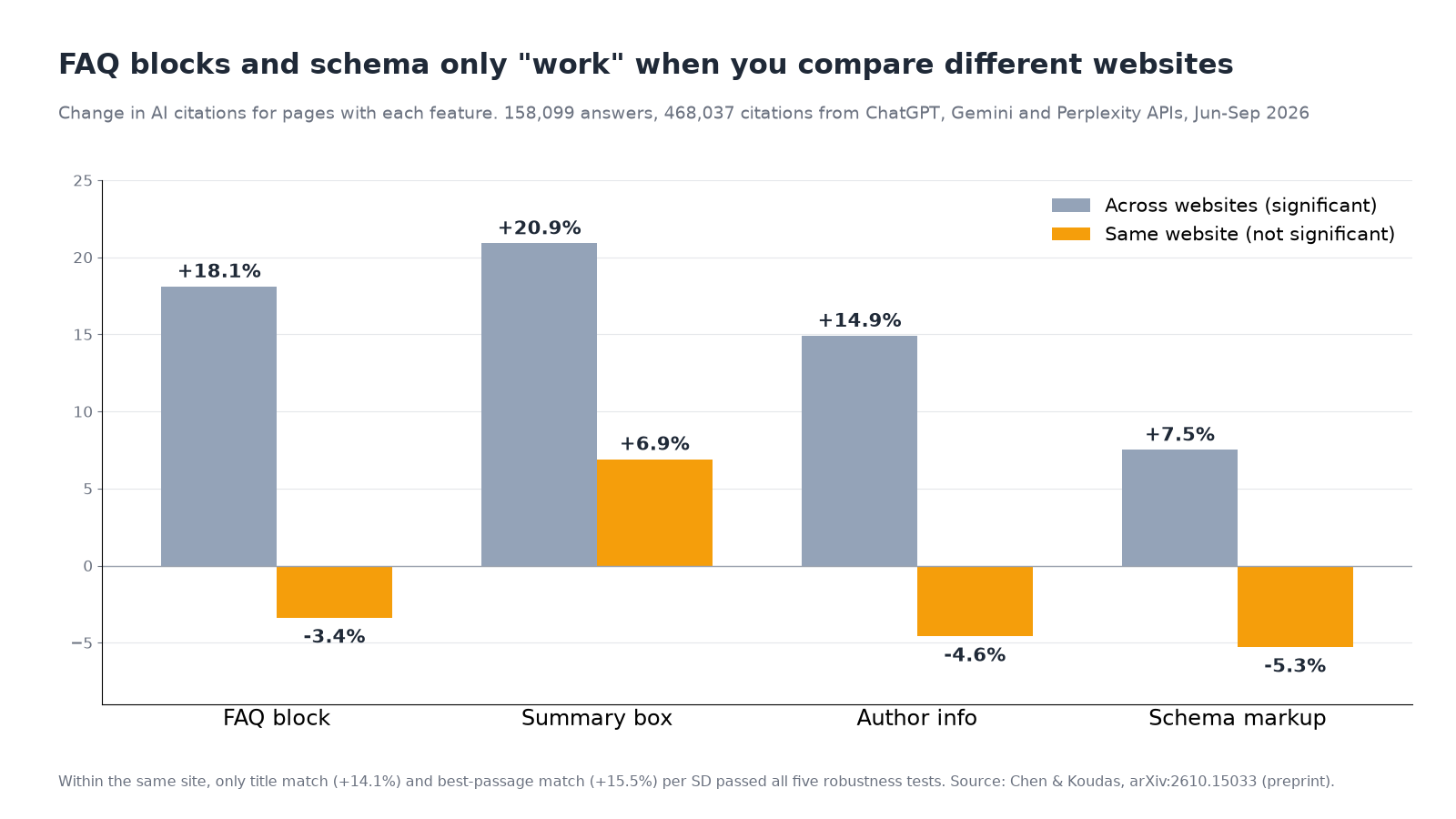
| FAQ blocks, comparing pages on the same website | -3.4% citations, not significant (+18.1% when comparing across different sites) | Chen and Koudas, University of Toronto, arXiv preprint, Oct 2026 |
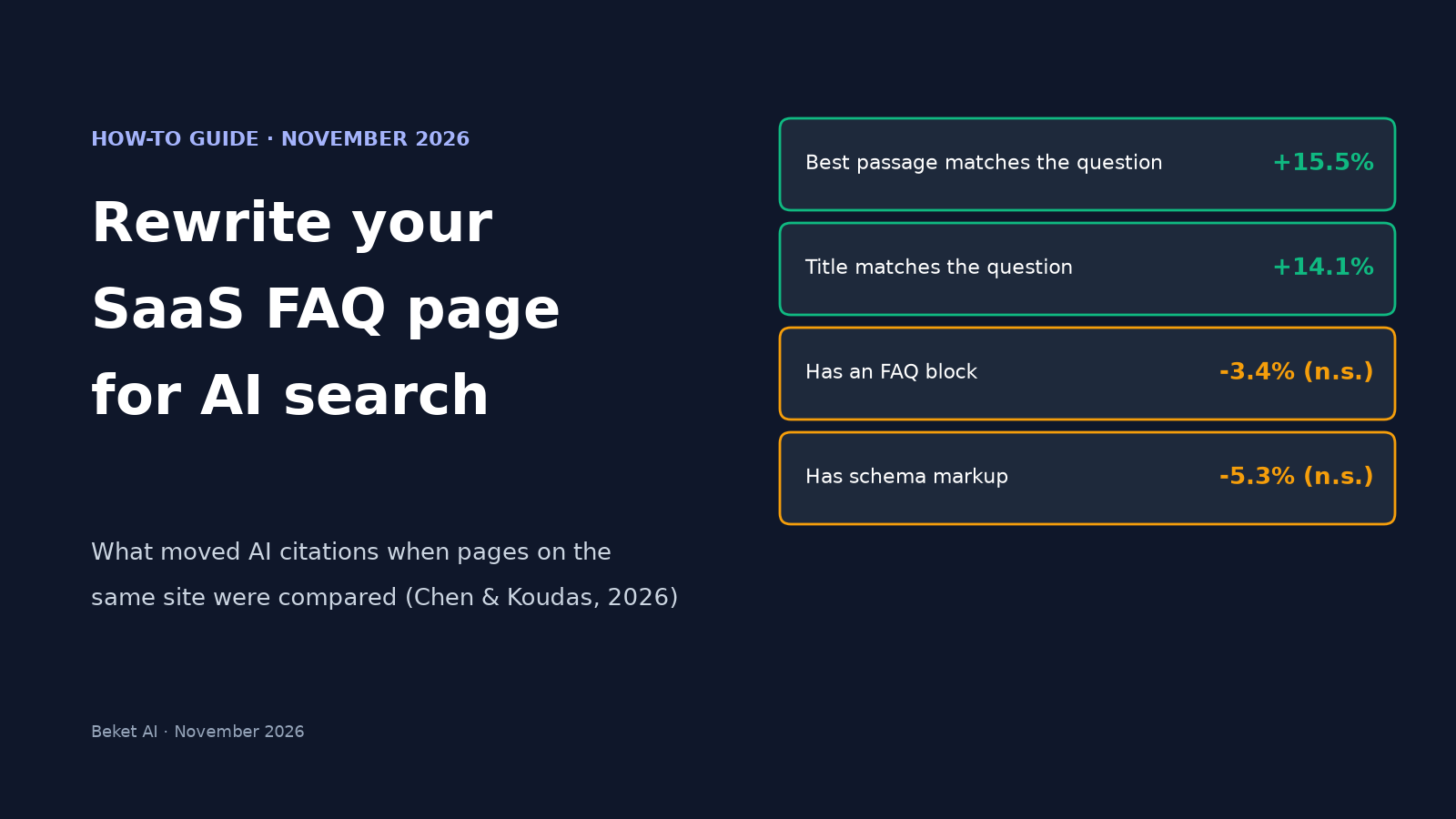
| Title and best passage matching the question, same website | +14.1% and +15.5% more citations per standard deviation; the only features that passed all five robustness tests | Chen and Koudas |
| Share of cited links going to FAQ-labeled pages (ChatGPT Search and Google AI Mode) | 0.36% overall; 0.37% on SaaS websites | Parse, 7.4M cited links, May to Aug 2026 |
| FAQPage schema on heavily vs. lightly cited pages, one page per publisher | 34.5% vs. 28.5%, not significant (p=0.156) | GetIntel, 615 cited pages, Aug 2026 |
| Google FAQ rich results | No longer shown in Google Search as of May 7, 2026 | Google Search Central changelog, Search Engine Journal |
The Toronto study is the most careful of these. It followed 158,099 answers and 468,037 citations from the ChatGPT, Gemini and Perplexity APIs over 90 days, then compared pages only against other pages on the same site. Across different sites, FAQ blocks, summary boxes, author boxes and schema all looked helpful. Within a site, none of them was significant. The authors' explanation: these features cluster on big, already-cited websites (FAQ blocks appeared on 43% of pages from the most-cited quarter of sites and 23% from the least-cited quarter), so cross-site comparisons credit the FAQ with what the website earned.
Two caveats matter. The paper is a preprint, it used the engines' APIs with small models (which may not match what signed-in users see), and it can't judge a site-wide template change. Still, the one thing that held up in every test was plain: pages whose title and paragraphs match the questions people ask get cited more. A good FAQ page is just a page built entirely out of those matches.
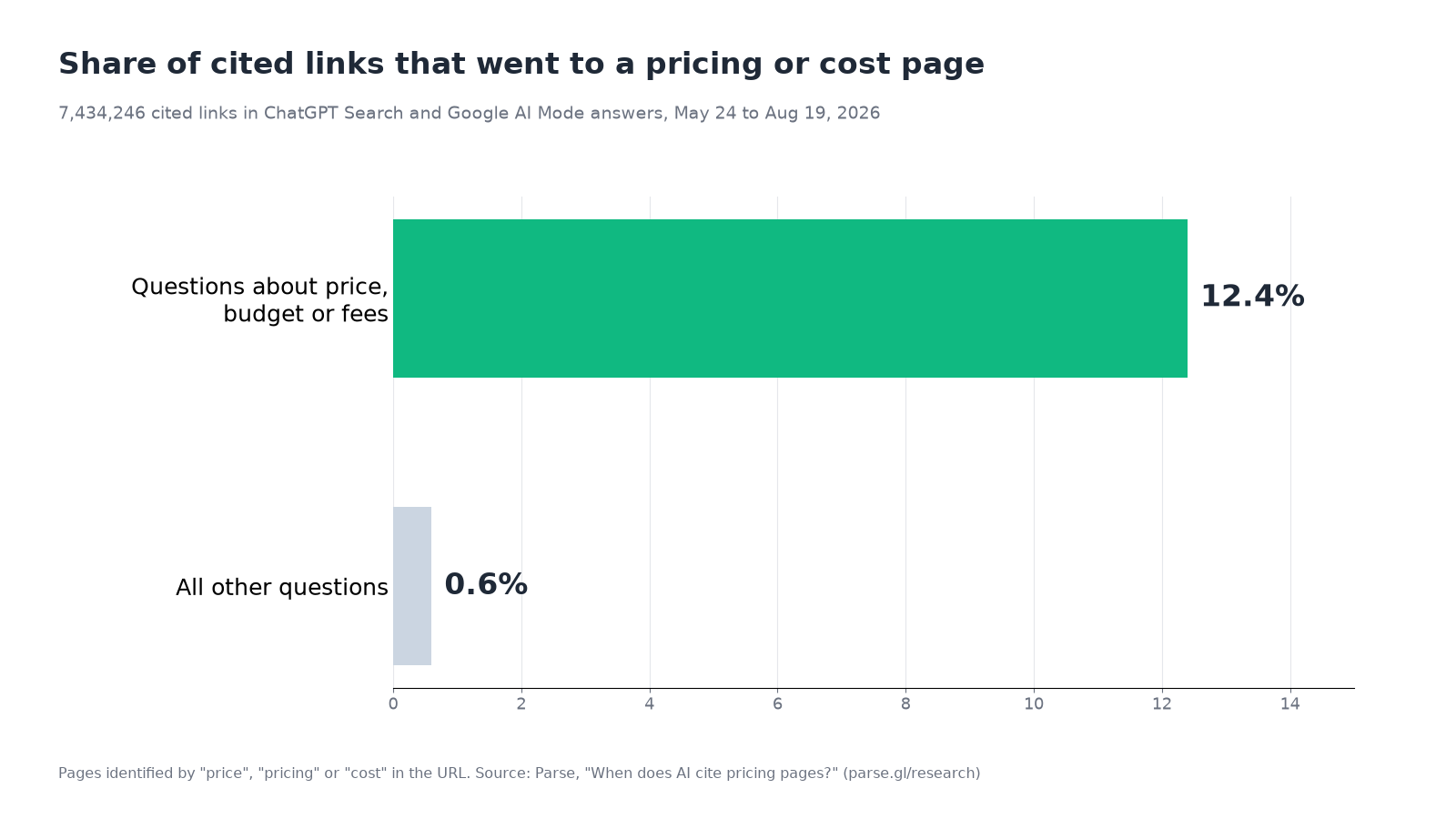
Price questions are where this pays off most. Parse found that pricing and cost pages supplied 12.4% of cited links when the question was about price, budget or fees, against 0.6% on other questions. Qvery asked ChatGPT software shortlist questions with a price ceiling and found 92.80% of its answers cited a vendor's pricing page (Qvery, Oct 2026). On Google AI Mode, the same price questions leaned on best-of and comparison lists (78.23% of answers), with a vendor's own pricing page in 44.35%.
So: keep your FAQ page if it helps buyers, but treat each entry as a standalone answer that has to win on its own words.
Step 1: Collect the questions buyers actually ask
Don't start from the questions you wish people asked. Pull them from where buyers already speak:
- Sales call notes and demo requests. The objections and "does it..." questions that come up before a deal closes.
- Support tickets and live chat. Pre-sale questions about limits, seats, integrations and cancellation.
- Search Console queries that contain your product category plus "price", "cost", "vs", "for [team size]" or "integrate".
- Unbranded AI prompts in your category. These show which questions put a shortlist in front of a buyer before they've heard of you.
For the last one, here are real prompts from our SaaS tools study, where Beket AI asked ChatGPT, Perplexity and Google AI Overview 25 unbranded buyer questions on November 9, 2026:
- best CRM for a 10-person sales team
- best project management tool for a 20-person company
- best accounting software for freelancers
- best affordable email marketing tool for growing brands
- best help desk tool for a 15-person company
Notice the pattern: a category, a team size or buyer type, and often a budget word. Your FAQ should answer the same shape of question about your own product: "Is [product] a good fit for a 10-person sales team?", "How much does [product] cost for 15 agents?", "Does [product] have a free plan for freelancers?"
In that same study, 8 of the top 10 cited domains were vendor sites. AI engines do read vendor pages on these questions, so it's worth making yours answer them directly. For local businesses, our list of questions customers ask AI before hiring does the same job.
Step 2: Phrase each question the way the buyer would
Put the buyer's wording in the heading. "Pricing" is a label; "How much does [product] cost per user?" is a question someone types.
The Toronto data adds a useful detail about engines. Matching the title helped Gemini (+16.8%) and Perplexity (+4.6%) but did nothing measurable for ChatGPT (-0.2%), because ChatGPT rewrites each question into about four keyword-style searches of its own. It adds the current year to 23% of them and a brand the user never named to 28%. What helped all three engines was the best-matching paragraph (ChatGPT +9.5%, Gemini +7.8%, Perplexity +4.8%).
In practice:
- Use the buyer's words in the heading, for Gemini and Perplexity.
- Make sure the answer paragraph also contains the key terms (product name, plan name, the number, the year where it matters), because ChatGPT may search for it in different words.
- Keep one question per heading. Bundling "pricing, billing and refunds" into one answer blurs all three.
Step 3: Make the first sentence the answer
Each answer should make sense if it's quoted on its own, without the heading above it. Lead with the yes, the no, the number or the action. Then add the conditions. Then link to the detail.
| Weak opening | Rewritten opening |
|---|---|
| "Our flexible plans scale with your business." | "[Product] Team costs $X per user per month, billed annually, or $Y billed monthly." |
| "We integrate with the tools you already use." | "Yes, [product] syncs contacts and invoices with QuickBooks Online both ways, every 15 minutes, on the Pro plan and above." |
| "Security is our top priority." | "[Product] stores data in [region] and encrypts it at rest and in transit. Admins can export or delete all workspace data from Settings." |
| "It depends on your needs." | "Most teams under 20 people use the Starter plan; you need Business for SSO and audit logs." |
These are illustrative patterns, not real vendor copy; fill in your own facts. The test is simple: if someone read only the first sentence, would they have their answer?
Here's the same rewrite on our own pricing, as a real example:
How much does Beket AI cost? Beket AI Pro costs $49 a month and includes daily re-audits, starting at 50 prompts across ChatGPT, Perplexity and Google AI Overview. You can start with a free audit of 25 prompts across the same three engines.
Two rules keep this honest. Repeat the subject inside the answer ("Beket AI Pro costs", not "It costs"), because the answer often travels without its question. And say "no" when the answer is no, followed by what to do instead. A vague answer leaves the engine to fill the gap from someone else's page.
Step 4: Publish a price an engine can quote
A vague price answer is the easiest gap for an engine to fill from someone else's page, so give pricing the most care. A quotable price has:
- The plan name exactly as it appears on your pricing page.
- The amount and currency ($49, not "under fifty dollars").
- The unit: per user, per seat, per agent, per workspace, per 1,000 contacts.
- The billing period: monthly, or annual shown as a monthly figure. Say which.
- What changes the bill: seat minimums, usage caps, required add-ons.
- A date, such as "Prices as of November 2026", so a reader can tell a current page from an old one.
Parse's top-cited pages on price questions included cost explainers and comparisons, not just price tables. Their advice was to explain what changes the bill (usage, seats, limits, required extras) and to show a worked example for variable pricing. A line like "A 12-person team on Business pays $X a month" answers the question buyers actually ask.
Then make sure crawlers can see it. A price that only appears after a monthly/annual toggle, inside an iframe or after client-side rendering may never be read. In the Toronto data, 11.5% of downloaded pages needed JavaScript for their main text, and within a site those pages got 10.6% fewer citations from Gemini. Our guide to whether ChatGPT can read JavaScript shows how to test what each crawler sees. The safe default is the price in plain text in the first HTML response.
If you genuinely can't publish a price (enterprise-only, custom quotes), say what the price depends on and give a starting point or a range you'll stand behind. "Contact sales" on its own invites someone else's guess.
Step 5: Keep every page that states a price in sync
The FAQ is rarely the only place your price lives. Help articles, comparison pages, old launch posts, partner marketplace listings and review profiles all restate it, and engines can retrieve any of them.
- Keep one source of truth (usually the pricing page) and link the FAQ answer to it.
- When prices change, search your own site for the old figure and update or date-stamp every page that has it. Keep old announcements if you like, but add a note pointing to the current price.
- Update third-party listings you control, such as marketplace and review profiles.
- Expect a lag. One practitioner, Malte Landwehr, reports that ChatGPT now leans more on its own stored copy of pages and less on live fetches (summary). OpenAI hasn't confirmed this, but if it holds, an updated price may not show up until the page is recrawled.
If an engine is already quoting a wrong figure, our guide to fixing wrong information in ChatGPT covers how to trace where it came from.
Step 6: Decide on schema last
FAQPage schema is still valid markup, and Google says you can leave it in place. But Google stopped showing FAQ rich results in Search on May 7, 2026, and none of the studies above found that it earns AI citations once you control for the website. Google's own guide to optimizing for its generative AI features also says there's no special schema.org markup to add for AI search.
A sensible rule: keep FAQPage markup only if it's generated from the same content as the visible answers, so the two can't drift apart. Markup that claims an answer the page no longer gives is worse than no markup at all.
Step 7: Check what AI says now, then re-check
Before and after the rewrite, ask the engines the questions from Step 1 and record:
- Whether your product is named, and in what position.
- Whether the price or fact stated matches your page.
- Which pages are cited: yours, a review site, a reseller, a competitor's comparison.
Do it on more than one engine. In our SaaS study, ChatGPT and Perplexity answered all 25 prompts while Google AI Overview answered 18, and the engines named different tools. Answers also change from day to day, so one check is a snapshot, not a verdict.
Beket AI runs these checks for you. The free audit covers 25 prompts across ChatGPT, Perplexity and Google AI Overview. Pro is $49 a month with daily re-audits, starting at 50 prompts across the same three engines, so you can see whether answers shift after you publish.
The rewrite checklist
- Questions come from sales calls, tickets, Search Console and unbranded AI prompts, not from guesses.
- Each heading is one question, in the buyer's words.
- Each first sentence is the answer and names the product or plan.
- Prices include plan, amount, currency, unit, billing period and a date.
- Prices are plain text in the HTML, not behind a toggle, iframe or script.
- Every other page that states a price matches the pricing page, or is dated.
- Schema, if any, mirrors the visible text exactly.
- You've recorded what ChatGPT, Perplexity and Google AI Overview say today, so you have a baseline to compare against.
Related posts
Otterly Alternatives: 5 AI Visibility Tools With Public Pricing (2026)
Five Otterly alternatives with published prices, compared on prompts, engines, seats and fit: Beket AI, Profound, Semrush, Ahrefs Brand Radar and Scrunch.
Which LA Marketing Agencies Does AI Recommend? 2026 Study
SmartSites led AI mentions in a Beket AI study of 25 LA agency buyer questions. Only 3 of 30 agencies showed up on ChatGPT, Perplexity and AI Overview.
How much does AI visibility tracking cost?
Published AI visibility prices as of November 2026: Beket AI Pro is $49 a month, Agency is $245 a month for 5 sites, and Otterly Lite starts at $29 a month.