
AI Brand Monitoring: A Weekly Routine to Track What AI Says About Your Brand (2026)

Google Alerts emails you when a blog post mentions your company. Nothing emails you when ChatGPT starts telling buyers you're "a pricier option," when Perplexity drops you from a "best of" answer, or when Google AI Overviews cite a review page from 2023 to describe what you sell.
That's the gap AI brand monitoring fills. It isn't hard to do by hand, but it fails if you treat it like a one-off check. We looked at 103 Beket AI audits that track the same brand on two or more engines. The median brand's best engine named it 12 percentage points more often than its worst engine. In 20 of those 103 audits (about 1 in 5), the brand was named on one engine and never named on another. And the answers move. A preliminary Supercite study found that 75% of AI answers named a different set of brands the next day (Supercite).
So this guide is built as a routine, not a checklist. You'll set up a fixed prompt set, pick engines, decide what to log, run a 30-minute weekly review, and know what to do with each kind of finding. At the end there's a short, sourced rundown of the tools that help, including the free first-party reports from Google, Microsoft and OpenAI.
The routine in one paragraph
Keep 20 to 50 fixed prompts in four buckets (facts, reputation, category, comparisons). Run them on the engines your buyers use, at least weekly and ideally daily. Log whether you were named, how you were described, who else was named and which sources were cited. Every week, triage anything wrong, negative or missing and trace it to a source you can fix. Once a month, report your share of answers by engine, not one screenshot.
What AI brand monitoring is (and how it differs from classic brand monitoring)
Classic brand monitoring watches what people publish about you: news, reviews, social posts, forum threads. AI brand monitoring watches what AI assistants say about you when someone asks a question. The two are linked, because AI answers are built from the same web content, but they aren't the same job.
| Classic brand monitoring | AI brand monitoring | |
|---|---|---|
| What you watch | New mentions on the web and social | Answers from ChatGPT, Gemini, Perplexity, Microsoft Copilot, Google AI Overviews and AI Mode |
| Trigger | Someone publishes something | Someone asks a question, so you have to ask it too |
| Unit of measure | Number and tone of mentions | Share of answers that name you, how you're described, which sources are cited |
| How it changes | When new content appears | Daily, even when nothing new was published |
| Typical free tool | Google Alerts | A fixed prompt set plus the first-party AI reports covered below |
The second row is the important one. An alert tool can't tell you what an AI answer says, because the answer doesn't exist until someone asks. Monitoring means asking the same questions on a schedule and comparing.
Step 1: Build a fixed prompt set in four buckets
Start with 20 to 50 prompts and don't change them week to week. If you rewrite the prompts every time, you can't tell whether your visibility changed or your questions did.
Split them into four buckets, because each one catches a different problem:
| Bucket | What it catches | Example prompts (swap in your details) |
|---|---|---|
| Facts | Wrong hours, prices, locations, features, ownership | "What does [brand] charge for [product]?" · "Does [brand] offer [service] in [city]?" · "Is [brand] still in business?" |
| Reputation | Negative or outdated framing | "What are the downsides of [brand]?" · "What do customers complain about with [brand]?" · "Is [brand] worth it?" |
| Category (unbranded) | Whether you're named at all when buyers don't know you | "Best [category] for [use case]" · "[category] near [area] open on Sunday" · "Which [category] tools work for small teams?" |
| Comparisons | Who replaces you and how you're positioned | "[brand] vs [competitor]" · "Alternatives to [competitor]" · "Cheapest [category] with [feature]" |
The reputation bucket is the one most teams skip, and it's where AI is bluntest. Our guide to checking ChatGPT brand sentiment with negative prompts shows how much the wording of a question changes the tone of the answer.
Weight the set toward category prompts. Branded prompts tell you whether AI describes you correctly. Unbranded prompts tell you whether new buyers ever hear your name, and that's usually where the business impact is.
Step 2: Check more than one engine
It's tempting to check ChatGPT and call it done. Our data says that hides a lot.
For each of 103 Beket AI audits that tracked the same brand on two or more engines (10+ answers per engine, latest answer per prompt), we compared the share of answers that named the brand on its best and worst engine:
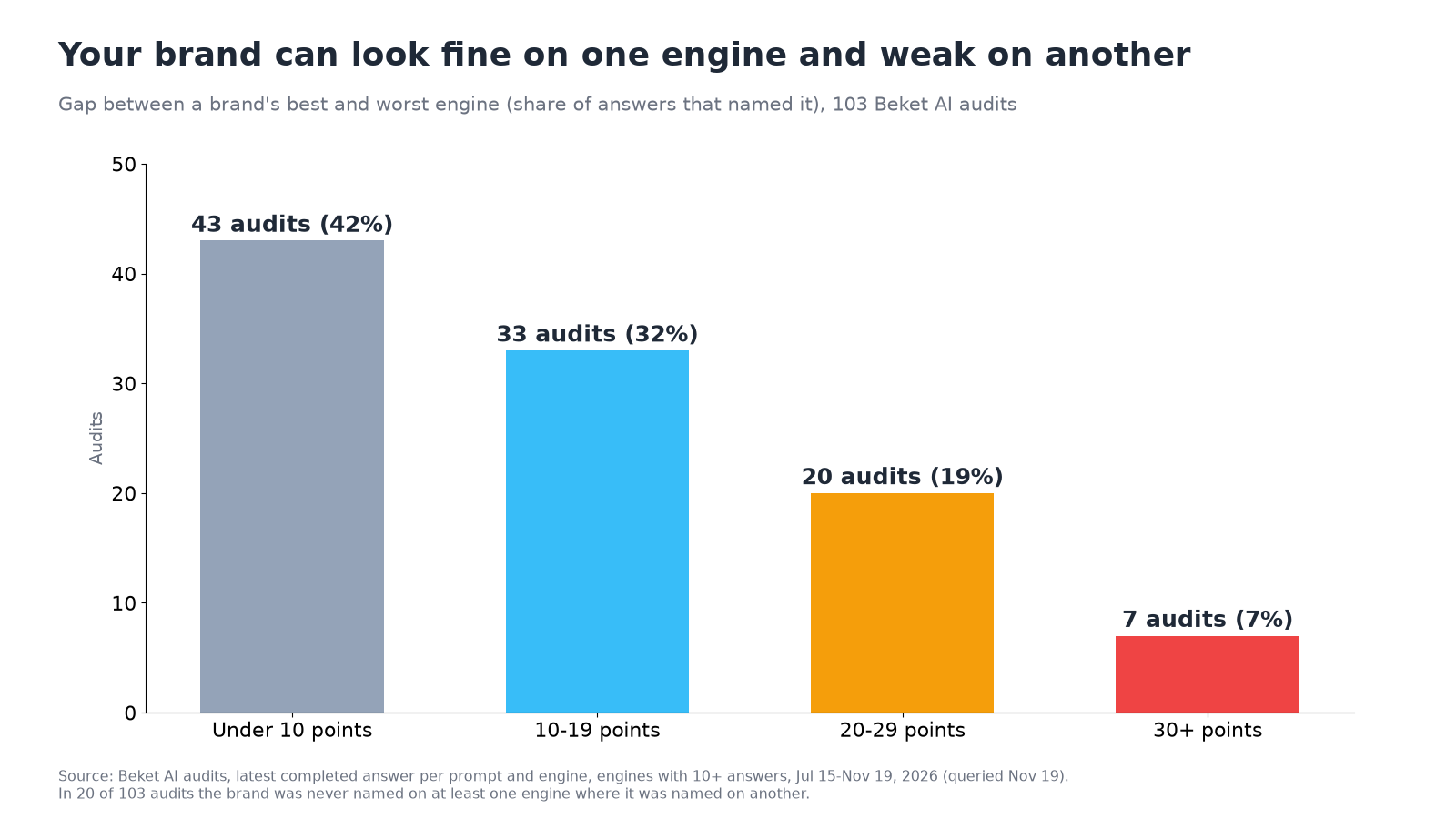
- The median gap was 12 points, and the average was 13.7.
- 27 audits (26%) had a gap of 20 points or more.
- In 20 audits (19%), the brand was never named on at least one engine while it was named on another.
The averages by engine look similar, which is exactly why they mislead:
| Engine | Audits | Average share of answers naming the brand |
|---|---|---|
| ChatGPT | 101 | 35.4% |
| Google AI Overviews | 73 | 32.4% |
| Perplexity | 79 | 30.0% |
| Microsoft Copilot | 13 | 37.7% |
| Google AI Mode | 11 | 31.6% |
Across all brands, no engine is much "easier" than another. For any single brand, though, one engine can be far weaker than the rest. You only find that by checking each one. Gemini had too few qualifying audits to report on its own.
Which engines to start with: ChatGPT and Google AI Overviews are the usual starting point, and they're the two engines most of these audits tracked. Add Perplexity if your buyers do research-heavy B2B purchases, Microsoft Copilot if they work in Microsoft 365 or search on Bing, and Google AI Mode if your category gets longer, multi-step questions. Then expand once you know where the gaps are.
Step 3: Decide what to log for every answer
A screenshot folder isn't monitoring. Log the same fields every time so you can compare weeks. A spreadsheet is enough to start:
| Field | What to record | Why it matters |
|---|---|---|
| Date, engine, prompt | Exactly as run | Lets you compare like with like |
| Named? | Yes / no | The core visibility number |
| Position | 1st, 2nd... or "listed" | Being named last in a list of eight is weaker than first |
| Description | The sentence(s) about you, copied | Catches wrong facts and tone shifts |
| Accuracy | Correct / wrong fact / outdated | Drives Step 5 |
| Tone | Positive / neutral / negative | "Fine, but overpriced" is a mention, not a win |
| Competitors named | Every other brand in the answer | Shows who takes your place |
| Cited sources | Every URL the answer links to | Tells you where to fix things |
Two habits keep the data clean. Run checks in a logged-out window or a temporary chat so memory and past conversations don't skew the answer. And record the cited URLs every time, because that's what turns a complaint ("ChatGPT says we're expensive") into a task ("update the 2023 comparison page it cites").
Step 4: Set a cadence that matches how fast answers move
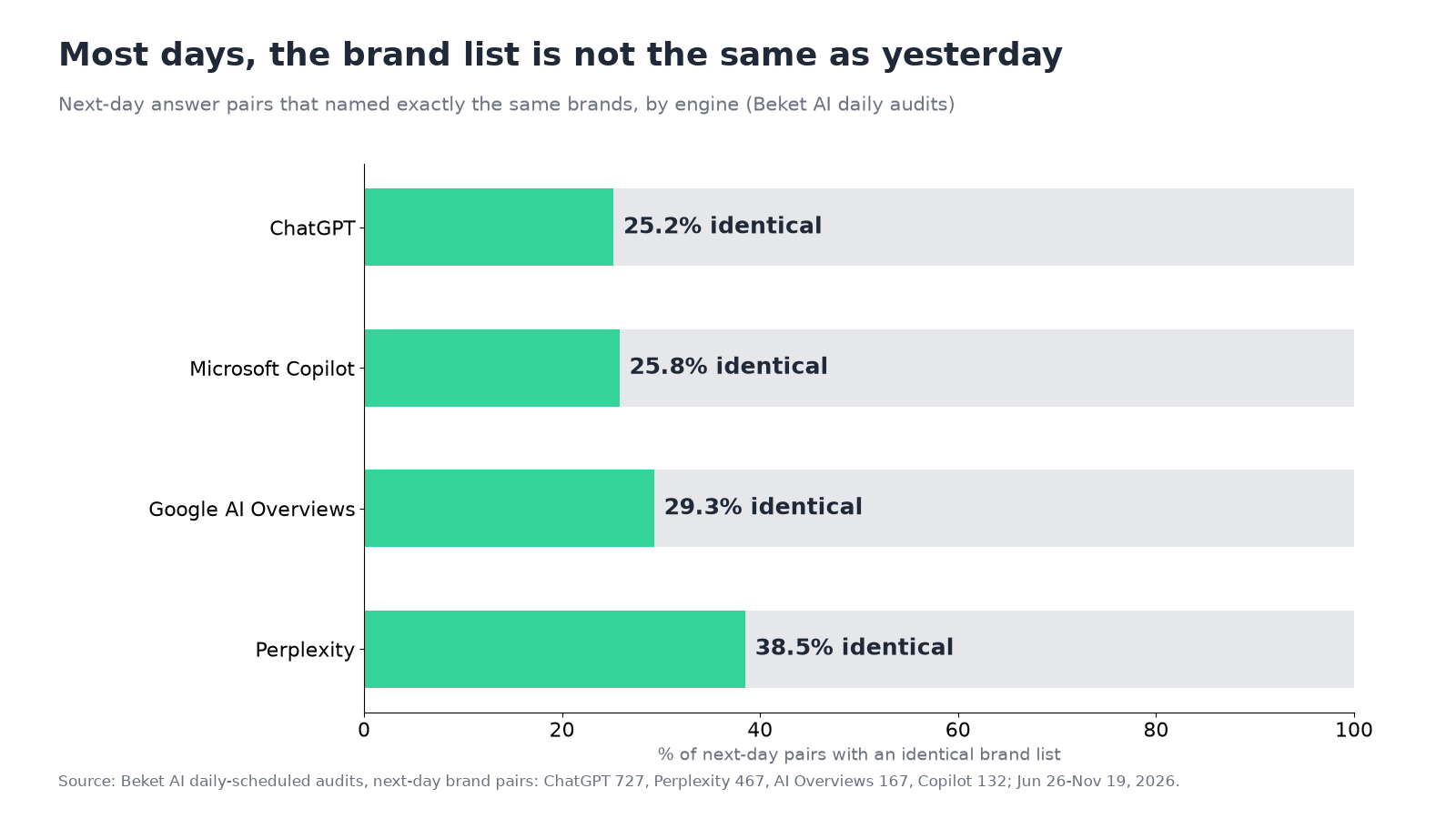
One check a month tells you very little, because AI answers are partly random. In Beket AI's daily audits, only about 30% of next-day answer pairs named exactly the same brands, and on average 30% of the brands named on day one were gone on day two. We broke that down in how often AI answers change.
Supercite's preliminary two-day study points the same way. Of 839 comparable answers across ChatGPT, Gemini, Google AI Overviews and AI Mode, 75% named a different set of brands the next day (Supercite revised this from 84% on November 19), and 27% of day-one brands were gone on day two (Supercite). Supercite sells an AI visibility tracker, and these are days one and two of a seven-day run, so treat the exact numbers as early.
What this means for cadence:
- Collect daily, review weekly. Daily runs give you a share ("named in 18 of 28 answers this month"), which holds up much better than a yes/no from one check.
- If you're doing it by hand, run the full set once a week on the same day, and run the reputation and facts prompts twice so one odd answer doesn't trigger a fire drill.
- Re-check after big events: a launch, a price change, a rebrand, a wave of reviews, or a major model or search update.
The 30-minute weekly review
- Scan for red flags (10 min). Filter the week's log for wrong facts, negative tone and new competitors. These go to triage.
- Compare share by engine (10 min). Note any engine where your share of answers dropped noticeably against your recent average.
- Check sources (5 min). For each red flag, open the cited URLs. Is the source yours, a directory, a review site, a forum, or a competitor's page?
- Assign one fix (5 min). Pick the single change most likely to help and put a name and a date on it.
Step 5: Triage what you find
Most findings fall into five patterns. Each has a different usual cause and a different place to act:
| What you see | Usual cause | Where to act |
|---|---|---|
| Wrong fact (old price, hours, address, feature) | An outdated page, directory listing or the model's training memory | Update your own pages first, then the directories and profiles AI cites. Our guide to fixing wrong information in ChatGPT walks through the order |
| Negative or outdated framing | Old reviews, forum threads or a comparison page that hasn't been updated | Answer the complaint publicly, refresh your own comparison and pricing pages, and earn newer reviews |
| Missing on one engine only | That engine relies on different sources or a different index | Check whether you're present in the sources that engine cites (for Copilot, also Bing and Bing Places) |
| Competitor named instead of you | They appear on the lists and review sites the answer draws from | Look at which third-party pages are cited and whether you can be included or reviewed there |
| You're cited but not named | Your page is used as a source, but the answer recommends others | Make your page state clearly what you offer, for whom and where, so the recommendation can point back to you |
Your fixes happen on your site and across the web. Monitoring tells you where to work. Then re-run the same prompts for a few weeks to see whether the answer moves, and judge by share across runs, not by the next single check.
Step 6: Add the free first-party signals
Google, Microsoft and OpenAI now each report a slice of your AI visibility. None of them shows what the answer actually says about you, but they're free and they help confirm trends.
| Report | What it shows | What it doesn't |
|---|---|---|
| Google Search Console, Generative AI report | Impressions when links to your pages were shown in AI Overviews and AI Mode, with Pages, Countries and other tabs (Google help) | Clicks, the queries behind each answer, or whether your brand was named in the text. See our walkthrough of the Generative AI report |
| Bing Webmaster Tools, AI Performance | Citations of your pages across Microsoft Copilot, AI-generated summaries in Bing and select partners, plus grouped "grounding queries" and page-level citation counts (Bing help). Microsoft has since added intent categories and a citation share metric (Bing blog) | Microsoft says grounding queries are grouped phrases, not full prompts, and the report doesn't show individual answers or why a page was cited |
| ChatGPT Business Hub (beta) | 28 days of mentions, website clicks and "discovery topics" once you claim and verify your business (Search Engine Watch) | For online businesses, a mention requires a reference to your website, so a brand name on its own doesn't count. No prompts, no competitors, ChatGPT only |
| Google Alerts | New web pages that mention your brand (Google help) | Anything about AI answers. It's useful for spotting the reviews and articles AI may cite later |
Put these numbers next to your prompt log once a month. If Search Console impressions rise while your share of AI Overview answers stays flat, you're being cited more as a source without being named more often. That's a different problem from not being cited at all.
AI brand monitoring tools that do the asking for you
Running 30 prompts by hand on three engines every week adds up to roughly 360 answers a month to log. That's when a tool starts paying off. Here's what the main options say they cover, based on their own pages:
| Tool | What it monitors | Notes |
|---|---|---|
| Beket AI | Your brand's mentions, descriptions, competitors and cited sources across ChatGPT, Gemini, Perplexity, Microsoft Copilot, Google AI Overviews and Google AI Mode, with Claude, GPT and Grok as add-ons | Free one-time audit of 25 prompts on any 3 of the 6 engines. Pro is $49/month per site with daily re-audits: 50 prompts on 3 engines, with more prompts at $25 per 25 and extra engines at $19 each (pricing). Includes an MCP server, an API and a Looker Studio connector |
| Semrush AI Visibility Toolkit | Per its knowledge base: brand visibility and mentions, brand perception and sentiment versus competitors, prompt research, and daily tracking of chosen prompts (Semrush) | A natural fit if your team already works in Semrush |
| Ahrefs Brand Radar | An AI visibility index that Ahrefs says spans 581 million prompts, plus custom prompt tracking (Ahrefs) | Ahrefs says the index works best once your brand already appears in AI search |
| Free first-party reports | Search Console, Bing Webmaster Tools, ChatGPT Business Hub (see Step 6) | Confirm trends; they don't show answer text |
Whichever you pick, ask four questions before you pay: Does it run your prompts or only a shared prompt database? Which engines, and are they included or extra? How often does it re-run each prompt? Does it show the full answer text and cited URLs, or only a score? You need all four to run the routine above.
What a month of monitoring should give you
At the end of each month you should be able to answer five questions in one page:
- What share of answers named us, on each engine, compared with last month?
- Which competitors were named most often in answers where we weren't?
- Which wrong or negative descriptions are still open, and which got fixed?
- Which sources did AI cite most when it talked about our category?
- What's the one change we're making next month?
If you can answer those, you're monitoring. If all you have is a screenshot of ChatGPT naming you once, you're not.
How we got our numbers
- Engine gap: Beket AI audits, excluding demo and archived audits. For each prompt and engine we kept only the latest completed answer, then calculated the share of answers that named the audited brand. We kept engines with at least 10 answers in an audit, and audits where at least two engines qualified and the brand was named at least once. That left 103 audits and 7,054 answers, run between July 15 and November 19, 2026 and queried November 19. Each audit counts once. Brand detection uses Beket AI's entity matching, so a small share of mentions may be missed or misattributed.
- Next-day churn: from our daily audit analysis: consecutive completed answers 20 to 28 hours apart in daily-scheduled audits (Jun 26 to Nov 19, 2026). "Identical" means exactly the same set of brands, which is a strict test.
- These are Beket AI's own audits, not a random sample of all brands. All figures are aggregates. No customer names, brands or prompts are shown.
Start with a baseline
The hardest part of AI brand monitoring is the first week, because you don't yet know what "normal" looks like for your brand. A free Beket AI audit gives you that baseline: 25 prompts on any 3 of the 6 engines, with your score, the answers it flagged, the competitors named and a fix list. Then pick your prompt set from what it finds and start the weekly routine.
Related posts
Ads Now Sit Next to Bing's AI Overviews: What Changes for Organic Citations
Microsoft confirmed ads next to Bing's AI Overviews on Nov 19. What it said, what it left out, and what to check before Black Friday.
Generative Search Visibility: What Decides Whether AI Assistants Mention Your Company (2026)
What decides whether ChatGPT, Perplexity and Google's AI answers mention your company: evidence-ranked factors, how they differ by engine, and our audit data.
Service Area Pages vs Doorway Pages: What Google Allows and What AI Engines Cite (2026)
Service area pages vs doorway pages: what Google's spam policy says, which city pages AI engines cited in 33 Beket AI local audits, and when to build one.