
How to Submit a Product Feed to ChatGPT: Required Fields, Formats and Mistakes (2026)

Most “how to get into ChatGPT Shopping” advice stops at “submit your product feed.” This guide covers the part after that: what OpenAI’s product feed schema actually requires, how a row should look, where the feed goes, and the formatting mistakes that quietly reject rows or leave products with thin data.
Everything below comes from OpenAI’s public commerce docs as of November 13, 2026. OpenAI updates these pages often, so check the live spec before you build a pipeline around any single detail.
Update, Nov 14, 2026: ChatGPT can now buy, not just recommend
On November 13, 2026, OpenAI launched ChatGPT Wallet, which lets ChatGPT’s agents (dots) complete a purchase after the shopper reviews the items, total and card, and approves with a security check such as Face ID or a fingerprint. A current product feed is still the first step in OpenAI’s Commerce Partner Playbook, but stores also need to let signed ChatGPT agent requests through their CDN or firewall, and work with payment and fraud providers so legitimate agent orders are not declined. The Wallet is rolling out first to ChatGPT Pro subscribers aged 18 and older in the United States, with an eligible US-issued card.
What a ChatGPT product feed does, and what it does not
A ChatGPT product feed is a structured file of your catalog (one row per item or variant) that ChatGPT can use for product discovery. OpenAI’s Submit product feeds guide says ChatGPT “can use product feeds and other available retail and public web sources for product discovery.” So the feed is one input, not the only one.
Three limits are worth knowing before you spend a sprint on it:
- A feed does not guarantee placement. The spec says search eligibility “does not guarantee display,” and OpenAI’s Businesses in ChatGPT page says ChatGPT “continues to make independent recommendations and comparisons.”
- You don’t strictly need one. On its merchants page, OpenAI answers “Do I need a product feed if ChatGPT already crawls my site?” with “No, but feeds give you greater control over how your products appear.”
- Shopping is US-first. The same page says shopping is currently live for ChatGPT users in the U.S., and the spec says the standard upload currently targets the US, whatever you put in the country columns.
What the feed buys you is control over the facts: the exact title, the current price, stock status, images and return terms, instead of whatever ChatGPT pieced together from a crawl. We made the broader version of that argument in The AI Shelf Runs on a Feed You Already Know.
It also matters commercially. Adobe reported that AI-referred visitors to U.S. retail sites converted at a 90% higher rate and brought 83% more revenue per visit than non-AI visitors in September 2026, based on more than 1 trillion retail visits (Search Engine Land summary).
Step 1: Pick your path in
OpenAI’s pages describe more than one way in, depending on your platform:
| Your situation | What OpenAI says to do | Source |
|---|---|---|
| You sell on Shopify or Etsy | Your catalog is already integrated; no extra setup or application is required | ChatGPT merchants page |
| Any other store | Start in Business Hub: claim the business, verify your identity, then upload products | Submit product feeds |
| You want to run ChatGPT ads on products | Create a feed in your ad account and upload over SFTP (needs product feed API access) | Ads product feeds |
The merchants page also mentions an application and waitlist, and says a self-serve merchant platform is planned. If Business Hub doesn’t show you a products section yet, that’s the likely reason.
For the Business Hub route, OpenAI’s sequence is:
- Open Business Hub and claim your business.
- In the product section, verify your identity. OpenAI says this is required before you can upload products.
- Return to the product section and choose to upload products.
- Choose the countries and currencies you sell in.
- Prepare the feed against the schema, with every required field in every record and stable
item_idvalues. - Choose one delivery method (manual upload, a hosted HTTPS URL, or SFTP), then review the upload and fix errors.
If you haven’t claimed your profile yet, our ChatGPT business profile guide walks through the claim, the verification methods and the blue check.
Step 2: Fill the 11 fields every row needs
The spec lists nine required fields under basic product data, plus two required geo fields. Every row needs all eleven.
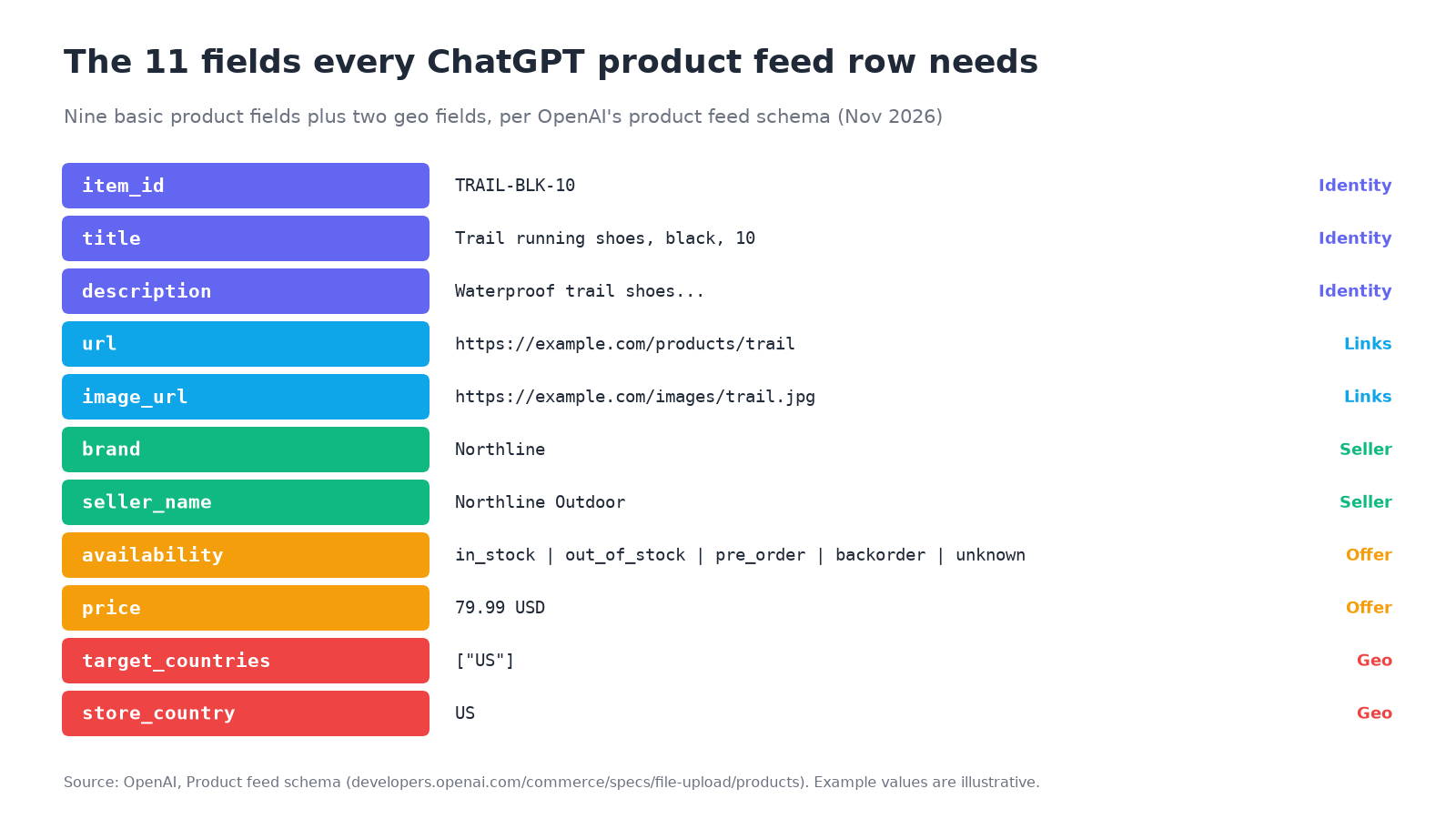
| Field | What goes in it | Watch out for |
|---|---|---|
item_id |
Stable ID, unique per item or variant | Never reuse it for a different product |
title |
Product name, with the variant when relevant | OpenAI suggests at most 150 characters |
description |
Factual, plain-text description of this item | OpenAI suggests at most 5,000 characters |
url |
Product page, with the variant selected when possible | Must be public; keep it stable |
brand |
Brand as shown on the product page | Real brand, not a placeholder |
seller_name |
Name of the seller supplying the offer | Required on every row |
image_url |
Direct link to the main image (e.g. JPEG or PNG) | Must show this variant and be public |
availability |
in_stock, out_of_stock, pre_order, backorder or unknown |
Missing or unrecognized values reject the row |
price |
Regular price as amount CURRENCY, e.g. 79.99 USD |
Uppercase ISO 4217 code, no thousands separators |
target_countries |
Destination countries, e.g. ["US"] |
Empty doesn’t mean worldwide |
store_country |
Country of the seller’s store, e.g. US |
Not a regional price override |
Here is OpenAI’s own minimal example, one JSONL record on one line:
{"item_id":"MUG-350-BLUE","title":"Blue ceramic mug, 350 mL","description":"Dishwasher-safe glazed ceramic mug with a handle.","url":"https://example.com/products/mug-blue","brand":"Northline","seller_name":"Northline Home","image_url":"https://example.com/images/mug-blue.jpg","price":"18.00 USD","availability":"in_stock","target_countries":["US"],"store_country":"US"}
The spec also covers CSV and TSV cells (quote cells with commas, quotes or newlines; serialize JSON objects inside a cell), and the Ads guide shows a plain UTF-8 CSV with one row per item or variant. Search eligibility defaults to on, checkout to off, and ads to off unless your feed has an ads default.
Step 3: Add the optional fields that make products comparable
Required fields get a product into the catalog. ChatGPT’s own pitch to merchants is that “richer data helps your products surface with more accurate information when shoppers compare options.” The optional fields are where comparison details live:
- Variants: a separate row per selection, each with its own
item_id, a sharedgroup_id,listing_has_variations=true, and avariant_dictsuch as{"color":"Black","size":"10"}. The group ID must differ from every item ID. - Identifiers:
gtin(exactly 8, 12, 13 or 14 digits with a valid check digit, leading zeros kept) andmpn(submitted withbrand). - Attributes:
condition,product_category(broad to specific, separated by>),material,color,size,gender,age_group, and structureddimensionsandweightwith units. - Price and media:
sale_price(must be lower thanprice, same currency) andadditional_image_urls. - Shipping and returns:
shipping_price,accepts_returns,return_deadline_in_daysand areturn_policyURL. - Reviews:
review_countandstar_rating(0 to 5, two decimals), describing the same set of product reviews.
Some fields, such as marketplace_seller, store-level ratings and is_digital, only work on integrations configured to carry them. Adding the column alone doesn’t switch them on.
Step 4: Avoid these 10 feed mistakes
Each of these comes straight from a rule in OpenAI’s spec. Several fail quietly: the upload succeeds, but the row is rejected or the value is ignored.
| Mistake | What the spec says | Fix |
|---|---|---|
Copying Google Merchant Center’s preorder |
The value is pre_order; unrecognized availability values reject the row |
Map preorder to pre_order |
Leaving availability blank when stock is unknown |
Omitted or empty values reject the row | Send unknown explicitly |
Writing $79.99 or 1,299.00 USD |
Money is a decimal amount, a space and an uppercase three-letter code, with no thousands separators | Use 79.99 USD and 1299.00 USD |
| A “sale” price equal to or above the regular price | A nonpositive, equal, higher or different-currency sale price isn’t used | Only send sale_price when it is strictly lower |
Placeholder text like n/a, null or unknown in optional fields |
Omit unknown optional values; unknown is valid only where listed |
Leave the field out |
| IDs stored as numbers | Keep identifiers as strings to preserve leading zeros | Quote IDs and GTINs as text |
| Price inside an offer ID, or IDs that change when price changes | Keep item_id, group_id and offer_id stable; never include price in an offer ID |
Use SKU-based IDs |
| Inventing an MPN to cover a missing GTIN | Don’t invent a value to replace a missing GTIN; omit a GTIN if unassigned | Leave both out if you don’t have them |
| Relying on sale or availability dates to schedule changes | Uploaded dates don’t schedule price or availability changes | Re-send the feed when a sale starts, ends or stock changes |
| Treating a blank shipping cell as free shipping | Omitted or empty shipping_price means unknown; zero means no charge |
Send 0.00 USD for free shipping |
That first one matters for anyone reusing a Google feed. The Merchant Center availability attribute uses preorder, and Google also names columns differently (link and image_link rather than OpenAI’s url and image_url). OpenAI accepts some aliases (id or sku for item_id, item_group_id for group_id), but don’t assume every Merchant Center column name maps over. Check each one against the spec.
Step 5: Keep it current, and check what happens next
The spec says to submit the current price and update the feed when a sale starts or ends, and to update availability when an item sells out or comes back. OpenAI’s feed guide says the delivery methods (manual upload, hosted URL or SFTP) send full snapshots, so plan a regular re-upload or a hosted URL your platform keeps fresh. Advertisers get one extra tool: the Delta Feeds API updates price, availability and titles for existing variants without re-uploading the whole catalog. OpenAI documents it for ad accounts, with access enabled per account.
If you advertise, the Ads upload history reports rows accepted and rejected, with statuses such as completed_with_errors, skipped and failed. Check it after every upload rather than assuming a successful file transfer means the products went live.
Then check the outcome that actually matters: does ChatGPT name your products when shoppers ask unbranded questions like “best waterproof trail shoes under $100”? The feed controls the facts. It doesn’t control whether you get picked. Track a fixed set of buyer questions before and after the feed goes live, and keep tracking, because AI answers change from week to week.
If you sell on Google too, the same thinking applies to AI Mode checkout; see How to Make Your Store Buyable in Google AI Mode. For how OpenAI’s and Google’s commerce protocols differ, read What Is Agentic Commerce? ACP vs UCP.
Quick checklist before you upload
- Every row has all 11 required fields, with a real brand and seller name.
availabilityuses one of the five exact values, andunknownis explicit.- Prices read
79.99 USD: decimal point, space, uppercase code, no symbols or commas. - IDs are strings, stable, unique, and contain no prices.
- Each variant has its own row,
item_id, URL, image, price and stock, with a sharedgroup_id. - Product and image URLs are public, absolute and preferably HTTPS.
- Optional fields are omitted when unknown, not filled with
n/a. - Sale prices are strictly lower than regular prices.
- There’s a plan to re-send the feed whenever prices or stock change.
- You have a baseline of unbranded buyer questions to measure against.
For that last step, Beket AI’s free audit runs 25 unbranded prompts across ChatGPT, Perplexity and Google AI Overview and shows who gets named and which sources get cited. Pro ($49/month) re-runs the audit daily, starting at 50 prompts, so you can see whether your products show up more often after the feed goes live.
Related posts
Digital PR for AI Search: How to Earn Coverage ChatGPT and Perplexity Actually Cite (2026)
Digital PR for AI search: find the sources ChatGPT, Perplexity and AI Overviews cite, pitch what each accepts, then re-check. With data from 5 studies.
Persona Prompts for AI Visibility: How to Test What ChatGPT Recommends to Each Buyer
Persona prompts for AI visibility: build buyer personas, run control and persona prompts on ChatGPT, Perplexity and AI Overview, and read the gaps.
How to Use a ChatGPT Business Profile for GEO and AEO (And What It's Missing)
How to claim a ChatGPT business profile, use it for GEO and AEO, and what official Insights leave out: no prompts, citations, competitors or sentiment.