
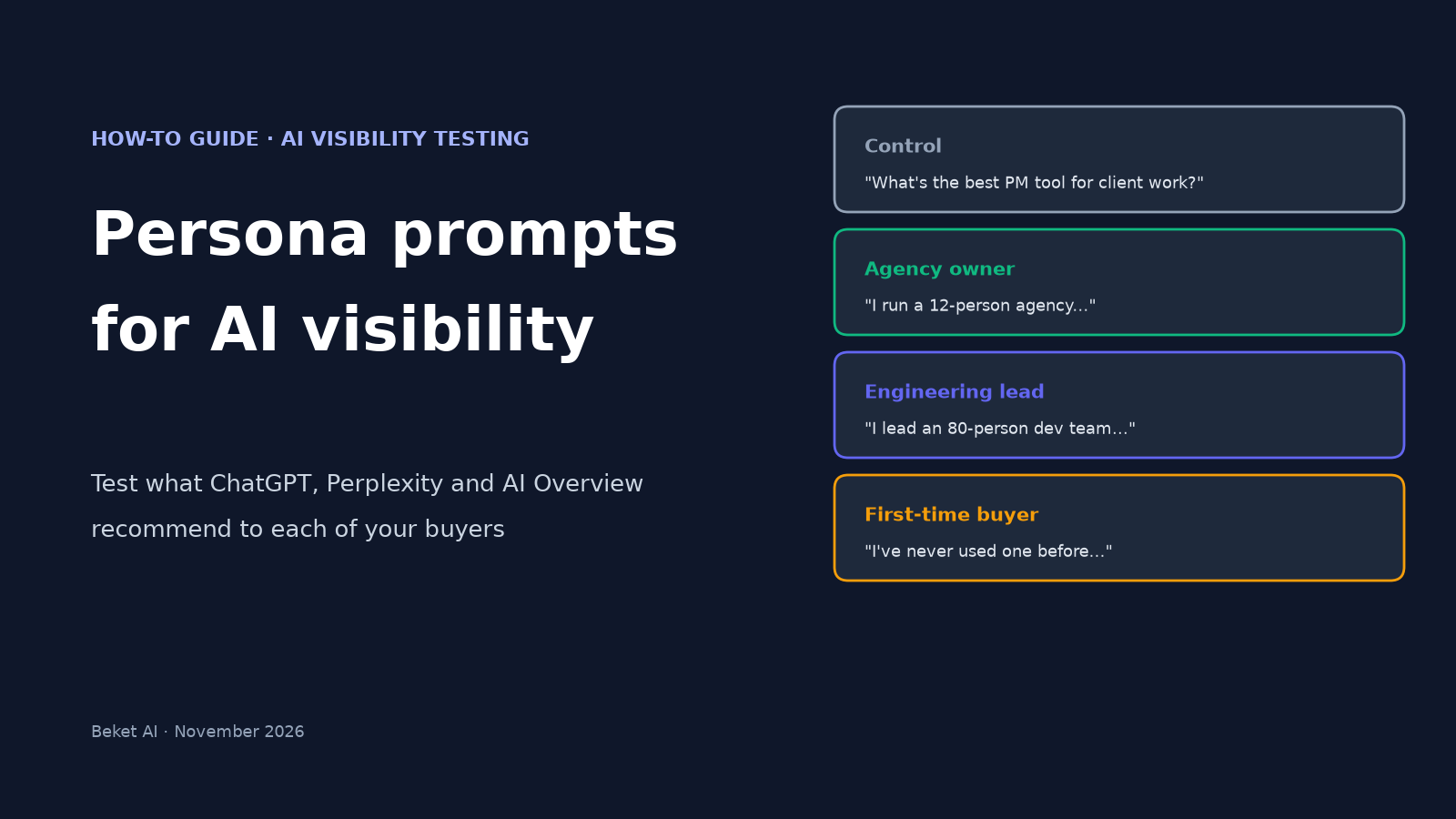
Persona Prompts for AI Visibility: How to Test What ChatGPT Recommends to Each Buyer

Most AI visibility checks ask a neutral question: “What’s the best funnel builder?” Real buyers rarely ask that way. They say who they are first. “I run a 12-person agency.” “I’m the CTO, and I need something my developers won’t hate.” “I’m a first-time home buyer in Seattle.”
That opening line is a persona prompt, and it can change which brands an AI names. This guide shows how to build persona prompts for AI visibility testing, run them on each engine without your own chat history leaking in, and read the results without fooling yourself.
A quick note on the keyword: most “persona prompts for AI” content is about prompt engineering, as in telling ChatGPT to “act as a copywriter.” This guide is about the opposite direction: the persona belongs to the buyer asking the question, and you are measuring what the AI recommends to them.
The evidence that personas move AI answers
The largest public test we know of comes from the AI search agency Radyant. In its persona study, published June 23, 2026, it ran 8 funnel-builder questions with 8 persona prefixes (including a no-persona control) across ChatGPT, Google AI Overviews, Gemini, Microsoft Copilot and Perplexity from March 18 to May 10, 2026. That came to 17,929 AI responses about 10 brands.
The prefixes were deliberately bare: “I’m CTO at a company.” “I’m the founder of an agency.” No industry, no company size. What Radyant reported:
- 28% of brand, persona and model combinations moved by 5 percentage points or more once a persona was added.
- The biggest single gain was +24 points (one brand on Gemini under a “Head of Performance Marketing” prefix). The biggest single loss was −24 points (another brand on AI Overviews under the “CTO” prefix).
- Engines were not equally sensitive. Average absolute visibility shift per persona was 8.9 points on Google AI Overviews and 2.2 points on ChatGPT.
- Adding any persona narrowed the field slightly: average brand visibility fell from 30.0% with no persona to 28.3–29.3% with one.
- Sources that used the role’s working vocabulary (“agencies,” “performance marketers,” “ROAS”) lined up with most large swings. Exact job titles mostly did not appear in the cited pages.
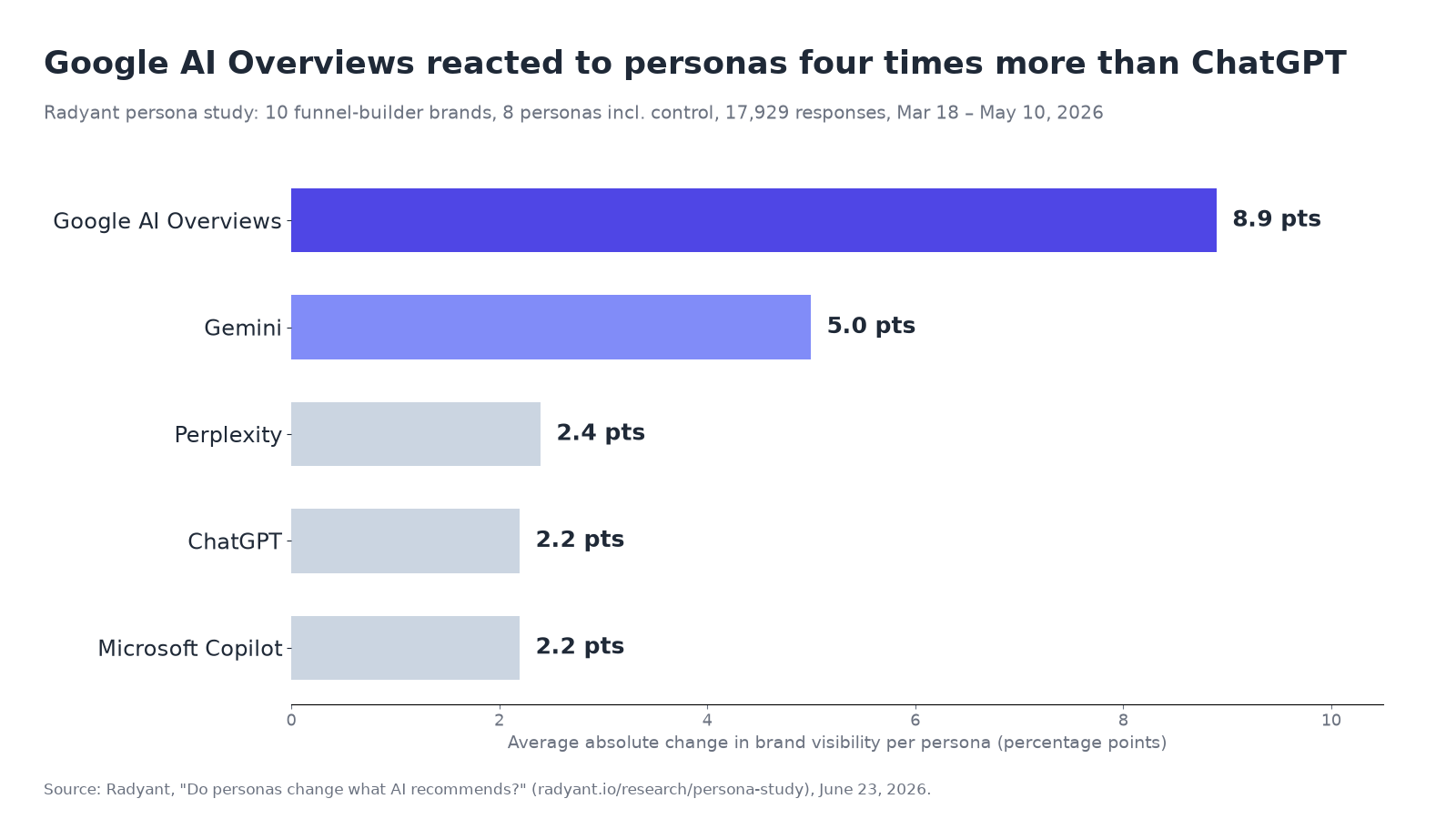
Radyant is upfront about its limits: one software category, German-market IPs, an explicit role line that real users don’t always type, and AI Overviews checked through live Google Search while the other four engines went through APIs. Treat the numbers as proof that the effect exists, not as a forecast for your category.
The second reason this matters is personalization you can’t see. ChatGPT can reference saved memories and past chats to tailor answers, and in November 2026 Google started pushing AI Mode users to opt in to Personal Intelligence, which connects their Google apps to Search. Some buyers will never type “I’m a CTO.” The engine may already know.
Step 1: Pick 3 to 5 buyer personas from real customers
Don’t invent personas from a marketing workshop. Pull them from places where buyers have already described themselves:
- Sales call notes and demo forms. Job title, team size, and the first sentence they used to explain the problem.
- Support tickets. The same tickets that feed prompt research from support tickets also show who is asking.
- Lost deals. The persona you lose to a competitor is often the one where AI answers matter most.
Keep it small. Three to five personas cover most businesses. Each one needs a role, one or two context details that change the decision (budget, team size, location, urgency) and the words that persona uses for its own problem.
| Business | Persona | Context that changes the answer | Their words |
|---|---|---|---|
| B2B SaaS (project tool) | Agency owner | 12 people, bills clients by the hour | “client portal,” “time tracking,” “white-label” |
| B2B SaaS (project tool) | Engineering lead | 80 developers, already on GitHub | “sprints,” “Git integration,” “API” |
| Local service (law firm) | First-time client | Car accident last week, no lawyer yet | “free consultation,” “how much does it cost” |
| Local service (law firm) | Small business owner | Contract dispute with a supplier | “business litigation,” “retainer” |
| Online store (running shoes) | Beginner runner | First 10K, wide feet, under $120 | “comfortable,” “beginner,” “wide fit” |
These rows are examples to show the shape, not data from a test.
Step 2: Write one control prompt and one variant per persona
Start with the unbranded buyer question you already track, written with no persona. That’s your control. Then write a variant for each persona that adds only the persona line and keeps the actual question the same.
Control: What’s the best project management tool for client work?
Agency owner: I run a 12-person design agency and bill clients hourly. What’s the best project management tool for client work?
Engineering lead: I lead an 80-person engineering team that lives in GitHub. What’s the best project management tool for client work?
Three rules keep the test clean:
- Change one thing. If the persona variant also rewords the question, you can’t tell whether the persona or the wording moved the answer.
- Never name a brand. Not yours and not a competitor’s. A branded prompt tests what the AI says about a name you gave it, not whether it recommends you. Our guide to checking whether ChatGPT recommends your business covers why unbranded questions are the real test.
- Write the persona line the way a buyer would. A sentence like “I run a 12-person agency” is realistic. “Act as an agency owner” is prompt engineering, and buyers don’t talk that way.
Two persona lines per persona is a good stretch goal: one short (“I’m an agency owner.”) and one with the context that matters (“I run a 12-person agency and bill hourly.”). Radyant’s short prefixes still moved answers, so the short version is a fair floor.
Step 3: Run every prompt in a clean session
Your own account is the biggest source of noise. If you’ve spent months asking ChatGPT about your own product, it may remember.
| Engine | How to get a clean run | Location |
|---|---|---|
| ChatGPT | Use Temporary Chat, which doesn’t use or update memory, or a logged-out browser | Note the city your IP resolves to |
| Perplexity | Logged-out private window | Note the city |
| Google AI Overview | Private window, signed out, so Personal Intelligence and search history don’t apply | Results change by location; test from the market you sell in |
Run each prompt at least 3 times per engine, in a new session each time. AI answers vary from run to run even with the same prompt, so a brand that shows up once in three runs is a different story from one that shows up three times out of three. Radyant averaged about 280 responses per prompt and persona combination. You won’t match that by hand, and you don’t need to. You’re looking for gaps big enough to see.
Also remember that ChatGPT in the app and ChatGPT through the API don’t always agree. If you use a tool that queries engines by API, read why API checks and the ChatGPT app can differ before comparing its numbers with what you saw by hand.
Step 4: Log the results in a persona matrix
For every run, record: engine, persona, run number, date, every brand named in order, whether your brand appeared, and which sources were cited. Then roll it up into a matrix that shows how often your brand appeared out of the runs for each cell.
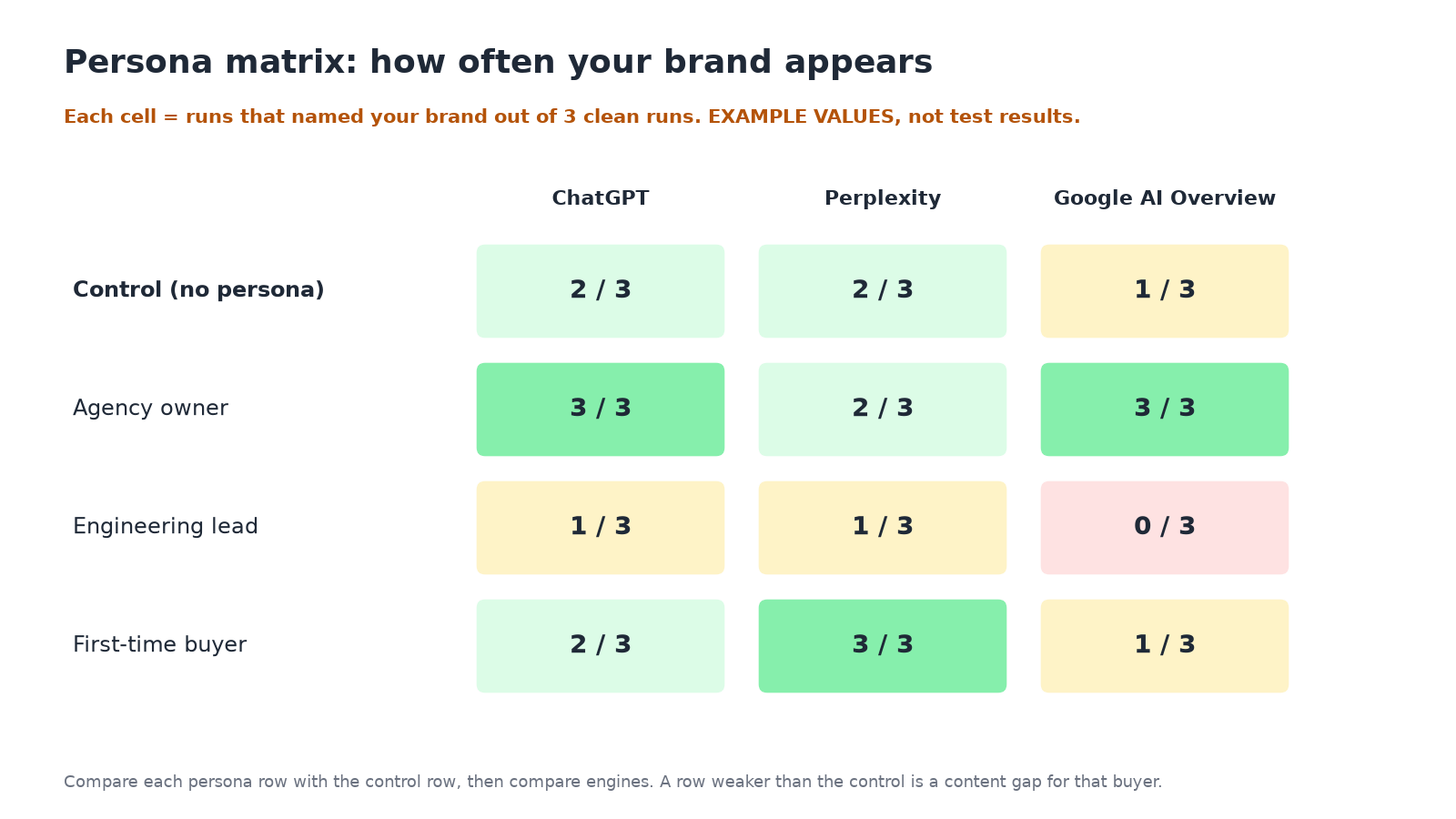
The values in that diagram are an example layout, not results. When you fill in your own, read across and down:
- A persona row that’s weaker than the control on most engines is a content gap for that buyer.
- An engine column that swings much more than the others tells you where to focus that persona’s work. In Radyant’s data, that was usually AI Overviews or Gemini.
- A competitor that appears only for one persona has usually published something that speaks to that buyer. Open the sources cited in those answers and read them.
Step 5: Fix the gap with pages in the persona’s words
Radyant found that the large swings lined up with sources that used each role’s working vocabulary, not its job title. The practical takeaway is to publish in the words your buyers use about their own work.
Practical fixes, in rough order of effort:
- Add a use-case section or page per persona. “Project management for agencies” with client portals, time tracking and hourly billing spelled out in the words agency owners use.
- Put the persona’s constraints in plain text. Team size you support, price per seat, location served, what you don’t do. If a buyer says “under $120” or “free consultation,” the answer needs a page that states those facts.
- Get mentioned in the places that persona reads. If the competitor that wins the “engineering lead” answers is cited from developer forums and comparison posts, that’s where your brand needs to show up too. Our guide to digital PR for AI search covers how to earn those mentions.
- Don’t stuff job titles into pages. Radyant’s data suggests the match is semantic. Writing “for CTOs” twelve times won’t help if the page doesn’t talk about what CTOs care about.
Step 6: Re-run on a schedule
One round of tests is a snapshot. AI answers change as models update and new pages get indexed. Re-run the same control and persona prompts after you publish changes, and then every few weeks, using the same engines, the same location, and the same number of runs, so the numbers are comparable.
A one-page checklist
- 3–5 personas taken from sales notes, tickets or lost deals
- One unbranded control prompt per buyer question
- One variant per persona that changes only the persona line
- No brand names in any prompt
- Clean sessions: Temporary Chat or logged out, private window for Google
- Same location for every run, written down
- At least 3 runs per prompt per engine
- Log brands named, order, your brand yes/no, and cited sources
- Matrix: persona rows × engine columns, appearances out of runs
- Read the sources behind any persona-only competitor
- Publish fixes in the persona’s own words
- Re-run with the same setup after changes
Where Beket AI fits
Persona testing by hand is worth doing once, because reading the answers yourself teaches you more than any dashboard. The part that gets tedious is the baseline: the neutral, unbranded buyer questions you need to track over time.
Beket AI’s free audit runs 25 unbranded prompts across ChatGPT, Perplexity and Google AI Overview and shows which brands each answer names and which sources it cites. Pro ($49/month) re-audits daily, starting at 50 prompts across the same three engines. Use that as your control, and layer your persona tests on top so you know whether a drop is about a specific buyer or about everyone.
Run a free AI visibility audit to get your baseline.
Related posts
How to Submit a Product Feed to ChatGPT: Required Fields, Formats and Mistakes (2026)
How to submit a ChatGPT product feed: the 11 required fields, price and availability formats, delivery options, and 10 spec mistakes that reject rows.
AEO Hacks That Backfire: 6 Shortcuts AI Search Ignores or Flags (2026)
Which AEO and GEO hacks backfire: keyword stuffing, FAQ padding, self-ranking listicles, fan-out pages, planted mentions, and what AI answers cite instead.
Digital PR for AI Search: How to Earn Coverage ChatGPT and Perplexity Actually Cite (2026)
Digital PR for AI search: find the sources ChatGPT, Perplexity and AI Overviews cite, pitch what each accepts, then re-check. With data from 5 studies.