
Prompt Research From Support Tickets: How to Find the Questions Buyers Ask ChatGPT (2026)

A customer writes to your support team: "Can we export invoices to QuickBooks if we're on the starter plan?" Someone answers, the ticket closes, and nobody thinks about it again.
That sentence is close to word for word what the next buyer will type into ChatGPT while comparing you with two competitors. You won't find it in a keyword tool, though, because almost nobody types it into Google.
This is a working guide to prompt research from the data you already own: support tickets, chat logs and sales notes. You'll pull the real questions out, check what ChatGPT, Perplexity and Google's AI Overview say when someone asks them, and then write answers in the customer's own words.
Why keyword tools miss the questions people ask AI
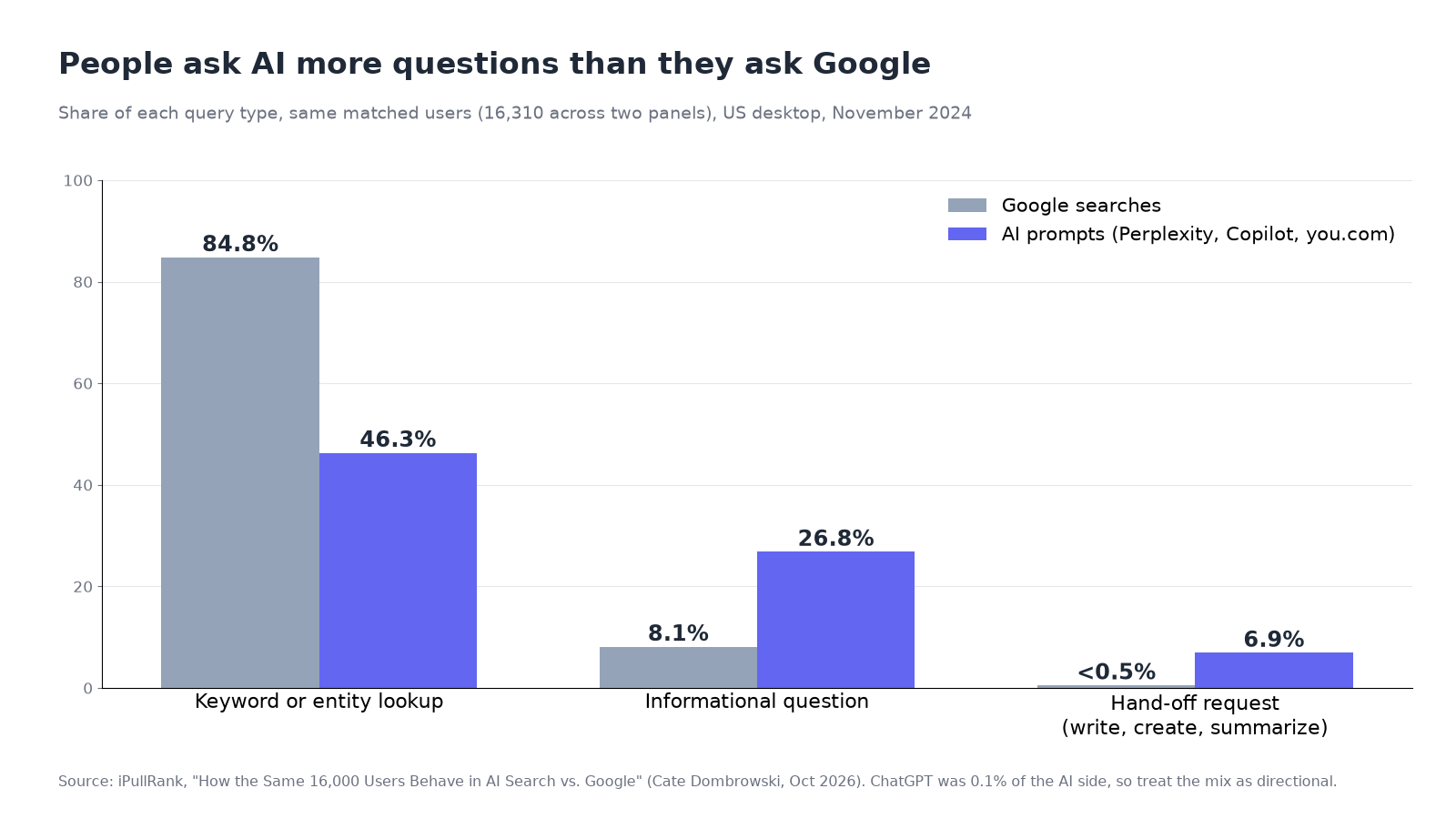
Keyword tools are built from what people type into search engines. People talk to AI tools differently, and the best evidence we've seen comes from iPullRank's study of the same 16,000 users in AI search and Google. Cate Dombrowski matched 16,310 people across two panels, one logging their Google searches and one logging what they typed into Perplexity, Copilot and you.com. Here's what she found:
| What was measured | AI tools | |
|---|---|---|
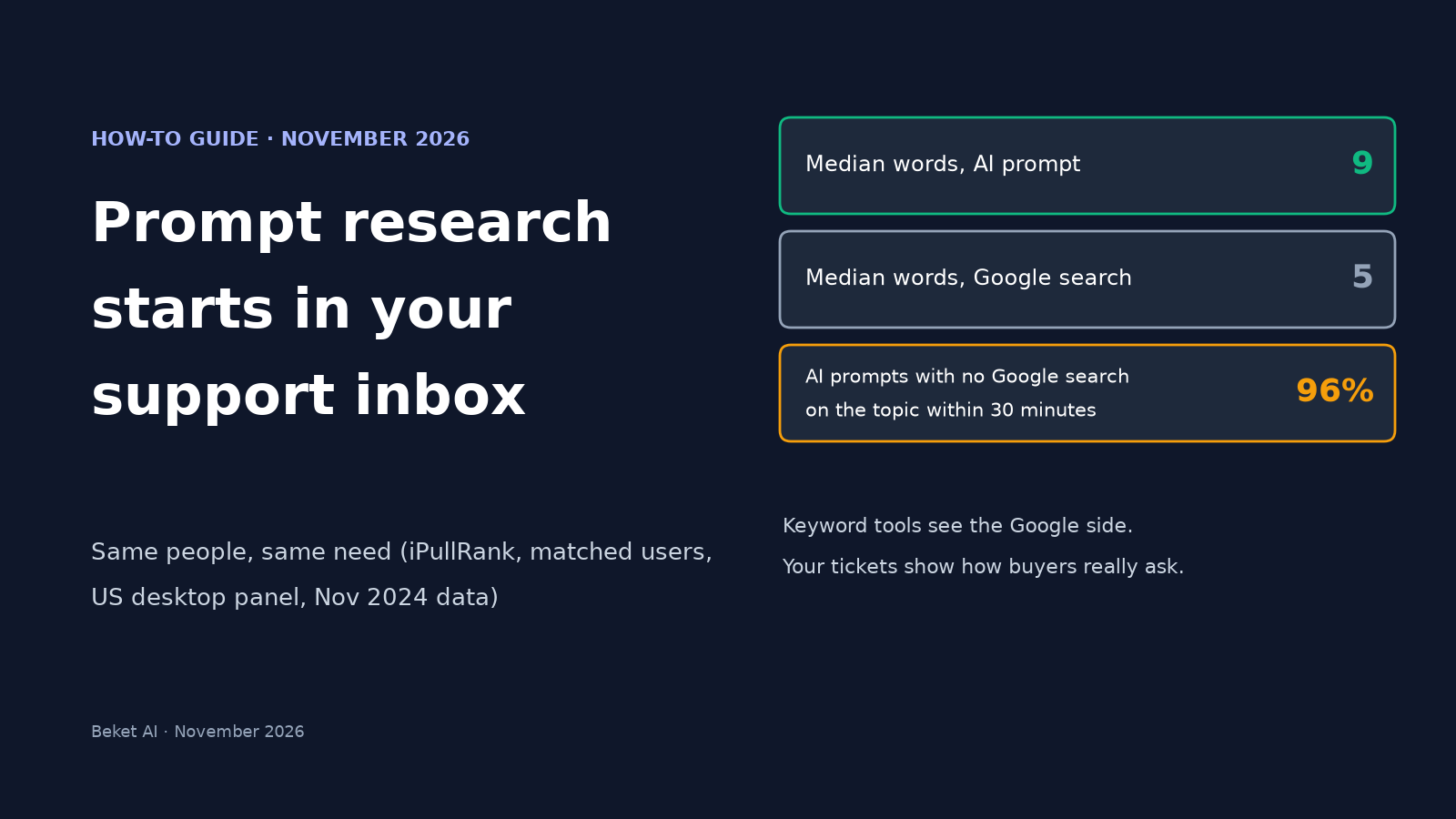
| Median length when the same person had the same need (267 matched pairs) | 5 words | 9 words |
| Share of queries that were informational questions | 8.1% | 26.8% |
| Share that were keyword or entity lookups | 84.8% | 46.3% |
| Share that were requests (write, create, summarize) | under 0.5% combined | 6.9% |
| AI prompts where the same person didn't search the topic on Google within 30 minutes | n/a | 96% |
The last row is the one that matters for prompt research. If most prompts never turn into a Google search, Search Console and keyword tools can't show them to you. The study also found that a person's Google habits explained only about 4% of how they prompt AI.
Two caveats from the study itself. Both panels are US desktop users in November 2024, and ChatGPT made up only 0.1% of the AI side. So treat the numbers as a direction, not a current benchmark.
Support tickets fill that gap. They're questions written by real customers, in full sentences, and they come with the constraints a buyer adds to an AI prompt: the plan they're on, their team size, the tool they already use. One marketer posted on X that 12 of 50 phrases pulled from a client's support tickets "triggered AI citations when used verbatim," while keyword tools found none of them. That's one person's account, not a study, but it fits what the iPullRank data shows.
What you need before you start
- An export of the last 90 days of tickets. Most help desks can export to CSV. Ninety days is enough to catch repeat questions without drowning in them.
- Other places customers ask in their own words, if you have them: chat transcripts, pre-sales emails, demo-request forms with a free-text box, sales call notes, and for local businesses, contact-form messages and booking enquiries.
- A spreadsheet and an AI assistant you're allowed to use with company data.
- About two hours for the first pass. Later passes go faster.
Step 1: Pull the tickets that sound like buying questions
Not every ticket is useful. A password reset tells you nothing about how buyers shop. Filter for tickets that sound like someone deciding, or someone checking a decision they just made:
- Pre-sales and trial questions ("Does it work with...", "Can I...", "Is there a limit on...")
- Billing and plan questions (price, contract length, what's included, refunds)
- Integration and setup questions
- "How do I do X" questions where X is the reason people buy a product like yours
- Complaints that start with a comparison ("We switched from...", "Our old tool did...")
Drop bug reports with stack traces and anything that only makes sense inside your product's admin screen.
Step 2: Strip personal data before anything goes into an AI tool
Do this before you paste a single ticket anywhere. Remove names, email addresses, phone numbers, street addresses, account and order numbers, and anything that identifies a customer's company. Check your privacy policy and any customer contracts too, because some don't allow ticket text to go into third-party tools at all.
Keep the wording of the question itself. That's the part you need.
Step 3: Rewrite each ticket as the question behind it
Most tickets bury the question in a story. Ask your AI assistant to pull it out without changing the customer's words. A prompt like this works:
For each support ticket below, write the question the customer was trying to answer.
Rules:
- Keep the customer's own words and constraints (plan, team size, tools, budget, location).
- One question per line. Don't merge tickets.
- Write two versions: (A) as asked, (B) with our brand name replaced by the product category.
- If a ticket has no real question, write SKIP.
The unbranded version (B) is the one to focus on. Someone comparing options often doesn't know your name yet, so they ask about the category. Every Beket AI study uses unbranded questions for the same reason, and each one publishes its full question list.
Here's what the output looks like. These rows are made-up examples to show the format, not real tickets:
| Ticket (shortened) | As asked | Unbranded |
|---|---|---|
| "Hi, we're 12 people on the starter plan and accounting wants invoices in QuickBooks..." | Can we export invoices to QuickBooks on the starter plan? | Which invoicing tools export to QuickBooks on a starter plan for a 12-person team? |
| "Trial question: does it break if we add more than 50 users?" | Does it slow down past 50 users? | Which project tools handle more than 50 users without slowing down? |
| "Do you come out on weekends? Our basement flooded Saturday." | Do you do weekend emergency calls? | Which plumbers in [city] do weekend emergency calls? |
Step 4: Group, count and tag by buying stage
Paste the questions into a spreadsheet, merge near-duplicates, and count how often each one came up. Then tag each one by stage:
| Stage | What the question sounds like | Priority for AI search |
|---|---|---|
| Discovering | "What's the best tool for...", "Who does X in [city]" | High: this is where AI picks a shortlist |
| Comparing | "Does it work with...", "X vs Y for...", "Which ones handle..." | High: constraints decide who gets named |
| Deciding | Price, contract, limits, refunds, setup time | High: wrong answers here lose deals |
| After purchase | How-to and troubleshooting | Lower for discovery, still worth a help page |
Sort by stage, then by count. Your first 10 to 20 questions should come from the top three rows.
Step 5: Check which questions your keyword tools already know
Run your list through whatever keyword tool you use. Questions that show up there are already on your SEO radar. The ones that don't are the gap the X post describes, and they're usually the longer, more specific ones.
Two more places can show you AI-style questions directly:
- Google Search Console. BrightLocal's local AI visibility study suggests filtering queries with the custom regex
^(?:\S+\s+){9,}\S+$to find queries of 10 words or more. Those tend to look like prompts. Just remember the iPullRank finding that most prompts never reach Google, so this shows you a slice, not the whole picture. - Bing Webmaster Tools. Microsoft's AI Performance report includes "grounding queries," which it describes as the key phrases the AI used when retrieving content it cited from your site, across Copilot and Bing's AI summaries. We walk through it in our Bing AI Performance report guide.
Step 6: Ask the engines and write down what comes back
Take your top questions and ask them in ChatGPT, Perplexity and Google (to see the AI Overview). Use a fresh or logged-out session so your own history doesn't color the answer. For each answer, log:
- Whether you're named, and where in the answer
- Which competitors are named
- Which sources are cited (your site, a review site, a directory, a competitor's page)
- Whether what it says about you, or about the category, is correct
Ask each question more than once. Answers move around a lot. In BrightLocal's study of about 200,000 local searches, the businesses named on repeat runs of the same prompt overlapped by only 23% on average on ChatGPT, 21% on AI Mode and 33% on AI Overviews. Our guide to checking whether ChatGPT recommends your business by hand covers the method in more detail.
Step 7: Answer the question where it belongs, in the customer's words
Now write. A few rules that hold up:
- Use the customer's phrasing as the heading where it reads naturally, and answer it in the first sentence underneath. "Yes, the starter plan exports invoices to QuickBooks" beats three paragraphs of context.
- Include the specifics people asked about: the limit, the price, the plan, the integration, the city or service area.
- Put the answer on the page that should own it. Pricing questions go on the pricing page, integration questions on the integration page, and service-area questions on the location page. Don't pile everything into one long page of loose questions.
- Fix the public help center too. If a question kept coming up in tickets, your help article probably doesn't answer it clearly, and that article is something AI engines can read.
Our guide to writing a SaaS FAQ page for AI search goes deeper on direct first sentences and quotable prices.
Step 8: Re-check in a few weeks, with the same questions
Ask the same questions again two to four weeks after you publish, the same way you did the first time. Keep the question set stable so you can compare runs. Add new questions as new tickets come in, but log them as new rather than swapping them in for old ones.
The checklist
- [ ] Export 90 days of tickets, plus chat logs, sales notes or contact-form messages if you have them
- [ ] Keep only buying-stage questions (pre-sales, pricing, integrations, comparisons)
- [ ] Remove all personal and customer-identifying data first
- [ ] Rewrite each ticket as one question, in the customer's words, with an unbranded version
- [ ] Merge duplicates, count them and tag them by stage
- [ ] Pick 10 to 20 questions from the discovering, comparing and deciding stages
- [ ] Flag the ones your keyword tool doesn't know
- [ ] Check long queries in Search Console and grounding queries in Bing Webmaster Tools
- [ ] Ask each question more than once in ChatGPT, Perplexity and Google, and log who gets named and cited
- [ ] Answer each question on the page that owns it, with the answer in the first sentence
- [ ] Re-run the same set in two to four weeks
What tickets won't tell you
Tickets come from people who already found you. They lean toward your current customers and toward questions that come up after purchase. People who never heard of you, or who picked a competitor, don't file tickets. So treat tickets as the best source for phrasing and constraints, and use sales calls, lost-deal notes and the questions in our study of what customers ask AI before hiring a local business to fill in the discovery side.
And remember that AI answers change from day to day. A check tells you what the engines returned when you asked, not what they'll say next month.
If you'd like a starting baseline before you build your own list, the free Beket AI audit runs 25 prompts across ChatGPT, Perplexity and Google AI Overview and shows which businesses each engine names.
Related posts
Which NYC Mortgage Brokers Does AI Recommend? 2026
We asked ChatGPT, Perplexity and Google AI Overview 10 NYC mortgage questions. GuardHill Financial was named most. See the full results by engine.
AI Search This Week: Gemini 4 Hydrogen Takes Over Google Search (Nov 13, 2026)
Gemini 4 Hydrogen now powers Google Search, the November core update is rolling out, and ChatGPT opened business profiles. The week in AEO, GEO and SEO.
Which NYC Lawyers Does AI Recommend? 2026 Study
We asked ChatGPT, Perplexity and Google AI Overview 10 questions about NYC lawyers. 26 answers named just 3 law firms. See where they pointed instead.