
Does ChatGPT Recommend Your Business? How to Check by Hand, and What Zero Mentions Means

Ask ChatGPT "who's the best plumber in Burnaby?" once, and you get one answer. Ask again tomorrow and you may get a different list. That's the problem with checking whether ChatGPT recommends your business: a single try tells you very little, and most owners only ever do a single try.
In a study published in January 2026, SparkToro had 600 volunteers run 12 recommendation prompts through ChatGPT, Claude and Google's AI a combined 2,961 times. They found less than a 1 in 100 chance of getting the same list of brands twice, and closer to 1 in 1,000 for the same list in the same order. The brands that kept showing up across many runs were the signal. Exact position was noise.
So the question isn't "did ChatGPT name me just now?" It's "across the questions my customers actually ask, how often do I come up, and on which engines?" You can get a rough answer to that by hand in an afternoon. Here's how, and how to read the result, including the one most people get: zero.
What you need before you start
- A spreadsheet with one row per question and a column for each engine.
- ChatGPT, Perplexity and Google. These are the three engines we tested in our nine local studies, so you can compare your results with ours.
- A clean session. Your own history can shape what you see, so take it out of the test (step 2).
- A list of 3 to 5 competitors you'd expect to see. You'll tally them too, because "who got named instead of me" is the most useful thing this test produces.
Step 1: Write 10 questions your customers would ask, without your name in them
This is the step that decides whether the test means anything. If you type your business name, ChatGPT will talk about you, and that tells you nothing about whether it would recommend you to someone who has never heard of you. Every question should be unbranded: no business name, no website, no owner's name.
Mix four kinds of questions:
| Type | What it tests | Example (family lawyer, Vancouver) | Example (plumber, Burnaby) |
|---|---|---|---|
| Broad "best" | Whether you're in the default shortlist | "best family lawyers in Vancouver" | "best plumber in Burnaby" |
| Specific service | Whether AI connects you to what you actually do | "lawyer for a contested divorce in Vancouver" | "who can fix a burst pipe in Burnaby tonight" |
| Neighbourhood or area | Whether AI knows where you work | "family lawyer near Kitsilano" | "plumber in North Burnaby or Brentwood" |
| Situation, in the customer's words | Whether you show up for real-life phrasing | "my ex won't agree to custody, who should I call in Vancouver" | "water heater leaking, need someone today Burnaby" |
Write at least two of each, and take the wording from real life: the first sentence of your inbound emails, what people say on the phone, the questions on your contact form. Use your customers' wording, not a keyword list.
Step 2: Take yourself out of the test
The answer you see is not quite the answer a stranger sees. OpenAI says ChatGPT uses an approximate location from your IP address for local results, and if Memory is on, saved memories can shape the search it runs. If ChatGPT already knows you own a law firm, that can leak into the answer.
- ChatGPT: start a Temporary Chat set to Unpersonalized. OpenAI says that mode doesn't use memory, custom instructions or plugins. You have to pick it before the chat starts.
- Perplexity and Google: use a private browser window, signed out.
- Location: put the city or neighbourhood in the question itself, as in the examples above. OpenAI's own advice for wrong-area local results is to do exactly that. If you're testing a city you're not in, a VPN changes your IP location, so leave it off unless you mean to.
Step 3: Run each question three times on each engine
One question, three engines, three runs: that's 9 answers per question and 90 for the full set. It sounds like a lot, but most answers are short and quick to log. Use a new chat for every run, so the earlier answer doesn't carry over.
Three runs is a small sample. SparkToro's authors say that to really know an AI tool's recommendations you'd need to ask "usually at least 60-100X." Three runs won't give you that. It will tell you whether you're named often, sometimes or never, which is what you need to decide what to do next.
Step 4: Log what you see, not what you hoped to see
For every answer, record four things:
| Column | What to write |
|---|---|
| Named? | Yes or no. Count a clear variant of your name as yes ("Smith Law" for "Smith Family Law LLP"). |
| Position | 1st, 2nd, 3rd and so on, or "in text" if you're mentioned without a list. |
| Competitors named | Every business named, not just the ones on your list. |
| Facts about you | Anything the answer says about you: hours, area, price, services. Mark anything wrong. |
For Google, add one more column: did an AI Overview appear at all? Often it won't. In our six Vancouver studies, the audits recorded a Google AI Overview for only 38 of 174 logged queries (21.8%). A missing AI Overview is not the same as "Google didn't name me," so log it separately.
Step 5: Read your tally
Add up how many of your answers named you, per engine. Then match your result to the closest row:
| What you found | What it most likely means | What to do first |
|---|---|---|
| Named on most runs, on all three engines | You're in the default shortlist for these questions | Check that the facts are right, then test narrower questions |
| Named often on one engine, rarely or never on the others | Normal. The engines draw on different sources | Look at what the other engines cited and where you're missing |
| Named only for narrow questions (your service or neighbourhood) | AI knows what you do, but not that you're a leading option | Earn independent mentions: reviews, local press, directories |
| Named, but with wrong facts | AI knows you, from outdated or conflicting sources | Fix the source pages first (our guide to fixing wrong information in ChatGPT) |
| Not named anywhere, ever | See the next section | See the next section |
| Google showed no AI Overview for most questions | Google didn't run an AI answer for that wording | Not a verdict on you. Rely on the other two engines |
Disagreement between engines is the normal case. In six Vancouver studies with the same unbranded questions on every engine, most businesses that came up were named by only one engine or by some but not all. Only in the realtors study did every engine agree on the top name.
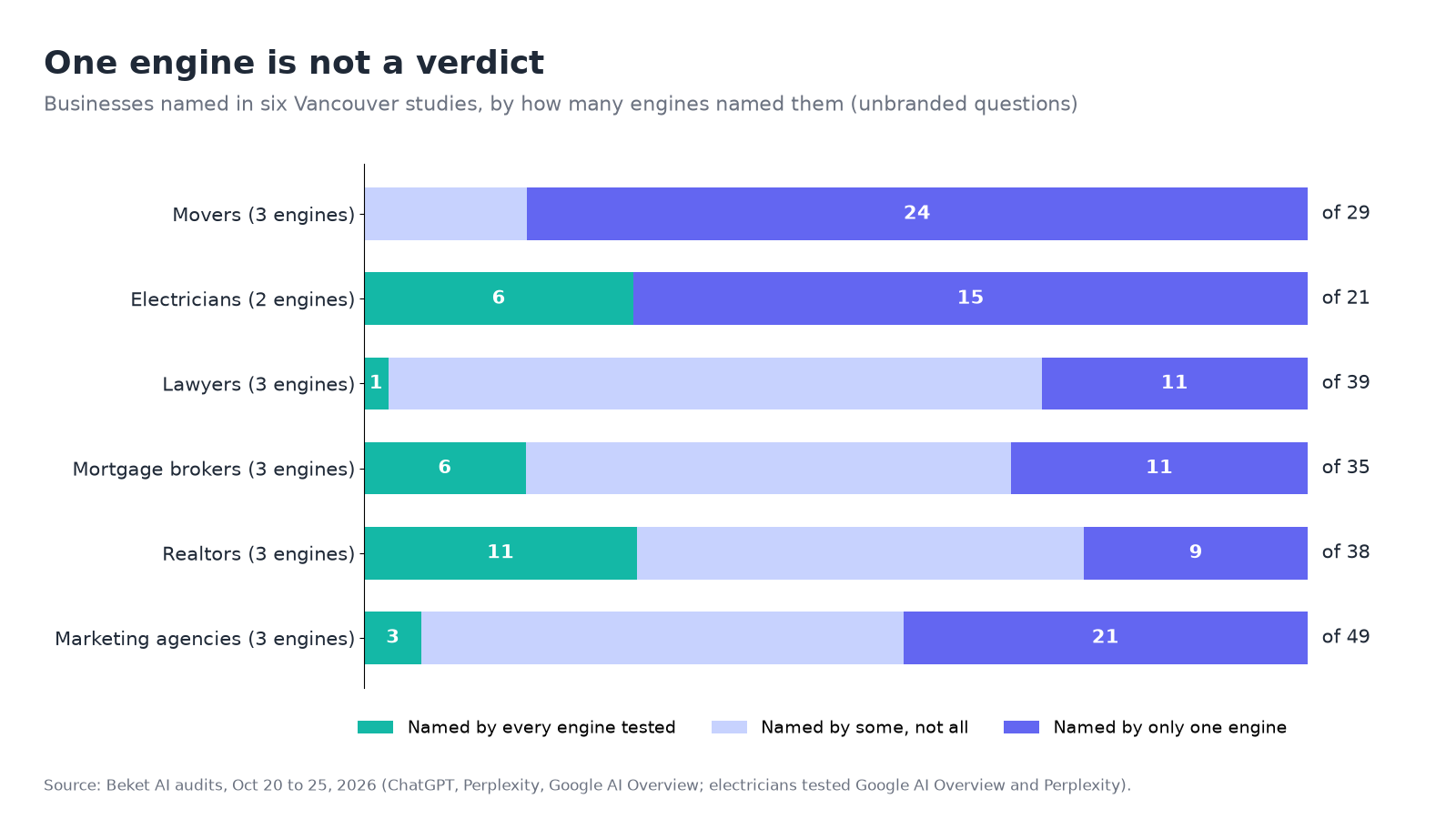
Source: Beket AI audits, October 20 to 25, 2026, as published in our nine-study roundup. These are the answers the engines returned on those dates; AI answers change over time.
So if ChatGPT names you and Perplexity doesn't, you haven't found a bug. You've found where the work is. We've written more on why one engine can't tell you how visible you are.
What a zero-mention result means (and doesn't)
Getting zero mentions across 90 answers is common, and it's worth reading carefully before you panic.
What it doesn't mean:
- It doesn't mean AI doesn't know you exist. Ask a branded question ("what does [your business] do?") as a separate check. If the answer describes you correctly, the engine knows you. It just doesn't think of you when someone asks for a recommendation.
- It isn't a penalty. There's nothing to appeal. The lists are just wide. In our nine local studies, each one surfaced 21 to 49 businesses, and the top four names took less than half of all mentions every time.
- It isn't permanent. These answers change from run to run and week to week.
What it usually does mean:
- The sources the engines read don't connect you to the question. When an engine searches the web, it can only work with what's published: your own pages, plus directories, review sites, "best of" lists and local press. In our studies, review sites and directories even turned up as names in the answers. If those don't say you do this service in this area, the engine has nothing to go on.
- Your service and area pages are thin or missing. A single homepage that says "full-service law firm" gives AI less to match than a page that says "family law, divorce and custody, Vancouver and the North Shore."
- The businesses that were named have something you don't. Look at your competitor column. Search their names and see where they're listed, reviewed or written about that you aren't. That list is your to-do list.
Then do the branded check. If the branded answer is wrong too, fix the facts first. If it's right, the gap is recommendations, not recognition, and the fix is more independent places that name you for the service.
When a hand check stops being enough
A hand check is a good first look. It gets harder to trust once you start changing things and want to see whether they worked, because you'd have to run the same 90 answers again, in the same clean way, every week, and compare.
That's what an AI visibility audit automates. A free Beket AI audit runs 25 prompts across ChatGPT, Perplexity and Google AI Overview and shows which businesses each engine named instead of you, and which sources it cited. Beket AI Pro is $49/month and re-audits daily, starting at 50 prompts across 3 engines, so you can see whether a change moved the numbers over weeks rather than in one afternoon. Whether you check by hand or with a tool, one check is a snapshot, so plan to check again.
The short version
- Write 10 unbranded questions in your customers' words: broad, service, area and situation.
- Use Temporary Chat (Unpersonalized) in ChatGPT and signed-out private windows for Perplexity and Google. Put the city in the question.
- Run each question three times on each engine, in a fresh chat each time.
- Log whether you're named, your position, every competitor named, any wrong facts, and whether Google showed an AI Overview at all.
- Read the tally per engine. One engine naming you and another not is normal.
- If you got zero, run a branded check to see whether AI knows you, then look at where the named competitors appear and you don't.
About the author: Nur Rysbek is the CEO of Beket AI.
Sources checked November 4, 2026. Study numbers are from Beket AI audits run October 16 to 25, 2026, and reflect the answers the engines returned on those dates. AI answers vary by day, wording, location and user.
Related posts
How to See Which AI Agents Visit Your Site (and Whether They Can Book or Buy)
Microsoft Clarity's free Agentic Analytics shows which AI agents visit your site and what they do. How to set it up, read it and test bookings and checkout.
How to Read Search Console's Generative AI Report
Walkthrough of Search Console's Generative AI report: AI Overviews and AI Mode impressions, why clicks are missing, and how it differs from Bing and GA4.
Which Vancouver Hotels Does AI Recommend? 2026 Study
Fairmont Pacific Rim led 416 AI mentions of Vancouver hotels on November 3, 2026. See who ChatGPT, Perplexity and Google AI Overview named, and how.