
How to See Which AI Agents Visit Your Site (and Whether They Can Book or Buy)

Someone asks ChatGPT to book a cleaning at a dental office near them. An AI agent opens the clinic's website, finds the booking page, picks a time and gets stuck on a form field it can't fill. Nobody at the clinic ever finds out. As Microsoft puts it, most analytics stacks "were built to understand human visitors, not agents acting on their behalf" (Microsoft Clarity).
On November 4, 2026, Microsoft Clarity added a way to see this. Its new Agentic Analytics feature shows which AI agents visit your site, what they do once they arrive, and, for some types of sites, whether they can actually finish a task like checkout (Microsoft Clarity, Search Engine Land). Clarity is free.
This guide covers what the report shows, how to set it up, how to read it, how to check whether agents can book or buy on your site, and where Clarity's new Brand Agents fit for local businesses.
Why AI agent traffic is worth checking now
Microsoft says that in a recent Clarity analysis, weekly sessions from AI agents "nearly doubled in three weeks to almost 2 million," and that these agents were "shopping, booking, and filling out forms" (Microsoft Clarity). Its research post puts the same growth at 88% in three weeks (Microsoft Clarity).
The study behind those numbers looked at more than 5.2 million sessions involving AI agents across 230,511 Clarity projects, between August 13 and September 9, 2026. Agents were detected from the OpenAI, Google and Anthropic ecosystems. Here is how often each action showed up in those sessions:
| Action | Share of agent sessions | Share of human sessions |
|---|---|---|
| Checkout | 25.21% | 14.65% |
| Submit form | 19.85% | 18.56% |
| Outbound click | 14.28% | 26.99% |
| Book appointment | 8.42% | not in human top 10 |
| Search | 7.16% | 4.79% |
| Login | 6.83% | 8.84% |
Source: Microsoft Clarity study, Aug 13 to Sep 9, 2026.
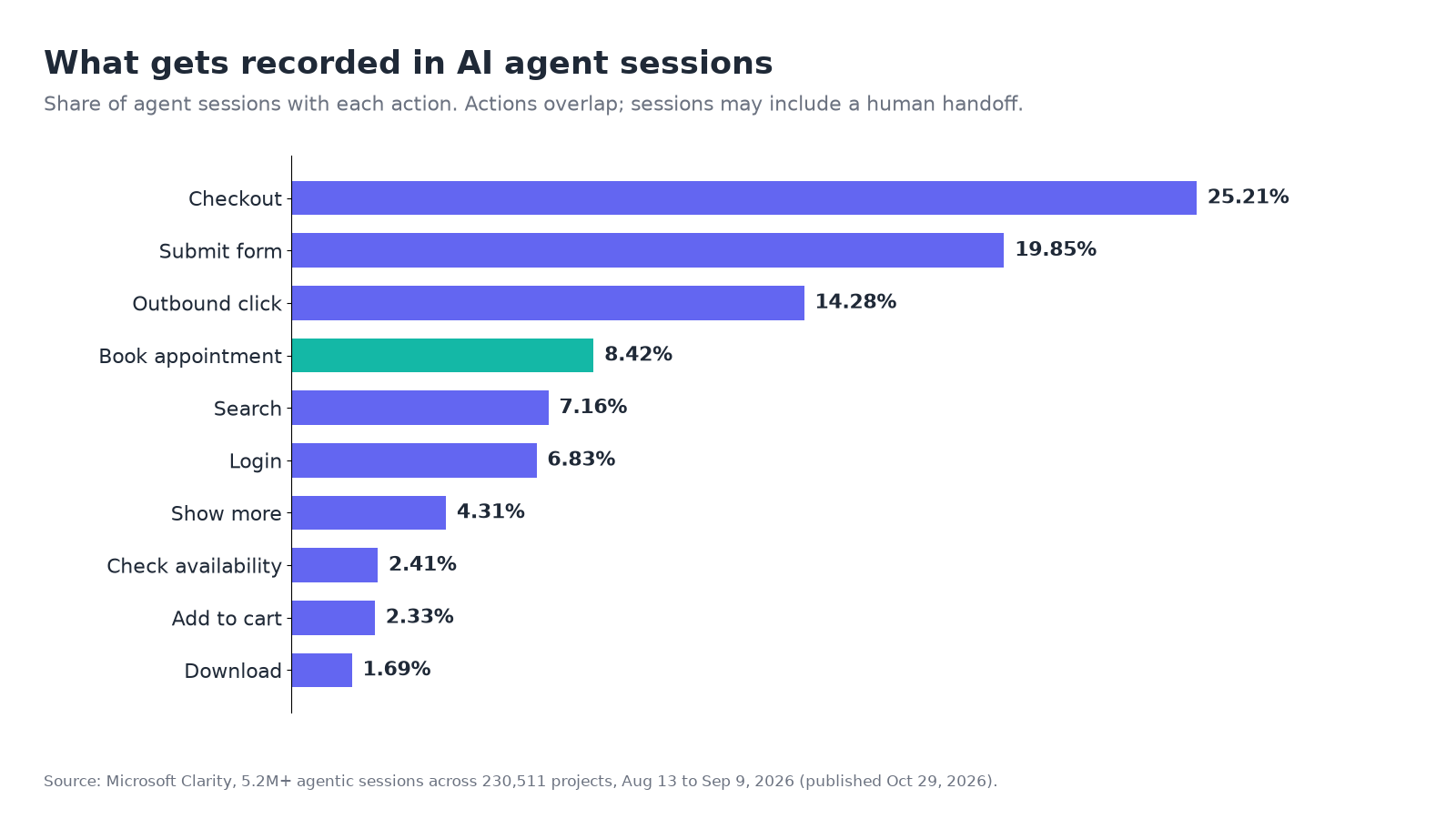
For a local business, the line that matters is appointment booking: it was recorded in 8.42% of agent sessions, more than 102,000 of them. Check availability (2.41%) and find location (10,521 sessions) also appeared. Agents aren't just reading your pages. Some of them are trying to do the thing your website exists for.
Read the numbers with Microsoft's own caveats. A session can include a human handoff, and Clarity can't yet split the agent part from the human part, so these are actions recorded during sessions that involved an agent, not proof that an agent finished a task on its own. The actions also overlap and come from many sites and industries, so they aren't steps in one funnel (Microsoft Clarity).
What Agentic Analytics shows
Agentic Analytics lives in a new Agent Activity dashboard. Microsoft says it shows "how agentic traffic changes over time, which agents visit your site, and what they do once they arrive, ranging from searches and form submissions to logins, downloads, appointment bookings, and checkout" (Microsoft Clarity).
Based on the dashboard Microsoft published, you get these panels:
- Agentic session volume: the number of detected agent sessions.
- Agentic session share: agent sessions as a percentage of all your sessions.
- Active session share: a percentage of detected agent sessions. Microsoft hasn't published a definition yet.
- Agentic sessions trend: a daily chart you can switch between the three numbers above.
- Agent operator: sessions by operator (OpenAI, Anthropic, Google), each with a link to recordings.
- Smart events: the actions recorded in agent sessions, such as checkout, book, search, submit form and login, with session counts.
- Agentic actionability: the results of simulations (more on this below).
Two limits to know. First, only supported agents are counted. For now, Microsoft lists Google, OpenAI and Anthropic agent operators (Microsoft Clarity). Agents from other companies likely won't be counted. Second, Microsoft says the dashboard is generally available "for projects with agentic traffic" (Microsoft Clarity). If you don't see it, that may mean Clarity hasn't detected agent sessions yet. It doesn't prove zero agents have visited.
This is different from AI crawlers. Crawlers like GPTBot fetch pages to train models or build search indexes. Agents act on a user's behalf in a browser. Clarity tracks crawlers separately in its Bot Activity report, which needs a CDN or server connection and counts requests, not citations (Microsoft Learn). If crawlers are your question, our Cloudflare AI Crawl Control guide covers that side.
Step 1: Install Clarity on your site
If you already use Clarity, skip to Step 3.
- Sign up at clarity.microsoft.com and create a project for your website.
- Go to Settings > Setup and pick an install method: a third-party platform (Shopify, Squarespace, Wix, WordPress and others), a manual tracking code pasted into your site's
<head>, or NPM (Microsoft Learn). - On WordPress, install the Microsoft Clarity plugin from Plugins > Add new plugin, activate it, open it from the menu, sign in and connect a new or existing project (Microsoft Learn).
- Not technical? The Setup page has a Share code option that emails the tracking code and instructions to whoever manages your site.
Microsoft notes that Clarity shouldn't be used on sites or apps aimed at users under 18. It masks sensitive content by default (Microsoft Learn).
Step 2: Confirm it's recording
Open your project. Clarity shows live users and recordings as soon as the code is installed. To double-check, open your site, right-click, choose Inspect, go to the Network tab and look for requests to clarity.ms/collect while you click around (Microsoft Learn).
Agent data only shows up once supported agents visit, so a brand-new install may have nothing to show for a while.
Step 3: Make your booking and checkout actions countable
The Agent Activity dashboard reports agent actions as Smart Events. If Clarity can't recognize your "book" or "contact" action, it can't tell you whether an agent did it.
Clarity creates some Smart Events automatically, including Purchase, Add to Cart, Begin Checkout, Contact Us, Submit Form, Request Quote, Sign Up, Login and Download. A project admin can edit those or create up to 20 custom events without code under Settings > Smart events > New event, using button clicks, page visits or API events (Microsoft Learn).
For a local business, set up an event for each action that brings in money:
- Booking confirmed: a page visit to your booking confirmation or thank-you page.
- Quote or contact form sent: the submit button or the form's thank-you page.
- Click to call: a button click on your phone link.
One catch: Clarity can't capture what's inside a third-party iFrame (Microsoft Learn). If your booking widget is embedded from another service in an iFrame, Clarity won't see the clicks inside it. A confirmation page on your own domain is often the most reliable thing to track.
Step 4: Find and read the Agent Activity report
Open your project and look for the Agent Activity dashboard. When we checked Clarity's help docs on November 4, 2026, there was no page for it yet, so menu names may shift as Microsoft rolls it out.
When you have data, read it in this order:
- Is agent traffic real for you? Look at agentic session share. A tiny share means you can check back monthly. A growing share means agents are becoming a real channel for you.
- Is it growing? Check the trend. Microsoft's own data shows fast growth, but your site may differ.
- Which agents? The operator panel shows whether it's mostly OpenAI, Google or Anthropic. That tells you which assistant your customers are using to act on their behalf.
- What are they trying to do? Compare the Smart Events in agent sessions to your money actions. If agents show up on your service pages but "Book" barely appears, that gap is the thing to look at.
- Watch the recordings. Each operator and event has a link to session recordings. Watching a few agent sessions is the fastest way to see where one stalls.
Keep the human-handoff caveat in mind. A session can start with an agent and end with a person, so a recorded booking doesn't prove the agent completed it alone.
Step 5: Test whether agents can book or buy
This is the most useful part of the new feature. Simulation assessments "test how effectively agents can complete important tasks on your website before a real customer journey fails," and show "whether the task was completed, how long it took, how many interactions it required, and where the experience could be improved" (Microsoft Clarity).
In the dashboard, simulations appear in the Agentic actionability panel with an average task completion rate, average time to complete, average number of interactions, a suggested next step and a link to the simulation details.
Simulations start with commerce and travel scenarios. Microsoft says it plans to add more types of customer journeys over time (Microsoft Clarity). Its study post names ecommerce and travel and hospitality businesses (Microsoft Clarity). If you run a salon, a clinic or a trades business, you may not get a simulation for your booking flow yet. Until then, use Smart Events and recordings from Steps 3 and 4.
What breaks agents, according to Microsoft
Microsoft hasn't published a list of failure causes. These are the examples it has given so far:
- Missing the offer. "An agent might find the right product but miss a promotion" (Microsoft Clarity). If your deal only appears in a pop-up or a banner image, an agent may never see it.
- Getting stuck at checkout. The same post says an agent can "reach checkout and get stuck," and when that happens "you may lose a customer without ever knowing why."
- Choices the agent can't confirm. In Microsoft's sample dashboard, the suggested fix was "Make selected product options easy to verify": after an agent added a jacket in a chosen size and color, the cart didn't show the size and color, so the agent couldn't check it had the right item. For a local business, the same idea applies to a booking summary. Show the service, date, time and location before the final step.
- Steps that need a person. The study asks "where might human intervention still be required" and notes that sessions can hand off to a human (Microsoft Clarity). Logins showed up in 6.83% of agent sessions. A required account or sign-in before booking is a likely place for an agent to hand back to the customer.
Brand Agents for local businesses, briefly
Clarity's second new feature points the other way. Instead of measuring outside agents, Brand Agents put Microsoft's AI assistant on your own website.
For local businesses, Microsoft says a Brand Agent can explain what you offer, match a visitor to the right service and offer to book it. Its example is someone asking for help with a leaking pipe under the kitchen sink. Brand Agents connect to booking and scheduling tools including Square, Jobber, HubSpot, Calendly, Housecall Pro and Salesforce, so the agent can capture leads and schedule appointments, including after hours (Microsoft Clarity).
To start, Microsoft says eligible WordPress businesses can install Clarity, choose "Clarity with Brand Agents," publish the agent, connect a supported CRM and put it to work.
For online stores, Brand Agents can also get products in front of shoppers in Microsoft Copilot, Bing, MSN and more. That is available for eligible WooCommerce and Shopify merchants (Microsoft Clarity). Microsoft's docs say accepting the Brand Agents terms publishes your catalog to Microsoft Merchant Center. They also say the product is in beta and require a disclosure in your site's privacy statement (Microsoft Learn). Read those terms before you switch it on.
Brand Agents is a Microsoft product, so the extra reach is in Microsoft's AI products. To be found in Bing and Copilot, your Bing Places listing matters too.
How this connects to AI visibility
There are now two separate questions about AI and your business:
- Does AI name you? When someone asks ChatGPT, Perplexity or Google's AI Overview for "a plumber near me," are you in the answer?
- Can AI act on your site? When an agent is sent to book or buy, can it finish the job?
Clarity's Agentic Analytics answers the second question for the agents it supports. It doesn't tell you whether you're recommended in the first place, and an agent can't book with a business the assistant never suggested. Fixing your booking flow for agents helps only if AI already recommends you.
The first question is the one most local businesses can't see at all. AI answers send relatively few clicks, which is why AI search traffic looks small even when it matters, and much of what does arrive gets labeled as direct traffic (your AI traffic is hiding in Direct).
A free Beket AI visibility check covers the first question. It asks 25 questions about your business across ChatGPT, Perplexity and Google AI Overview and shows whether each one names you and what it cites. Beket AI Pro ($49/month) re-runs the check daily, starting at 50 questions across the same three engines. Use Clarity to see what agents do once they reach your site, and Beket AI to see whether AI recommends you. Run a free check.
Checklist: see and fix AI agent traffic with Clarity
- Installed Clarity (Settings > Setup, or the WordPress plugin) and confirmed recordings
- Set up Smart Events for booking confirmed, form sent and click to call
- Checked whether your booking widget runs in a third-party iFrame Clarity can't see into
- Opened the Agent Activity dashboard and noted agent session share and trend
- Checked which operators (OpenAI, Google, Anthropic) send agent sessions
- Compared agent Smart Events with your money actions, and watched a few recordings
- Ran a simulation if your site fits the commerce or travel scenarios
- Made offers visible in page text, and showed a clear summary before the final booking or checkout step
- Reviewed whether a login is required before booking
- Read the Brand Agents terms and privacy disclosure before turning it on
- Checked whether ChatGPT, Perplexity and Google AI Overview name your business at all
Related posts
Which Vancouver Hotels Does AI Recommend? 2026 Study
Fairmont Pacific Rim led 416 AI mentions of Vancouver hotels on November 3, 2026. See who ChatGPT, Perplexity and Google AI Overview named, and how.
Does ChatGPT Recommend Your Business? How to Check by Hand, and What Zero Mentions Means
How to check by hand whether ChatGPT, Perplexity and Google AI Overview recommend your business, using unbranded questions, and what zero mentions means.
Google Maps vs AI: Do Vancouver's Top Realtors on Maps Get Named by ChatGPT? (2026 Study)
We compared the Google Maps top 3 for 25 Vancouver realtor searches with ChatGPT, Perplexity and Google AI Overview. AI named 7 of the 50 Maps businesses.