
ChatGPT-User vs OAI-SearchBot: How to Check Both in Your Server Logs

ChatGPT-User is a visit a person triggers: someone asks ChatGPT a question and it opens a page. OAI-SearchBot is OpenAI's search crawler: it visits on its own, and it decides whether your pages can show up in ChatGPT's search answers. They look similar in a log file, but they do different jobs, so you should count them separately.
That matters this week. On November 8, 2026, Malte Landwehr posted on LinkedIn, as summarized by Masters of Search, that ChatGPT-User visits had dropped sharply and stayed down, while OAI-SearchBot got busier. This guide shows how to pull both bots out of your raw logs, Cloudflare and Google Analytics, how to confirm the requests are really from OpenAI, and what a drop in one of them does and doesn't tell you.
The two bots in one table
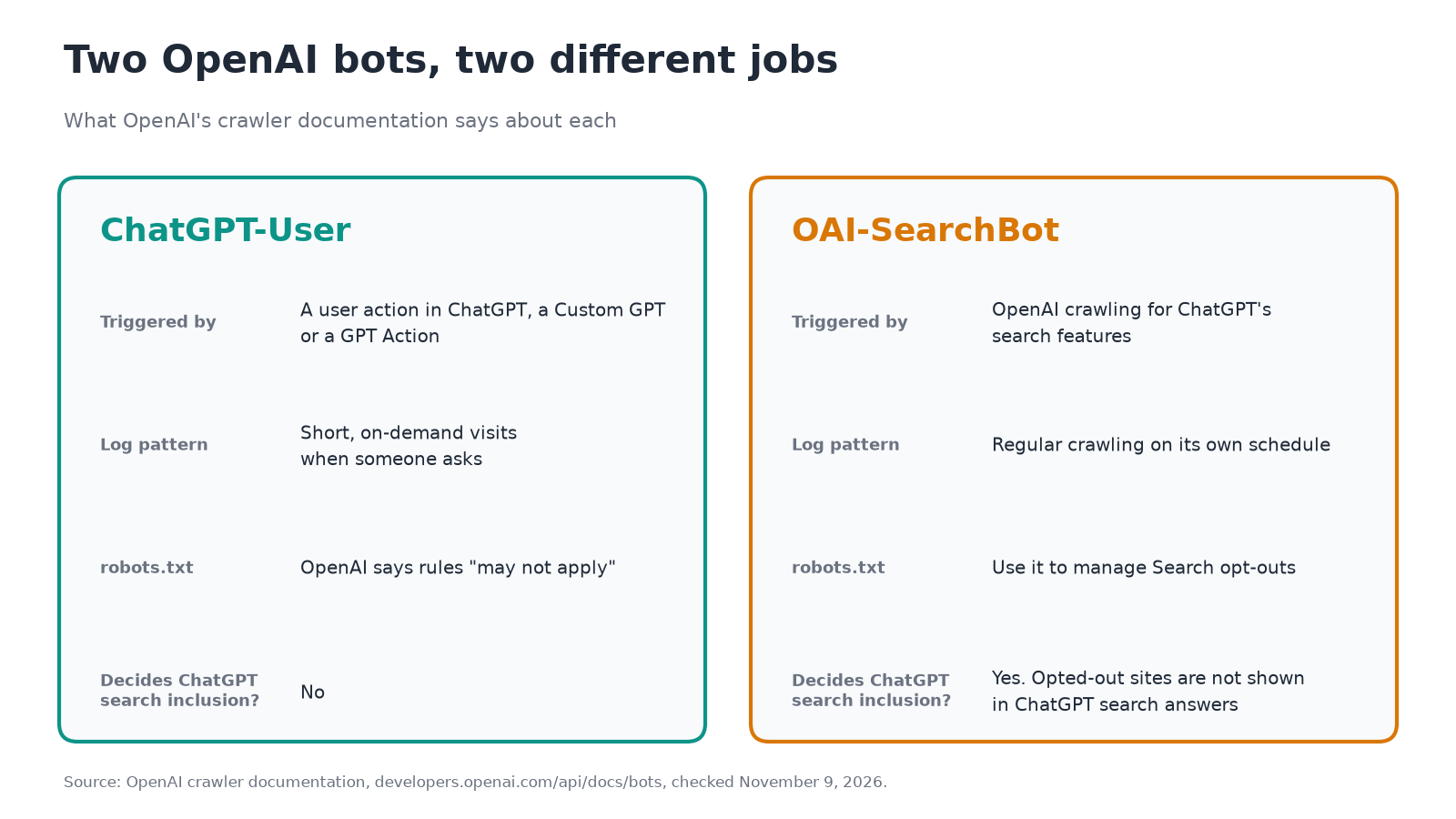
OpenAI's crawler documentation describes each one. This is what matters for reading your logs:
| ChatGPT-User | OAI-SearchBot | |
|---|---|---|
| What triggers it | A user's request in ChatGPT, a Custom GPT or a GPT Action | OpenAI's own crawling for ChatGPT's search features |
| User-agent token | ChatGPT-User |
OAI-SearchBot |
| Example user agent from OpenAI | Mozilla/5.0 AppleWebKit/537.36 (KHTML, like Gecko); compatible; ChatGPT-User/1.0; +https://openai.com/bot |
Mozilla/5.0 (Macintosh; Intel Mac OS X 10_15_7) AppleWebKit/537.36 (KHTML, like Gecko) Chrome/131.0.0.0 Safari/537.36; compatible; OAI-SearchBot/1.4; +https://openai.com/searchbot |
| Decides whether you appear in ChatGPT search? | No. OpenAI says it "is not used to determine whether content may appear in Search" | Yes. Sites opted out "will not be shown in ChatGPT search answers, though can still appear as navigational links" |
| robots.txt | OpenAI says rules "may not apply" because a user started the action | OpenAI says to use it for Search opt-outs and automatic crawling |
| Published IP ranges | openai.com/chatgpt-user.json | openai.com/searchbot.json |
The version numbers in those strings change, so match on the token (ChatGPT-User or OAI-SearchBot), not on the full string. OpenAI also says OAI-SearchBot may fetch your robots.txt with an extra robots.txt marker in its user agent, which helps you separate those requests from page visits.
A third OpenAI bot, GPTBot, collects content that may be used for training. It has its own robots.txt setting, so keep it separate from the two below. This guide only covers the two that touch ChatGPT answers.
What Landwehr reported, and what we can't say yet
According to Masters of Search's summary, Landwehr's reading is that ChatGPT now pulls source content from an index or cache instead of fetching the same URLs live on every question, sometimes more than 100 times a day for a single page. He says fewer sources per answer would also reduce ChatGPT-User traffic, but that isn't what he sees, and that content coming from other search providers wouldn't explain why OAI-SearchBot crawling is rising at the same time.
Treat it as a lead, not a finding. It is one practitioner's observation across the sites he monitors. OpenAI hasn't confirmed it, and we haven't tested it. The useful part is that you can check it on your own site in an afternoon, which is what the rest of this guide does.
Step 1: Pull both bots from raw access logs
If you run Nginx or Apache, your access logs are in a folder such as /var/log/nginx/ or /var/log/apache2/, usually in the "combined" format, where the IP is the first field and the user agent is the last. Managed hosts often let you download these from the control panel.
First, see whether either bot shows up at all. This also reads rotated, compressed logs:
zgrep -ihE "ChatGPT-User|OAI-SearchBot" /var/log/nginx/access.log*
Zero lines means neither bot reached your server in the period those logs cover (or that a CDN is answering for you; see Step 3).
Now count requests per day for each bot:
awk '/ChatGPT-User|OAI-SearchBot/ {
  bot = ($0 ~ /OAI-SearchBot/) ? "OAI-SearchBot" : "ChatGPT-User"
  split($4, t, ":"); day = substr(t[1], 2)
  n[day " " bot]++
} END { for (k in n) print k, n[k] }' access.log | sort
We ran this on a small sample log we wrote ourselves (eight made-up lines, not real traffic), and it printed:
03/Nov/2026 ChatGPT-User 2
03/Nov/2026 OAI-SearchBot 1
04/Nov/2026 ChatGPT-User 2
04/Nov/2026 OAI-SearchBot 2
Two notes on that output. Dates sort alphabetically, so a log that spans two months will list them out of order; paste the result into a spreadsheet and sort there. And you need weeks of data, not days: ChatGPT-User traffic comes in bursts when people ask about you, so only a long window shows a trend.
Two more one-liners are worth keeping. The first shows which pages ChatGPT-User fetches most, which tells you what people are asking ChatGPT about your business. The second shows the status codes OAI-SearchBot received:
grep "ChatGPT-User" access.log | awk '{print $7}' | sort | uniq -c | sort -rn | head
grep "OAI-SearchBot" access.log | awk '{print $9}' | sort | uniq -c
A 200 is a successful fetch, a 404 means the URL doesn't exist, and a 403 means your server or firewall refused the request. A wall of 403s for OAI-SearchBot is the number to chase first. Server logs don't record the question that triggered a fetch, so you can see which page was read but not why.
Step 2: Confirm the requests really come from OpenAI
A user agent is just text, and anyone can send ChatGPT-User in a header. OpenAI publishes IP ranges for each bot, and the reliable check is whether the request's IP falls inside them. Our guide to verifying Googlebot, GPTBot and other AI crawlers covers the method in depth. For this job, the short Python script below does both things at once: it counts requests per day and per bot, and splits each count into "in OpenAI's range" and "not in range." It uses only the standard library and reads plain or .gz logs:
import collections, gzip, ipaddress, json, re, sys, urllib.request

RANGES = {
    "ChatGPT-User": "https://openai.com/chatgpt-user.json",
    "OAI-SearchBot": "https://openai.com/searchbot.json",
}

def load_nets(url):
    req = urllib.request.Request(url, headers={"User-Agent": "range-check"})
    data = json.load(urllib.request.urlopen(req, timeout=20))
    return [ipaddress.ip_network(p.get("ipv4Prefix") or p.get("ipv6Prefix"))
            for p in data["prefixes"]]

nets = {bot: load_nets(url) for bot, url in RANGES.items()}
line_re = re.compile(r'^(\S+) .*?\[(\d+/\w+/\d+):')
counts = collections.Counter()

for path in sys.argv[1:]:
    opener = gzip.open if path.endswith(".gz") else open
    with opener(path, "rt", errors="replace") as f:
        for line in f:
            bot = next((b for b in RANGES if b in line), None)
            m = line_re.match(line)
            if not bot or not m:
                continue
            ip, day = m.groups()
            try:
                ok = any(ipaddress.ip_address(ip) in n for n in nets[bot])
            except ValueError:
                ok = False
            counts[(day, bot, "in OpenAI range" if ok else "NOT in range")] += 1

for (day, bot, status), n in sorted(counts.items()):
    print(f"{day}  {bot:<14} {status:<16} {n}")
Save it as openai_bot_daily.py and run python3 openai_bot_daily.py access.log*. On our made-up sample file, which includes one request from a documentation-reserved address pretending to be ChatGPT-User, it printed:
03/Nov/2026  ChatGPT-User   in OpenAI range  2
03/Nov/2026  OAI-SearchBot  in OpenAI range  1
04/Nov/2026  ChatGPT-User   NOT in range     1
04/Nov/2026  ChatGPT-User   in OpenAI range  1
04/Nov/2026  OAI-SearchBot  in OpenAI range  2
Use the "in OpenAI range" rows for your trend line, and look at the "NOT in range" rows separately. Two things to know about the lists. They change: when we downloaded them on November 9, 2026, the ChatGPT-User file listed 237 ranges and the OAI-SearchBot file 39, and the ChatGPT-User file carried a creation date of November 6. Download fresh copies each time instead of hardcoding them. And if your site sits behind a CDN or proxy, the IP in your origin log may be the CDN's, so make sure your server records the original visitor IP before you trust this check.
Step 3: See both bots in Cloudflare
If your site runs through Cloudflare, you may not need the raw logs at all, and in some setups the bots never reach your origin server because Cloudflare answers from cache. Cloudflare gives you three ways in.
The AI Crawl Control dashboard. Cloudflare's bot reference lists ChatGPT-User as an "AI Assistant" and OAI-SearchBot as an "AI Search" crawler, both operated by OpenAI. Open AI Crawl Control, go to the Metrics tab, and group requests over time by crawler to see each one on its own line. The Status code distribution chart shows what your site answered. We walk through every screen in how to see which AI crawlers visit your site with Cloudflare. The catch for this job: Cloudflare says that on free plans the Metrics tab only shows the past 24 hours, and that free-plan detection relies on user agent strings. That's too short to see a drop that unfolded over weeks.
The GraphQL Analytics API. Cloudflare's GraphQL limits page says adaptive datasets such as httpRequestsAdaptiveGroups keep at least 31 days of data on every plan. Cloudflare's AI Crawl Control GraphQL examples filter on userAgent_like, which is available on all plans and, as Cloudflare notes, can be spoofed. Adapted from those examples, this query counts requests per day for ChatGPT-User:
{
  viewer {
    zones(filter: { zoneTag: "<ZONE_ID>" }) {
      httpRequestsAdaptiveGroups(
        filter: {
          datetime_geq: "2026-10-10T00:00:00Z"
          datetime_leq: "2026-11-09T00:00:00Z"
          requestSource: "eyeball"
          userAgent_like: "%ChatGPT-User%"
        }
        limit: 5000
      ) {
        count
        dimensions { date }
      }
    }
  }
}
Run it again with %OAI-SearchBot% to get the other bot. We haven't run it against a live zone, so test it on a short window first. Cloudflare limits how long a period one query can cover, so if it errors, shorten the window. Bot Management customers can filter on detection IDs instead, which Cloudflare describes as reliably verified, and its bot reference lists 132995013 for ChatGPT-User and 126255384 for OAI-SearchBot.
Logpush. If you want the raw lines, Cloudflare's http_requests dataset includes a ClientRequestUserAgent field, and a September 30, 2026 changelog entry says Logpush is now available on Free, Pro, Business and Enterprise plans with usage-based pricing. Send the logs to storage you control and the Step 1 and Step 2 commands work on them, as long as you select the user agent and client IP fields.
Step 4: What Google Analytics can and can't show
Google Analytics won't show either bot. Google's help page says traffic from known bots and spiders is automatically excluded from Analytics properties, and that you can't turn that off or see how much was excluded. Neither bot is a "visit" in GA terms.
What GA does show is people who click a link in ChatGPT and land on your site. OpenAI's publishers and developers help article says ChatGPT adds utm_source=chatgpt.com to referral links, as we explained in how ChatGPT search works. Some of those visits still land in Direct, which we cover in your AI traffic is hiding in Direct. So use GA for the human side (clicks from ChatGPT) and logs for the machine side (fetches and crawls). A ChatGPT-User drop in your logs doesn't have to show up in GA, because a fetch that never turns into a click was never in GA to begin with.
What a drop in ChatGPT-User means
A single bot dropping tells you less than the two bots read together. Use this as a starting map:
| What you see | One possible reading | What to check next |
|---|---|---|
| ChatGPT-User falls and stays down; OAI-SearchBot is steady or rising | Matches Landwehr's reading that answers come more from OpenAI's index. It could also mean fewer people are asking ChatGPT about your pages | Compare at least four weeks before and after, and look at which pages lost the fetches |
| ChatGPT-User falls and 403 or 429 responses rise | Your firewall, rate limit or bot protection may be refusing it | Allow OpenAI's published IP ranges; check WAF and bot-fight settings |
| Both bots fall together | Points more toward an access problem than an OpenAI change | Check robots.txt, 5xx errors and recent CDN or security rule changes |
| OAI-SearchBot is missing but ChatGPT-User still appears | Your robots.txt or an edge rule may block the search crawler, while on-demand fetches still get through | Read robots.txt for OAI-SearchBot; check status codes for the bot |
| Both look normal | Nothing to fix. Landwehr's pattern may not apply to your site | Keep the baseline and recheck monthly |
Two cautions. First, a log can't tell you why a user asked or what ChatGPT said, only which page it read. Second, Landwehr's data came from sites he monitors, and yours may behave differently. Don't change your robots.txt because of one chart.
Why blocking OAI-SearchBot matters
OpenAI's documentation is direct: sites opted out of OAI-SearchBot won't be shown in ChatGPT search answers, though they can still appear as navigational links. OpenAI recommends allowing OAI-SearchBot in robots.txt and allowing requests from its published IP ranges, and says it can take about 24 hours for a robots.txt change to take effect.
If Landwehr's reading holds, the stakes go up. When ChatGPT answers from its own stored copy instead of fetching live, what it says about you depends on when OAI-SearchBot last crawled the page. Masters of Search puts it this way: a page indexed six months ago may be answering today's questions with six-month-old facts. A block on OAI-SearchBot, whether in robots.txt or at your firewall, would leave ChatGPT with an older copy or none. And because ChatGPT-User isn't what decides search inclusion, the on-demand fetch is not a substitute. OpenAI says to manage Search opt-outs with OAI-SearchBot.
That's also why blanket "block AI bots" switches are risky. Check what a one-click setting actually blocks before you turn it on; read the rules for each bot by name, and keep the search crawlers allowed.
Checklist
- [ ] Search your logs for both tokens over the longest period you have, and save the daily counts as a baseline.
- [ ] Verify the IPs against
chatgpt-user.jsonandsearchbot.json, and trend only the matching requests. - [ ] Check OAI-SearchBot's status codes. Fix any 403s.
- [ ] Read your robots.txt for
OAI-SearchBot, and check your CDN or firewall rules for OpenAI's IP ranges. - [ ] In Cloudflare, group by crawler and compare ChatGPT-User with OAI-SearchBot over at least a month.
- [ ] Keep pages that carry prices, hours, services and policies current, since ChatGPT may be working from a stored copy.
- [ ] Recheck monthly. Treat a one-week dip as noise until a longer window confirms it.
Logs show who visits. Audits show what AI says.
Your logs show which OpenAI bots read your pages. They don't show whether ChatGPT names your business when a customer asks. The free Beket AI audit runs 25 prompts across ChatGPT, Perplexity and Google AI Overview and shows whether your business is named, in what position, and which competitors appear beside it. Beket AI Pro is $49/month, re-audits daily, and starts at 50 prompts across 3 engines.
Bot details come from OpenAI's crawler documentation and the Cloudflare and Google help pages linked above, checked on November 9, 2026. The Landwehr report is one practitioner's observation, summarized by Masters of Search, and OpenAI has not confirmed it.
Related posts
Which SaaS Tools Does AI Recommend? 2026 Study
AI mostly cited vendor pages, not review sites, in 645 citation events. Beket AI asked 25 SaaS buyer prompts across ChatGPT, Perplexity and AI Overview.
What Questions Do Customers Ask AI Before Hiring a Local Business? 67 Questions From Our Seattle Audits
We sorted 67 unbranded questions from Seattle dentist, plumber and cleaner audits. Only 9 asked who is best. Here's what the rest asked and what to publish.
What Is Agentic Commerce? OpenAI's ACP vs Google's UCP, Explained for Merchants (2026)
Agentic commerce explained: how OpenAI's ACP and Google's UCP work, what happened to ChatGPT Instant Checkout, and what merchants should do now.