
How to Verify Googlebot, GPTBot and Other AI Crawlers (and Catch the Fakes)

Open almost any server log and you’ll find requests that call themselves Googlebot or GPTBot. Some of them are real. Some are scrapers that typed a famous name into their user-agent header because they know many sites wave that name through.
That matters more now that AI search depends on crawlers. If a fake “Googlebot” is hammering your site, you want to block it. If the real OAI-SearchBot or PerplexityBot is being stopped by an overcautious firewall rule, you want to know, because those are the crawlers that let ChatGPT search and Perplexity find and link your pages. Verifying a crawler is how you tell the two apart.
This guide walks through how to verify Googlebot and the main AI crawlers with the methods each company documents, with commands you can copy and a checklist at the end.
Why a user agent proves nothing
A user agent is just a line of text the visitor sends about itself. Changing it takes seconds. On October 30, 2026, Search Engine Roundtable reported on a podcast interview in which Google’s Gary Illyes said bot impersonation has become a bigger problem, and when asked why, said “I think it is AI.” In his explanation, companies hungry for training content pretend to be Googlebot because sites tend to let Googlebot in. According to the same write-up, he has seen requests claiming to be Googlebot coming from IP addresses unrelated to Google on honeypots he set up.
Disguise is routine for bad bots in general. Imperva’s 2026 Bad Bot Report says automated traffic made up 53% of the web traffic it observed in 2025, and the full report puts bad bots at 40% of all traffic, with 41% of bad bot traffic declaring itself as the Chrome browser. Claiming to be a well-known crawler is the same trick with a different costume.
The fix is to check something a scraper can’t easily fake: where the request came from.
The quick reference: how each crawler can be verified
Every major operator now documents at least one way to confirm its crawlers. Here is what each one offers, as of November 1, 2026.
| Crawler (user agent) | What it does | Official way to verify | Source |
|---|---|---|---|
| Googlebot | Crawls for Google Search, the index behind AI Overviews and AI Mode | Reverse DNS to googlebot.com, google.com or googleusercontent.com, then forward DNS; or IP list | |
| Bingbot | Crawls for Bing, whose index also grounds Copilot answers | Reverse DNS ending in search.msn.com, then forward DNS; Verify Bingbot tool; or IP list | Bing |
| OAI-SearchBot | Surfaces sites in ChatGPT search | IP list (searchbot.json) | OpenAI |
| GPTBot | Collects content that may be used to train OpenAI models | IP list (gptbot.json) | OpenAI |
| ChatGPT-User | Visits a page when a ChatGPT user’s request calls for it | IP list (chatgpt-user.json) | OpenAI |
| PerplexityBot | Surfaces and links sites in Perplexity search | IP list (perplexitybot.json) | Perplexity |
| Perplexity-User | Fetches a page to answer a user’s question | IP list (perplexity-user.json) | Perplexity |
| ClaudeBot, Claude-SearchBot, Claude-User | Training, search indexing, and user-directed fetches for Claude | One shared IP list (bots.json) | Anthropic |
| Applebot | Search features in Spotlight, Siri and Safari; may also feed Apple’s AI models | Reverse DNS in applebot.apple.com, or IP list | Apple |
Two names you may see in robots.txt advice aren’t on this list on purpose. Google says Google-Extended doesn’t have a separate HTTP request user agent string, and Apple says Applebot-Extended “does not crawl webpages.” They are robots.txt tokens that control how content is used, so there’s nothing to verify in your logs. If you want the full background on which crawler does what, see our comparison of GPTBot, OAI-SearchBot and Google-Extended in robots.txt.
Step 1: Pull the requests that claim to be crawlers
Start with your access logs. On a typical Apache or Nginx server using the common “combined” log format, the visitor’s IP is the first field. This command lists the IPs sending each claimed crawler name, most active first:
grep -E "Googlebot|bingbot|OAI-SearchBot|GPTBot|ChatGPT-User|PerplexityBot|Perplexity-User|ClaudeBot|Claude-SearchBot|Claude-User|Applebot" access.log \
  | awk '{print $1}' | sort | uniq -c | sort -rn | head -20
One catch: if your site sits behind a CDN or proxy, the IP in your log may be the CDN’s, not the crawler’s. Make sure your server logs the original client IP (for Cloudflare, that’s the CF-Connecting-IP header) before you verify anything, or every check below will fail.
Step 2: Check the IP against the operator’s official list
This is the method every operator in the table supports, and the only one OpenAI, Perplexity and Anthropic document. Each publishes a JSON file of IP ranges in the same basic format. The script below downloads the current list for the bot a request claims to be and checks whether the IP falls inside it. It uses only Python’s standard library.
import ipaddress, json, sys, urllib.request

RANGES = {
    "Googlebot": "https://developers.google.com/static/crawling/ipranges/common-crawlers.json",
    "Bingbot": "https://www.bing.com/toolbox/bingbot.json",
    "OAI-SearchBot": "https://openai.com/searchbot.json",
    "GPTBot": "https://openai.com/gptbot.json",
    "ChatGPT-User": "https://openai.com/chatgpt-user.json",
    "PerplexityBot": "https://www.perplexity.ai/perplexitybot.json",
    "Perplexity-User": "https://www.perplexity.ai/perplexity-user.json",
    "ClaudeBot": "https://claude.com/crawling/bots.json",
    "Applebot": "https://search.developer.apple.com/applebot.json",
}

def in_ranges(ip, url):
    req = urllib.request.Request(url, headers={"User-Agent": "range-check"})
    data = json.load(urllib.request.urlopen(req, timeout=20))
    addr = ipaddress.ip_address(ip)
    for p in data["prefixes"]:
        net = ipaddress.ip_network(p.get("ipv4Prefix") or p.get("ipv6Prefix"))
        if addr in net:
            return True
    return False

bot, ip = sys.argv[1], sys.argv[2]
print(bot, ip, "VERIFIED" if in_ranges(ip, RANGES[bot]) else "NOT IN PUBLISHED RANGES")
Save it as check_bot_ip.py and run it with the claimed bot and the IP from your log. When we tested it on November 1, 2026:
$ python3 check_bot_ip.py Googlebot 66.249.66.1
Googlebot 66.249.66.1 VERIFIED
$ python3 check_bot_ip.py GPTBot 203.0.113.50
GPTBot 203.0.113.50 NOT IN PUBLISHED RANGES
(203.0.113.50 is from a block reserved for documentation, so it stands in for any address that isn’t OpenAI’s.)
Three things to know about the lists:
- They change. Bing asks site owners to refresh its list daily. When we downloaded them on November 1, OpenAI’s ChatGPT-User file and both Perplexity files carried creation dates from the previous week. Hardcoding a copy is how real crawlers end up blocked months later.
- They’re very different sizes. The chart below shows how many ranges each file held on November 1, from 317 for Googlebot to 10 for Perplexity-User. Size says nothing about how much a crawler visits you; it’s just how each operator’s network is laid out.
- Some lists cover more than one bot. Anthropic publishes one shared file for ClaudeBot, Claude-SearchBot and Claude-User, so a match proves the request came from Anthropic but not which of the three it was.
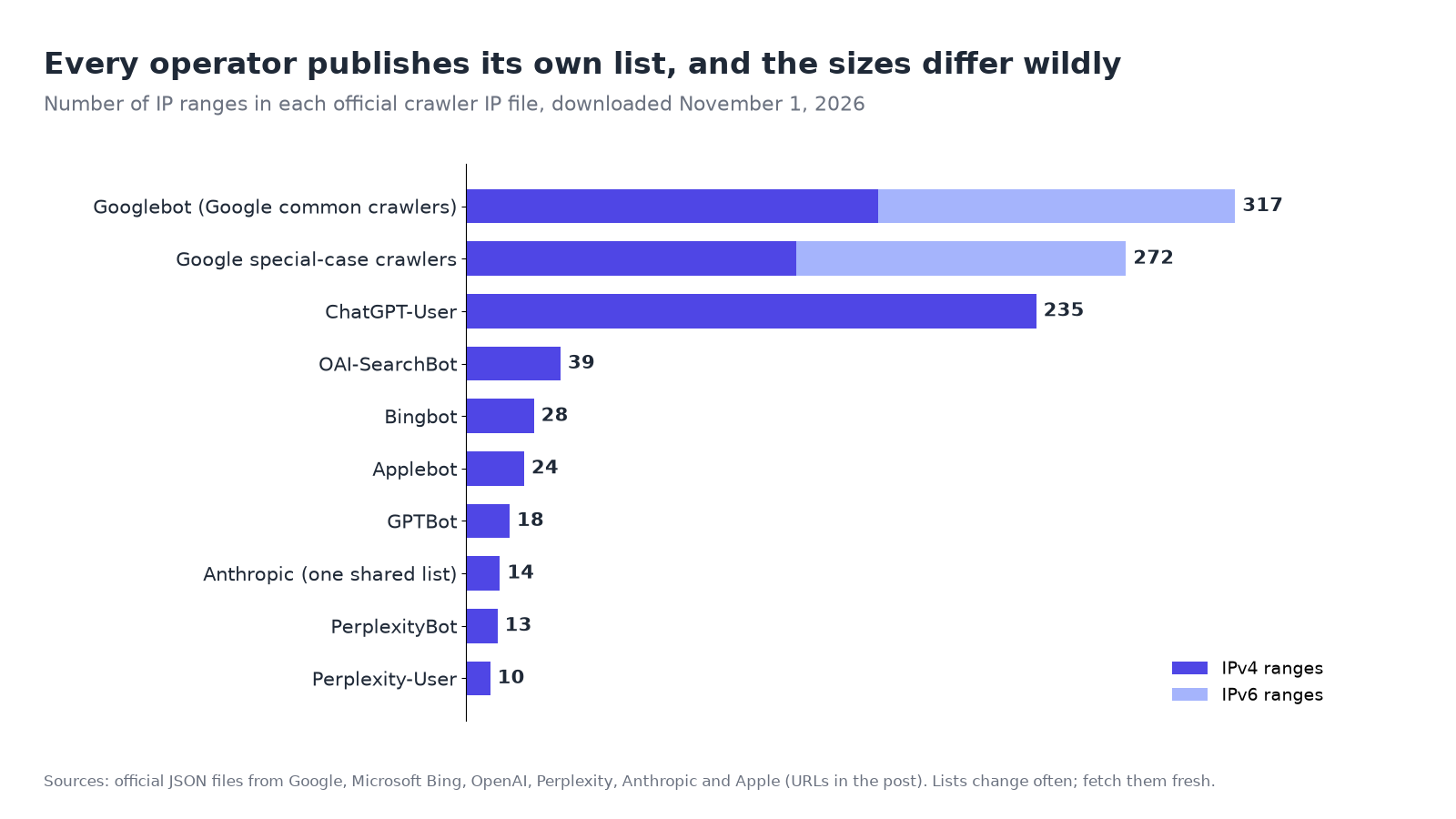
Google splits its own crawlers across several files. Googlebot is in the common crawlers list. Fetchers that a person triggers, such as Google Site Verifier, are in separate user-triggered lists, and Google notes those fetchers ignore robots.txt because a user asked for the page. If a request claims to be from Google and fails the Googlebot check, try the other lists linked from Google’s verification page before calling it fake.
Step 3: For Google, Bing and Apple, confirm with reverse DNS
Google, Bing and Apple also support a DNS check, which is handy for a one-off lookup when you don’t want to download a list. It takes two lookups. First, a reverse lookup turns the IP into a hostname. Then a forward lookup on that hostname must return the same IP. The second step matters because anyone who controls an IP block can set its reverse DNS to say “googlebot.com”; they can’t make Google’s DNS point back at their address.
Google’s own example, from its verification guide:
host 66.249.66.1
1.66.249.66.in-addr.arpa domain name pointer crawl-66-249-66-1.googlebot.com.

host crawl-66-249-66-1.googlebot.com
crawl-66-249-66-1.googlebot.com has address 66.249.66.1
The hostname must end in one of the domains each company names:
| Operator | Hostname must end in |
|---|---|
| googlebot.com, google.com, or googleusercontent.com | |
| Bing | search.msn.com |
| Apple | applebot.apple.com |
On Windows, nslookup does the same job. Bing also offers a free Verify Bingbot tool that checks an IP for you.
If reverse DNS and the IP list disagree, don’t block on the DNS result alone. At least one site owner has reported Bingbot IPs that had no reverse DNS name yet sat inside Bing’s published list and passed Bing’s own tool. When an official list or tool says yes, treat it as verified.
Step 4: For AI agents, look for a signature
A newer group of visitors, AI agents that browse on a user’s behalf, can prove who they are with cryptography instead of IP addresses. The standard is called Web Bot Auth, built on HTTP Message Signatures (RFC 9421). OpenAI’s help center says ChatGPT Work’s Cloud browser signs its requests this way, with a Signature-Agent header set to "https://chatgpt.com" and public keys published at https://chatgpt.com/.well-known/http-message-signatures-directory.
Checking signatures by hand is a developer job, and most small sites don’t need to. Cloudflare’s Verified bots program lists “a cryptographic Web Bot Auth signature, a published IP list with a stable user-agent, or reverse DNS” as the ways a bot can identify itself, so if your site runs through Cloudflare, its bot settings can recognize verified crawlers and agents without you checking signatures yourself. Illyes also pointed to signed requests as a more reliable way to verify bots in the interview above.
Step 5: Act on what you found
Verification only helps if the result changes what your site does.
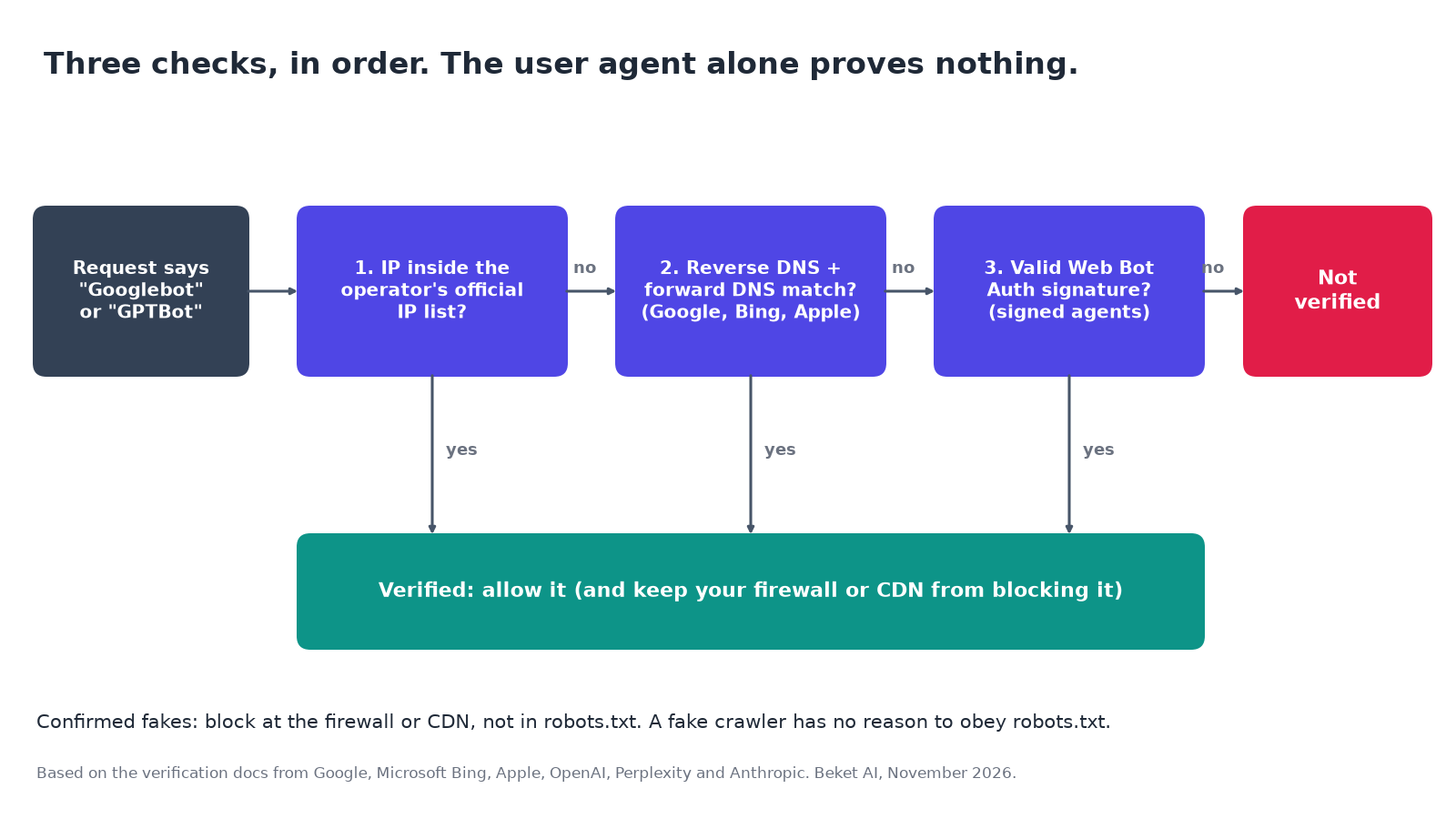
Block confirmed fakes at the network level, not in robots.txt. robots.txt is a request, and a scraper pretending to be Googlebot has already shown it doesn’t play by the rules. Per Search Engine Roundtable’s summary, Illyes described robots.txt as a suggestion rather than a security mechanism and pointed site owners to firewalls for unwanted traffic. Use your firewall, WAF or CDN rules instead.
Don’t block real crawlers by mistake. The opposite error is easier to miss. OpenAI says sites opted out of OAI-SearchBot won’t be shown in ChatGPT search answers, and it recommends “allowing requests from our published IP ranges.” Perplexity gives the same advice for PerplexityBot and warns that Cloudflare’s Bot Fight Mode can’t be skipped with WAF custom rules, so it may still challenge Perplexity’s bots. If you use Cloudflare, our Cloudflare AI Crawl Control guide shows how to see which crawlers are being allowed or blocked.
Match user agent and IP together. Perplexity’s documentation shows the pattern for firewall allow rules: allow PerplexityBot only when the IP is in PerplexityBot’s list, and Perplexity-User only when it’s in that bot’s list. An allow rule based on the name alone lets every impersonator through.
Don’t use IP blocks as your opt-out. If you’ve decided you don’t want a company’s crawler, say so in robots.txt. Anthropic warns that blocking its IP addresses “may not work correctly or persistently guarantee an opt-out” because it stops Anthropic from reading your robots.txt file. Training opt-outs are also getting a shared standard; we covered that in the AI training opt-out coming to robots.txt.
Decide whether this is worth your time. In the same interview, as summarized by Search Engine Roundtable, Illyes said most small websites don’t need to worry about bots right away: check whether bot traffic is actually causing a problem first, and a CDN with bot management is a practical starting point. Verification is still worth doing once, so you know your security settings aren’t turning away the crawlers you want.
Checklist: verifying AI crawlers
- [ ] Confirm your logs record the real visitor IP, not your CDN’s.
- [ ] List the IPs behind each claimed crawler name (Step 1 command).
- [ ] Check the top IPs for each name against that operator’s current JSON list.
- [ ] For Google, Bing and Apple, spot-check one or two IPs with reverse and forward DNS.
- [ ] Before calling a Google request fake, check Google’s other crawler and fetcher lists.
- [ ] Block confirmed fakes in your firewall, WAF or CDN, not in robots.txt.
- [ ] Make sure allow rules match user agent and IP together, never the name alone.
- [ ] Confirm OAI-SearchBot, PerplexityBot, Googlebot and Bingbot aren’t challenged or blocked by bot protection.
- [ ] If you automate checks, fetch the lists fresh on a schedule (Bing suggests daily) instead of hardcoding them.
- [ ] Put any crawler opt-outs in robots.txt, where the operators say they’ll read them.
Reachable is not the same as recommended
A clean log tells you the right crawlers can reach your pages. It doesn’t tell you whether ChatGPT, Perplexity or Google’s AI Overviews actually name your business when a customer asks a question. Being crawlable makes you eligible; it doesn’t make you the answer. For how one of those engines goes from crawling a page to citing it, see how ChatGPT search works.
That second question is what Beket AI measures. A free Beket AI audit runs 25 prompts across 3 AI engines and shows whether your business is named and which competitors appear in the same answers. Beket AI Pro is $49 a month, re-audits daily and starts at 50 prompts across 3 engines, so after a fix like unblocking a search crawler you can watch the answers as a trend instead of a one-off check.
Related posts
Should Nonprofits Optimize Reports and White Papers for AI Citations?
Yes, with nuance. What a 25-question audit of ChatGPT, Perplexity and Google AI shows about which reports get cited, and how to make yours easier to cite.
ChatGPT Ads in Canada Can Now Rewrite Themselves. They Still Can't Buy You the Answer
ChatGPT ads now rewrite themselves per chat, and Canadian businesses can buy them. What changed, what an early study says they earn, and what ads can't buy.
What Is Zero-Click Search? Why One Study Says 68% and Another Says 22%
Zero-click search explained: what counts, why 2026 studies range from 22% to 68%, the Canada vs U.S. numbers, and what local businesses should measure.