
AI Visibility ROI: How to Work Out What an AI Mention Is Worth (A Worksheet for Small Teams, 2026)

A mention in ChatGPT never shows up on an invoice. Someone asks an AI assistant for "a good accountant near me" or "the best scheduling app for a small clinic", reads your name, and calls you two days later. Your analytics file that as a direct visit, a phone call, or nothing at all.
That gap is why "what's our AI visibility worth?" is so hard to answer, and why most answers are either a shrug or a borrowed statistic. This guide walks through a way to put a defensible number on it with data you already have: one fixed set of buyer questions, three places to look for visits and leads, and one formula. It's written for small teams and local businesses, not for companies with a data science department.
The short version: count what you can see (AI referral visits), ask about what you can't (where new customers heard of you), value both with your own conversion rate and customer value, and keep the three buckets separate so nobody mistakes an estimate for a fact.
Why clicks undercount what AI is worth to you
Before you build a number, it helps to know where the value leaks out of your reports. There are three main leaks.
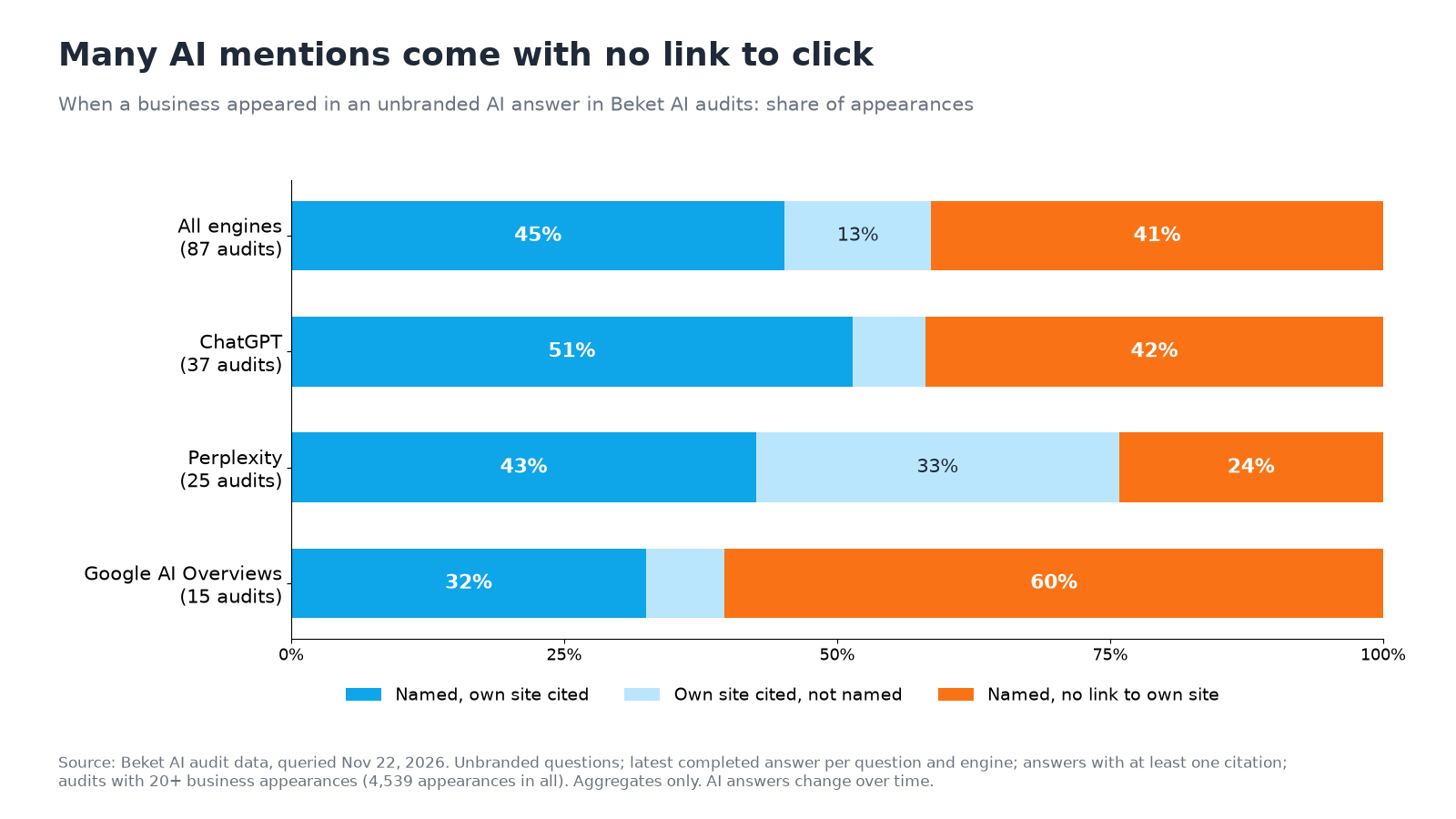
1. AI names you without linking to you. In our breakdown of mentions vs citations in Beket AI audits, we looked at 4,539 times a business showed up in an unbranded AI answer across 87 audits. In 41.4% of those appearances, the answer named the business but didn't cite its website. In Google AI Overviews, that rose to 60.3%. A buyer who reads your name there has no link to click; if they act, they search for you or call.
2. Google's own AI answers count as organic search. Google Analytics 4 now has an AI Assistant channel, described in Google's default channel group documentation as the channel "by which users arrive at your site from sources like ChatGPT, Gemini, Deepseek, Copilot, or Grok. It excludes Google's AI Overviews and AI Mode." So a click from an AI Overview lands in Organic Search, mixed in with every ordinary Google click.
3. Some clicks arrive with no referrer at all. GA4 only puts a visit in the AI Assistant channel when the referrer matches its list of AI assistants. A link copied out of a chat, or a tap in an app that doesn't pass a referrer, shows up as Direct. Semrush's AI visibility ROI guide also notes that the channel isn't retroactive and that, at the time of writing, Perplexity visits could land in Referral instead.
Put together, the AI Assistant row in GA4 is a floor, not a total. That's fine, as long as you treat it as one bucket and fill the others separately.
Step 1: Freeze the questions you'll measure against
Value only means something against a fixed baseline. Pick 10 to 25 unbranded questions a real buyer would ask before choosing you ("best family dentist in Burnaby", "CRM for a 5-person agency", "who repairs heat pumps in Tacoma"), and don't change them for at least a quarter.
For each question and each AI engine, record three things:
- Named: does the answer mention you at all?
- Linked: does it cite a page on your site?
- Position: are you the first business named, or the fifth?
Check more than one engine. The same question can name you in ChatGPT and skip you in Google AI Mode. Our weekly AI brand monitoring routine covers how to build the question set in buckets and how often to re-check.
This step doesn't produce a dollar figure. It tells you whether anything changed, which is what lets you connect a later rise in leads to your AI visibility instead of to the weather.
Step 2: Count the AI visits you can see
Open GA4's Traffic acquisition report, set the dimension to Session default channel group, and find AI Assistant. Then switch to Session source / medium to see which assistants are in it.
Write down, per month:
- AI Assistant sessions
- Key events (calls, bookings, form fills, purchases) from those sessions
- Revenue, if you run ecommerce
Then look at the gaps from the section above:
- Check Referral for any AI sources that didn't make it into the AI Assistant channel.
- For Google AI Overviews and AI Mode, use Search Console. GA4 can't separate those clicks from regular organic search. Our guide to tracking AI Overview traffic explains what Search Console does and doesn't show.
This is your direct bucket. It's small for most businesses, and that's normal. Why small AI traffic numbers still matter covers why the share looks tiny next to Google.
Step 3: Ask about the visits you can't see
The cheapest fix for leaks 1 and 3 is to ask. Add AI tools as separate answers to every "how did you hear about us?" question you have: contact forms, booking forms, intake paperwork, checkout surveys.
List them one by one instead of a single "AI" option: ChatGPT, Google (search results), Google AI answer, Gemini, Perplexity, Microsoft Copilot, other AI tool. Semrush's guide makes the same recommendation and adds sending the answer into your CRM so it stays attached to the customer record.
For local businesses, two more places matter:
- The phone. Many local customers call instead of filling in a form. Have whoever answers ask "how did you find us?" and log it in the same categories.
- Branded search. When people read your name in an AI answer and then look you up, it shows up as searches for your business name in Search Console. Trend it monthly. It won't prove AI caused it, but a rise that lines up with better AI visibility (from Step 1) is a useful signal.
This is your self-reported bucket. People misremember, so treat it as directional, but it catches the customers who never clicked anything.
Step 4: Turn it into a number with your own rates
Now value each bucket. You need three inputs you probably already know:
- Conversion rate: the share of visits or calls that become customers.
- Customer value: average order value, or the profit from a typical new client over a year.
- Cost: what you spend on AI visibility work (tools, content, your time or an agency's).
Semrush's guide gives the standard formula:
AI visibility ROI = (profit from AI visibility − AI visibility costs) ÷ AI visibility costs × 100
Use profit, not revenue, and measure costs and profit over the same period.
Here's what the worksheet looks like for a fictional local clinic. These are example numbers made up for illustration, not data.
| Bucket | What you count | Example month | How it's valued | Example value |
|---|---|---|---|---|
| Direct | AI Assistant sessions that booked | 40 sessions, 3 bookings | 3 × $300 profit per new patient | $900 |
| Self-reported | New patients who said an AI tool found us (form or phone) | 4 patients | 4 × $300 | $1,200 |
| Modeled | Estimate for AI Overview clicks inside Organic Search | Not estimated yet | Leave blank until you have a defensible method | $0 |
| Total (observed) | $2,100 | |||
| Cost | Tool, content updates, staff time | $600 | ||
| ROI | ($2,100 − $600) ÷ $600 × 100 | 250% |
Two rules keep this honest:
- Don't double count. If a patient booked through a tracked AI visit and also ticked "ChatGPT" on the form, count them once, in Direct.
- Report the buckets separately. "Direct $900, self-reported $1,200, modeled $0" is a claim you can defend. "AI is worth $2,100 a month" without the split invites the wrong argument.
Step 5: Don't borrow someone else's conversion rate
The most common shortcut is to take a headline stat ("AI visitors convert 23x better") and multiply. The published numbers disagree too much for that.
- Ahrefs reported that for its own site, AI search visitors were 0.5% of traffic but 12.1% of signups, a conversion rate 23 times higher than traditional organic search. That's one company's site over 30 days.
- Semrush's guide cites its own research finding the average AI search visitor is worth 4.4 times the average organic visitor.
- Amsive's study of 54 websites with validated GA4 conversion tracking found organic converting at 4.60% and LLM referrals at 4.87% on average over six months, and the difference wasn't statistically significant (p = 0.794). Splitting the 33 higher-traffic sites into B2B and B2C didn't produce a significant difference either.
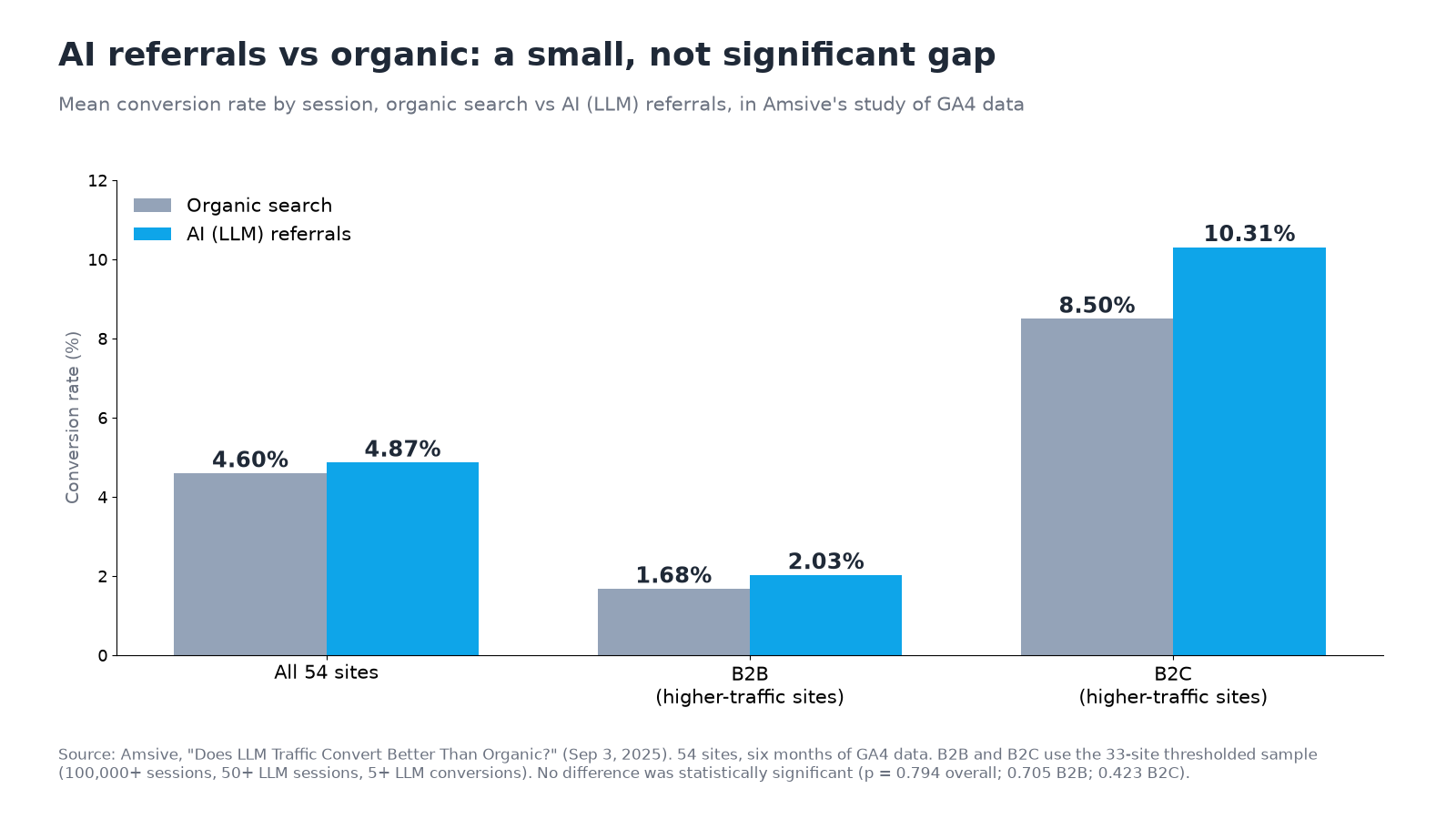
The lesson isn't that AI traffic is worthless or magic. It's that your rate is the only one that belongs in your model. If you don't have enough AI visits yet to calculate one, use your site-wide conversion rate and label the result as an estimate.
Step 6: Review on a lag, not a week
AI visibility and revenue don't move in the same week. Semrush suggests a rough sequence: visibility and citations move in the first month, AI referrals and branded search over the next one or two, leads after that, and closed revenue three to six months in. Their windows are a rule of thumb, not a law, but the order is the useful part.
In practice:
- Weekly or daily: check the fixed question set from Step 1 (are you named, linked, and where).
- Monthly: fill in the worksheet from Steps 2 to 4.
- Quarterly: compare the trend in visibility with the trend in direct and self-reported value. If visibility rose and nothing else did, the questions you track may not be the ones your buyers ask, or the answers name you in a weak position.
The checklist
- 10 to 25 unbranded buyer questions, frozen for the quarter
- Named, linked and position recorded per engine
- GA4 AI Assistant channel checked monthly, plus Referral for missing AI sources
- Search Console checked monthly for organic trends and searches for your business name
- AI tools listed one by one in every "how did you hear about us?" field, including the phone script
- Your own conversion rate and customer value, not a borrowed stat
- Direct, self-reported and modeled value reported separately
- ROI calculated on profit, over the same period as costs
Where Beket AI fits
Step 1 is the part most teams give up on, because asking the same 25 questions across several AI engines every week by hand takes a lot of time. Beket AI asks your buyer questions in ChatGPT, Gemini, Perplexity, Microsoft Copilot, Google AI Overviews and Google AI Mode, and records whether each answer names you, cites your site, and who it names instead. Pro ($49/month per site) re-runs the audit daily and sends change alerts, and Beket AI connects to Google Analytics, so the visibility trend and the AI referral visits can sit side by side. Steps 3 and 4 still belong to you: only your forms, phone and books know what a customer is worth.
To get your Step 1 baseline, run the free audit on the Beket AI homepage: 25 buyer questions on any 3 of the 6 engines.
How we got our numbers
The Beket AI figures in the first chart come from our audit data, queried on November 22, 2026: unbranded questions only, the latest completed answer for each question and engine, across 87 non-demo audits with enough data. They're aggregates; no customer names, brands or questions are shown. They describe the answers the engines returned at the time, and AI answers change over time. The full method is in our mentions vs citations analysis. All other figures come from the linked public sources, and the clinic worksheet uses made-up example numbers.
Related posts
Does ChatGPT Still Cite Reddit? Which Social Sites Each AI Engine Cites (2026 Data)
ChatGPT cited social sites in 2.9% of answers in Beket AI audits; Google AI Overviews in 53%. Which sites each AI engine cites, with Semrush's new data.
Personalized AI Overviews: Why Customers See Different Answers About Your Business (and How to Measure Visibility Anyway, 2026)
Google now tailors AI Overviews and AI Mode to recent searches. Why customers see different answers, and how to measure AI visibility with a clean baseline.
Google Search Is Adding Angi and Thumbtack Account Linking: What Home Service Businesses Should Do Now
Google says Angi and Thumbtack account linking is coming to Search. A to-do list for home service businesses: profiles, budgets, billing and what's unknown.