
Personalized AI Overviews: Why Customers See Different Answers About Your Business (and How to Measure Visibility Anyway, 2026)

You search Google for the best accountant in your city, and your firm is in the AI Overview. You tell your team. Meanwhile a prospect searches the same words and sees a different list. Neither of you is wrong, and neither of you is looking at "the" answer.
On November 23, 2026, Google said it is making that gap wider. Google's VP of Product for Search, Robby Stein, announced that AI Overviews and AI Mode will show "more personally relevant responses... tailored to your recent search context." This post covers what Google actually announced, why it makes casual spot checks unreliable, and how to measure your AI visibility anyway.
The short version: stop treating any single Google AI answer as the answer. Run a fixed set of questions from a clean setup, repeat them over time, record whether you're named and whether you're linked, and use your own analytics and customer answers to fill in what no check can see.
What Google announced on November 23, 2026
Three separate things were in Google's post. They're easy to blur together, so here they are apart:
| What | What Google said | Where |
|---|---|---|
| Tailoring by recent searches | "You'll also start seeing more personally relevant responses in AI Overviews and AI Mode, tailored to your recent search context." Example: pick up a trip you were researching without repeating yourself. | AI Overviews and AI Mode |
| More apps for Personal Intelligence | Opt in to connect Google Wallet, rolling out from November 23. Drive and the Gemini app follow "in the coming weeks". They join Gmail, Calendar and Photos. | AI Mode |
| A way to see the context used | "Soon" you'll be able to view the context AI Mode uses through a "Personalization" icon below any tailored response. | AI Mode |
A few details matter for how much weight to put on this:
- The app connections are opt-in. You choose whether to connect, and you can turn connections on or off at any time. Google says that if you connect Wallet, AI Mode can only read information from your accounts.
- The recent-search tailoring is described differently. Google says you can "adjust or turn off personalization at any time in your Search Settings." The post doesn't say how many people will see tailored AI Overviews or how much an answer will change.
- The Personalization icon isn't here yet. Google says "soon", so don't plan a workflow around it today.
Google's help page on how AI Mode personalizes responses adds the conditions: AI Mode personalization is available to users 18 or older who have history and personalized recommendations enabled, and AI Mode can remember details from past searches and interactions. It also warns that AI Mode might not always get personalization right.
Why two customers can see different businesses
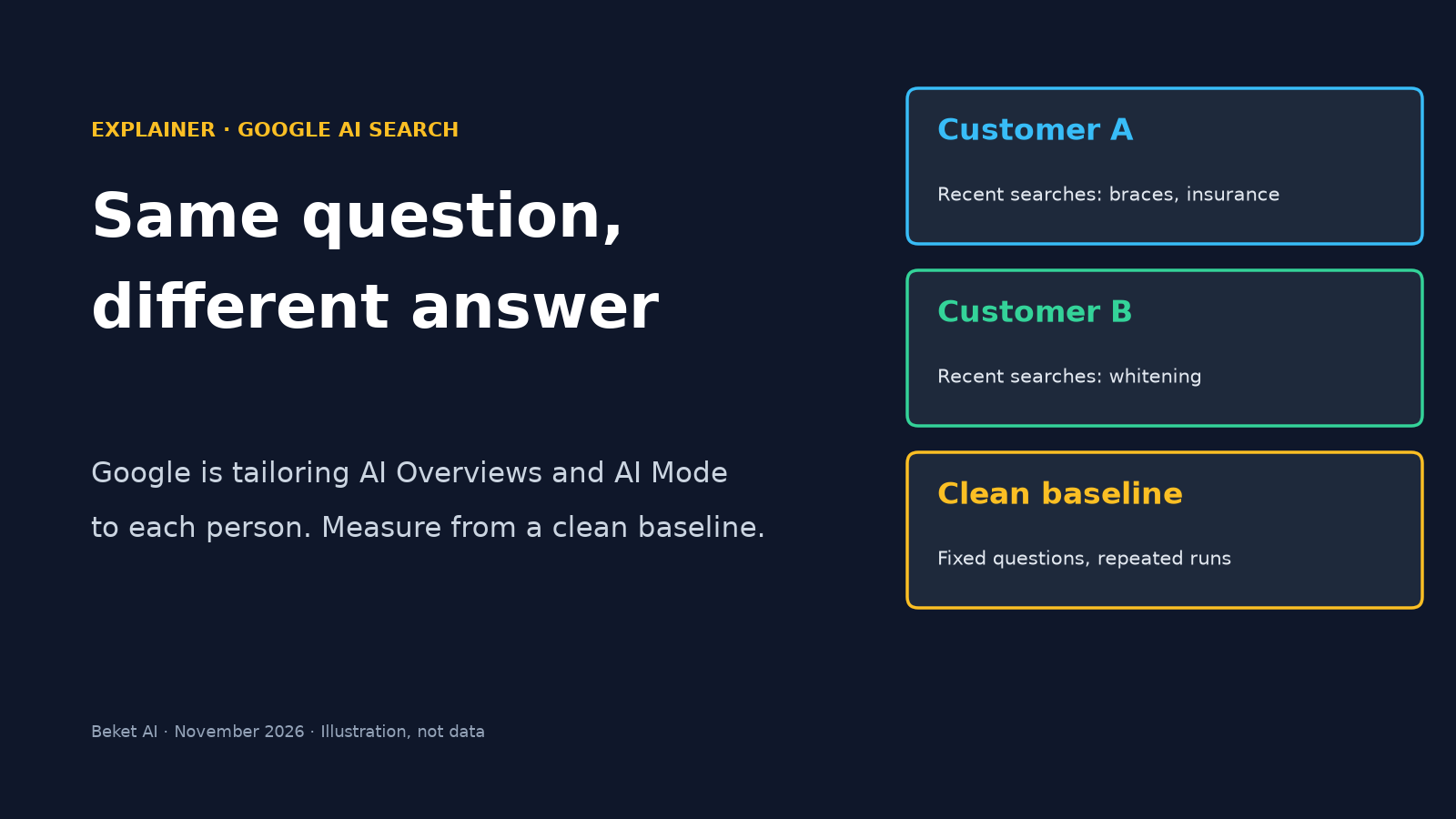
As a hypothetical example, take two people typing "best family dentist near me". One has spent the week reading about braces for her daughter and searching for dentists that take a particular insurance. The other has been looking at cosmetic whitening. If Google tailors each answer to that recent search context, there is no reason for the lists to match. We can't tell you how large the difference will be, because Google hasn't published that. The point is that the same words no longer imply the same answer.
This was already true before the announcement. Our explainer on whether ChatGPT answers are the same for everyone covers the layers that move an answer: chance, who's asking, memory and location. Google's announcement adds more personal context to Google's side of that picture.
Why your own check isn't what a prospect sees
If you're the owner, your Google account probably knows a lot about your business. You've searched your own name, your competitors and your service area many times. If you're signed in with history on, an answer you see about your own business may be shaped by exactly that history. That's the opposite of a neutral test.
So "I checked, and we show up" can mean any of three things: you show up for people like you, you showed up this time, or you show up for everyone. A single check can't tell those apart.
Two kinds of movement, and why you must separate them
Before you blame personalization for a change, remember that AI answers move even when nobody's context changes. In our analysis of how often AI answers change, we compared consecutive daily runs of the same prompt on the same engine in Beket AI audits. The list of brands named was identical the next day only 30.1% of the time.
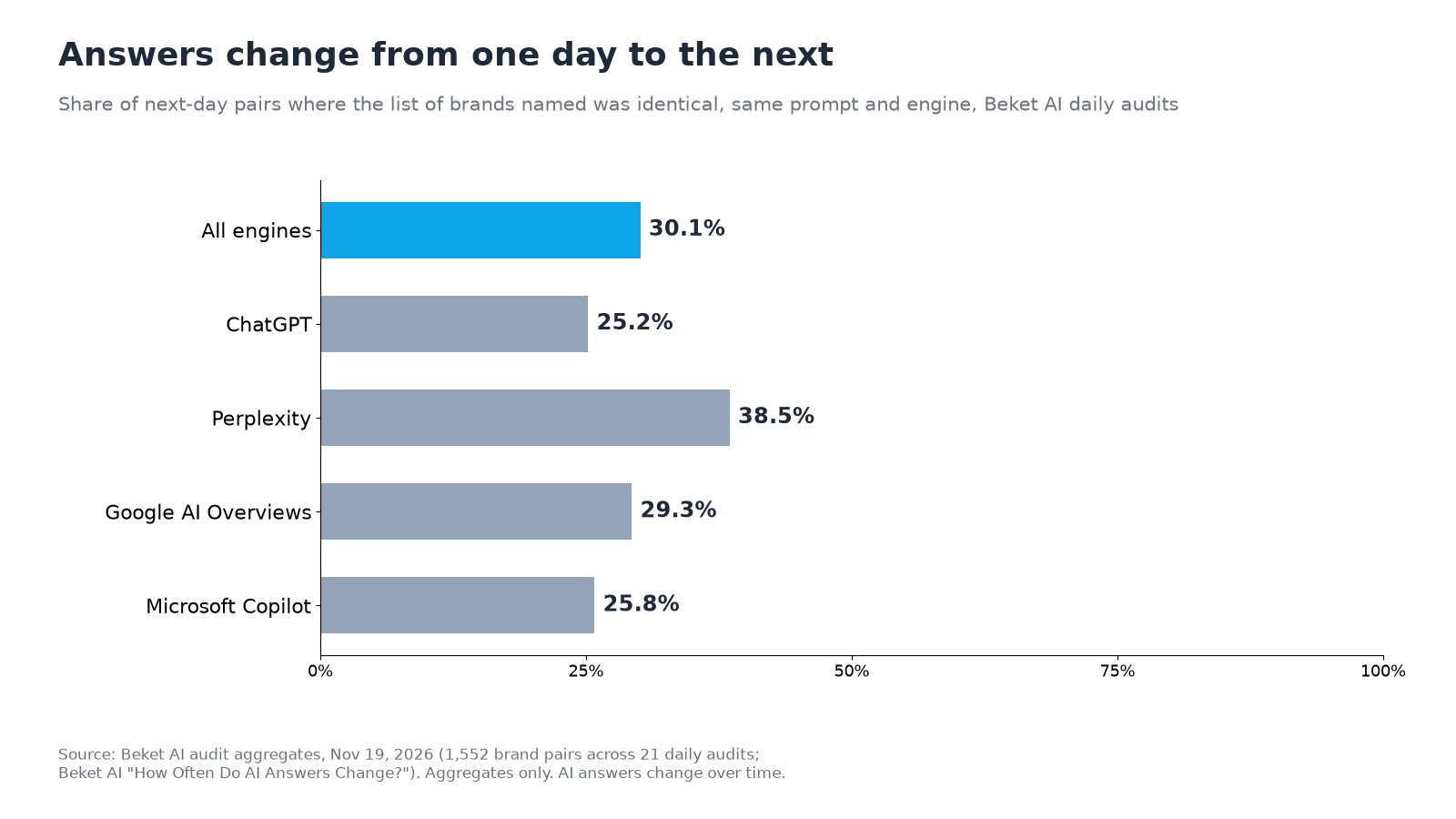
An audit asks the same prompt the same way each day, so this movement is mostly churn, not a change in who is asking. Personalization sits on top of it. That gives you two things to separate:
| Churn | Personalization | |
|---|---|---|
| Cause | The engine builds a fresh answer from a fresh set of pages each time | The asker's search history, settings and connected apps |
| Shows up as | Different answers to the same question from the same setup, on different days | Different answers to the same question from different people on the same day |
| How to see it | Repeat the same check many times | Compare setups, such as signed out against your own account |
| What to do | Track the share of runs you appear in, not one result | Don't generalize from your own account |
How to measure AI visibility anyway
You can't see anyone else's Search history, and you don't need to. You need a method that doesn't depend on any one person's context.
1. Build a clean baseline from a fixed question set
Write 10 to 25 unbranded questions a buyer would ask, such as "best [service] in [city]" and "who should I hire for [problem]". Freeze the list for a quarter. Run each in a setup with as little personal context as you can: a signed-out browser, or an account with personalization off. As Google describes it, personalization depends on being signed in with history and personalized recommendations on, so a signed-out check is a cleaner baseline. It isn't free of every factor: location, language and the device still count, so keep them the same each time.
2. Repeat it, and report a rate
One run is an anecdote. Run the same set on a schedule and report "named in 6 of 10 runs", not "we're in the answer". That handles churn. The percentage can also move for reasons that aren't about you, so look at the trend, not a single week.
3. Record named, linked, and who else appears
For each answer, note three things: whether you're named, whether your site is linked, and which competitors appear. They aren't the same. In our mentions vs citations analysis, 41.4% of appearances in Beket AI audits named a business without citing its site, and 60.3% in Google AI Overviews. Personalization could change the names, the links or both, so tracking only one hides part of the story.
4. Track the sources the answers lean on
Rather than chasing each person's version of the answer, look at where the answers get their information: your own pages, review sites, directories, local press, social profiles. Those third-party sources are what every version of the answer draws from, so they're a steadier thing to improve than any single answer.
5. Triangulate with data you own
No check shows what a particular prospect saw. Your own data can fill part of it in:
- GA4: the AI Assistant channel counts visits from tools like ChatGPT and Gemini, but Google's documentation says it excludes AI Overviews and AI Mode, so Google's AI answers are mixed into organic search. Treat it as a floor.
- Self-reported attribution: add "Google's AI answer" and each AI tool as options to your "how did you hear about us?" form and your phone script. We walk through the full approach in our guide to working out what an AI mention is worth.
- Searches for your name: if more people look you up by name after AI answers start naming you, that's a sign, not proof.
6. When you test with your own account, label it
If you do check from your signed-in browser, write it down as "owner's account" and keep it out of your baseline numbers. It's a useful second data point because it shows what a person with your history sees. It doesn't show what a stranger sees.
A simple log that survives personalization
| Date | Question | Setup | Engine | Named? | Linked? | Other businesses named | Sources cited |
|---|---|---|---|---|---|---|---|
| (date) | (frozen question) | Signed out / owner's account | AI Overview, AI Mode, ChatGPT... | Yes / No | Yes / No | (list) | (list) |
Keep the "Setup" column. It's what lets you say later whether a change came from you, from churn or from a different setup.
Where Beket AI fits
Steps 1 to 3 are the part teams drop, because asking the same 25 questions across several engines by hand takes a lot of time. Beket AI asks your buyer questions in ChatGPT, Gemini, Perplexity, Microsoft Copilot, Google AI Overviews and Google AI Mode, and records whether each answer names you, cites your site, and who it names instead. Pro ($49/month per site) re-runs the audit daily and sends change alerts, so you see a rate over time and not a single snapshot. A Beket AI audit is a consistent, repeatable check; it doesn't show what any one person sees in their own Google account. The Google Analytics and customer-answer steps still belong to you.
To get your baseline, run the free audit on the Beket AI homepage: 25 buyer questions on any 3 of the 6 engines. If you also want to know whether AI crawlers can read your site, the free 9-point AI-readiness check covers the technical side.
Sources
- Robby Stein, A more tailored Google Search that's uniquely yours, Google, November 23, 2026.
- Google Search Help, Personal Intelligence: How AI Mode in Search personalizes responses for you.
- Beket AI audit aggregates and methods: how often AI answers change and mentions vs citations. The chart above reuses the next-day figures published in the first of these (data as of November 19, 2026). They are aggregates, with no customer, brand or question named, and AI answers change over time.
Related posts
AI Visibility ROI: How to Work Out What an AI Mention Is Worth (A Worksheet for Small Teams, 2026)
How to measure AI visibility ROI with data you already have: GA4's AI Assistant channel, 'how did you hear about us' answers, your own rates and one formula.
GPT-6.2 Is ChatGPT's New Default for Paid Users: What to Check for Your Brand (2026)
OpenAI made GPT-6.2 the Chat tab model for paid ChatGPT plans. What it announced, why model launches matter for brands, and what to check this week.
Does ChatGPT Still Cite Reddit? Which Social Sites Each AI Engine Cites (2026 Data)
ChatGPT cited social sites in 2.9% of answers in Beket AI audits; Google AI Overviews in 53%. Which sites each AI engine cites, with Semrush's new data.