
AEO Workflow: A 6-Step Process to Get Your Content Cited by AI

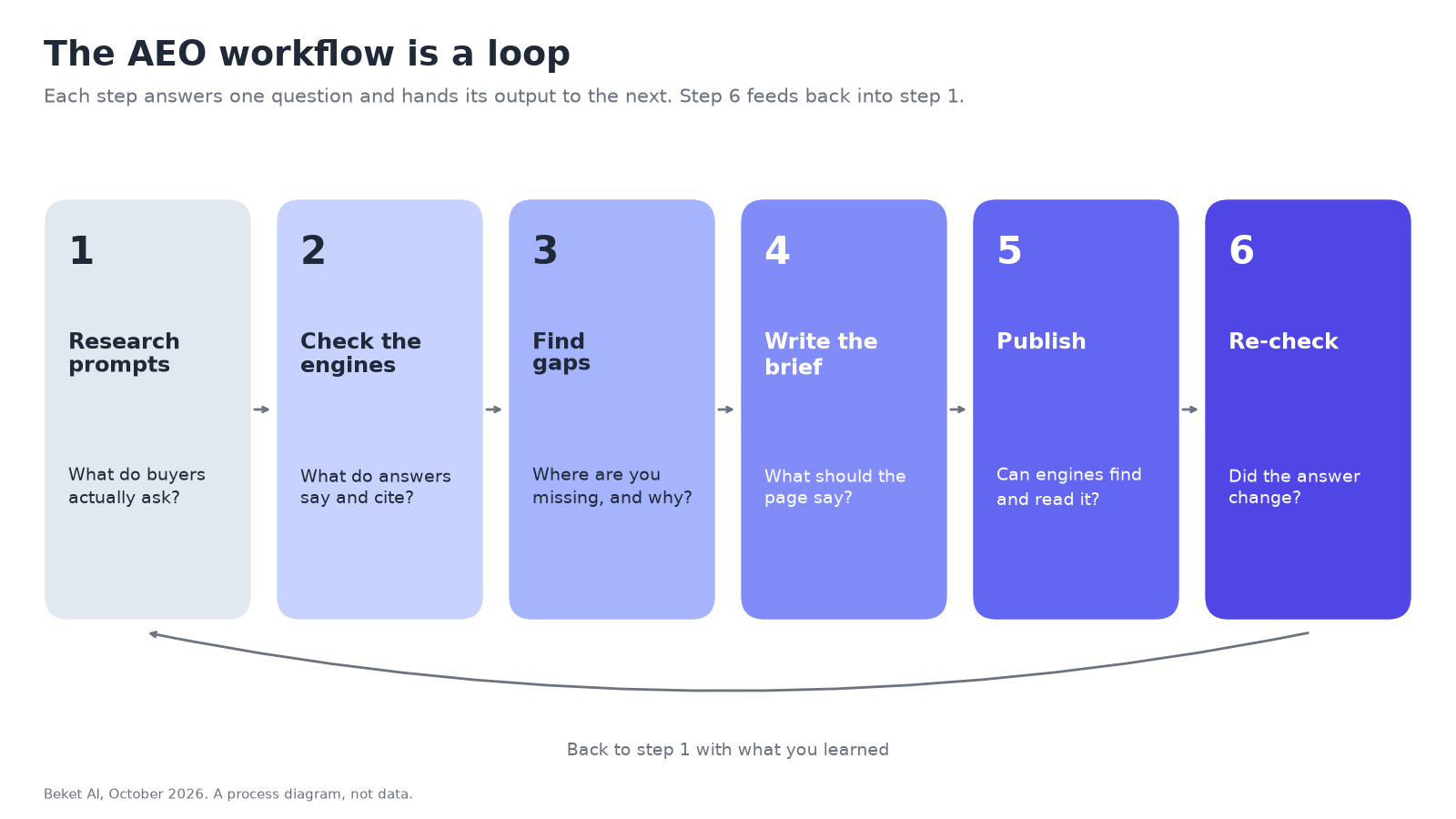
An AEO workflow is the loop you run to get your pages cited in AI answers: research the prompts, check what the engines say and cite, find the gaps, brief the content, publish, and re-check the same prompts. Each step answers one question. If you skip one, the next has nothing to work from.
This guide walks through the six steps, what to record at each one, which free tools help, and where an AI visibility tool like Beket AI fits. It is the same loop we use on our own blog.
Why AEO needs a workflow, not a checklist
Answer engine optimization (AEO) is about being named and cited when someone asks ChatGPT, Perplexity or Google’s AI features a question. Most AEO advice comes as a checklist: add schema, write clear headings, publish often. Those things can help, but a checklist can’t tell you which question to work on, which source the engines already trust, or whether the page you shipped changed anything.
A workflow can, because each step produces something the next step uses:
| Step | Question it answers | What you should have at the end |
|---|---|---|
| 1. Research prompts | What do buyers actually ask? | A list of unbranded prompts, grouped by topic |
| 2. Check the engines | What do the answers say and cite today? | Names, cited URLs and cited domains, per engine |
| 3. Find gaps | Where are you missing, and why? | Prompt gaps, source gaps and page gaps |
| 4. Brief | What exactly should the page say? | A brief tied to target prompts and a signal to watch |
| 5. Publish | Can the engines find and read it? | A live, crawlable page linked from your site |
| 6. Re-check | Did the answer change? | Before-and-after results on the same prompts |
Step 1: Research the prompts
Start with the questions, not the keywords. People ask AI engines full sentences, and the engines turn them into shorter searches behind the scenes, a process we covered in one question becomes twenty searches.
Good sources for prompts:
- Your own customers. Sales calls, support tickets and the questions people ask before they buy.
- Google Search Console. Long, question-shaped queries are often the same questions people put to AI.
- Bing Webmaster Tools. The AI Performance report lists grounding queries: the phrases the AI used when it retrieved pages it then cited. Our Bing AI Performance report guide covers setup.
- Autocomplete. Google’s suggestions show how people phrase a topic.
Grounding queries are worth a close look because they are the engine’s wording, not the user’s. In beket.ai’s own AI Performance export, one grounding query, “tools integrating training data analysis AEO content workflows”, accounted for 650 citations of our pages, plus 17 for a close variant. Nobody types that sentence. It is how the engine rephrased a question about AEO tools, and it is the reason this post exists. Microsoft says the grounding query data is a sample, so treat it as a list of topics to cover, not a complete record.
Keep the prompts unbranded. “Best [service] in [city]” tests whether an engine finds you. A prompt with your own name only tests whether it already knows you.
Step 2: Check what the engines say and cite
Ask each prompt on each engine you care about and record three things: the names in the answer, the URLs it cites, and the domains those URLs belong to. Do this per engine, because the engines behave differently.
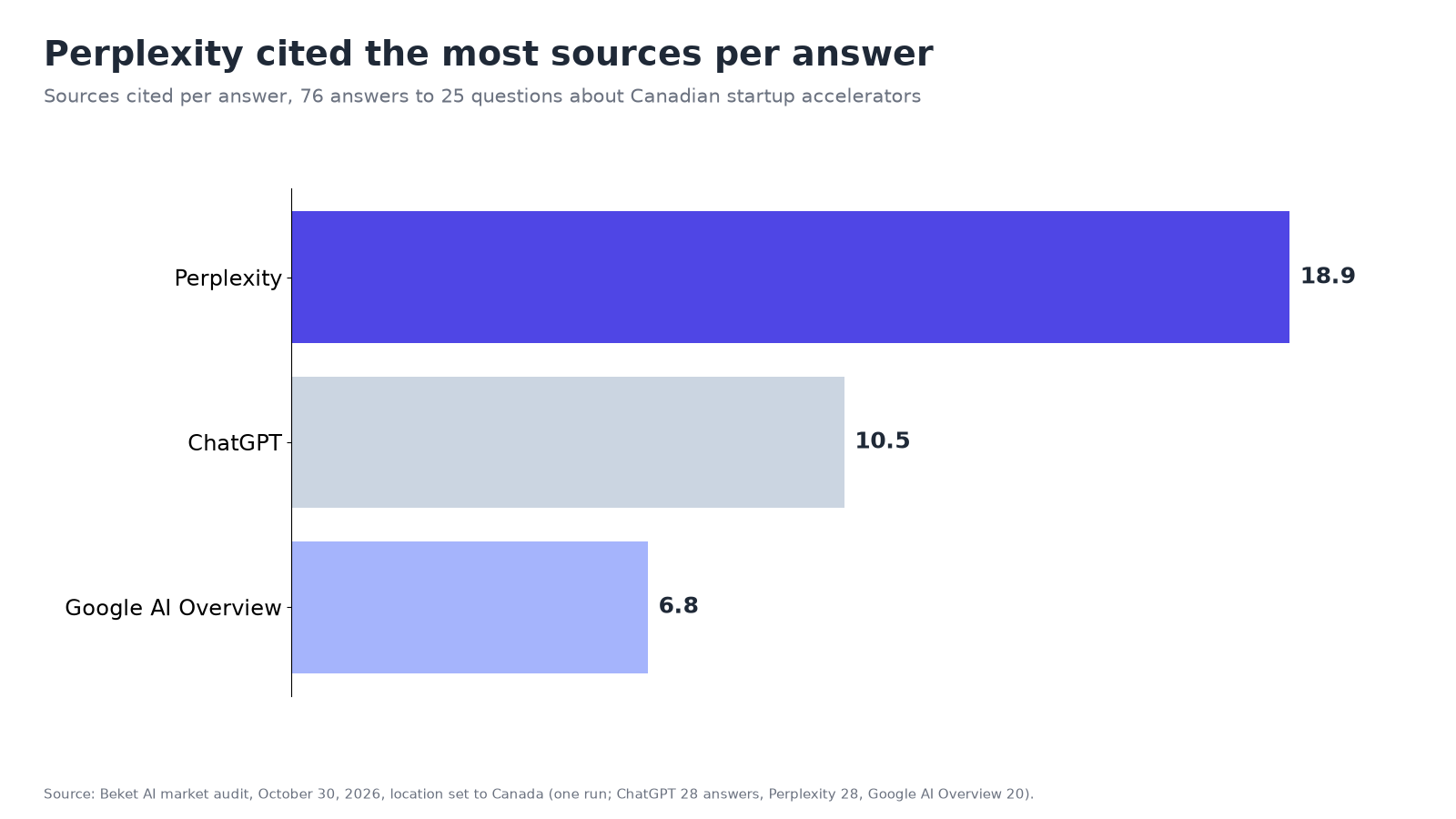
In our study of Canada’s top accelerators on October 30, 2026 (25 questions, one run, 76 answers), the three engines cited very different numbers of sources:
| Engine | Answers | Sources cited | Per answer |
|---|---|---|---|
| ChatGPT | 28 | 293 | 10.5 |
| Perplexity | 28 | 529 | 18.9 |
| Google AI Overview | 20 | 135 | 6.8 |
Source: Beket AI market audit, October 30, 2026, location set to Canada. Google AI Overview appeared for 18 of the 25 questions. One run, so read it as a snapshot.
Two lessons from that run apply to almost any topic:
- Being cited is not the same as being named. Some program websites were among the most cited domains (acceleratorcentre.com 26 citations, communitech.ca 21), yet those programs were not among the names counted with two or more mentions. Track names and citations separately.
- Third-party pages carry a lot of weight. A startup directory, failory.com, was the third most cited domain (32 citations), ahead of most of the programs’ own sites. We wrote more about this in your AI citations are coming from somewhere you aren’t looking.
Some answers cite no sources at all, which can mean the engine answered from what the model learned in training rather than from a fresh search. A new page can’t change those answers directly. For that side of AI visibility, see what parametric knowledge optimization (PKO) is and how to measure it.
Step 3: Find the gaps
Now compare what you found with where you want to be. There are three kinds of gap, and each leads to a different kind of work:
| Gap | What it looks like | What you do about it |
|---|---|---|
| Prompt gap | Competitors are named for a question and you aren’t | Prioritize that question for a page or an update |
| Source gap | A site is cited for competitors and you aren’t on it | Post or reply (forums, Q&A), claim a listing (directories, review sites) or pitch (editorial) |
| Page gap | Nothing on your site answers the question directly | Write the page, or rewrite the one that comes closest |
Rank the gaps before you write anything. A question where the answers name many competitors, cite many sources and change from run to run is usually harder to win than one with a thin answer and few names.
Step 4: Write the brief
A brief turns a gap into a page someone can write. Keep it short and specific:
- Target prompts. The two to five questions the page is meant to answer, in the words people use.
- The answer first. One or two sentences that answer the main question directly. Engines that only read the first screen should still get the point.
- Facts the current answers get wrong or leave out. Prices, hours, locations, specs, dates. Specific, checkable details are what make a page worth citing.
- Sources to cite. The evidence behind your claims, linked.
- Format. Guide, comparison, landing page, study. Match what the engines already cite for the prompt.
- A signal to watch. For example, “cited for one target prompt within six weeks”. Without it, step 6 has nothing to measure.
Step 5: Publish and make sure the engines can find it
Publishing is not the same as being findable. Before you move on:
- Check crawler access. Each engine has its own crawler for search. Blocking OpenAI’s OAI-SearchBot keeps pages out of ChatGPT search answers, and Anthropic says blocking Claude-SearchBot may reduce visibility in Claude’s results. Our guide to AI crawlers in robots.txt lists them side by side.
- Tell Bing about the change. Bing recommends IndexNow for telling search engines when pages are added, updated or removed. It doesn’t guarantee crawling or indexing.
- Link to it. Add internal links from pages that are already indexed and cited.
- Skip the gimmicks. Google says you don’t need “new machine readable files, AI text files, or markup” to appear in its AI features (Google Search Central).
Step 6: Re-check the same prompts
Record a baseline before you publish. Then ask the same prompts on the same engines again, several times over the following weeks, and compare. One run can’t tell a real change from day-to-day noise; one check is a snapshot, not a system.
Look at three things:
- Names. Are you mentioned for the target prompts now, and on which engines?
- Citations. Is the new page, or a source you worked on in step 3, among the cited URLs?
- First-party data. Bing’s AI Performance report shows page-level citations in Copilot and Bing’s AI answers. Search Console’s Generative AI performance report shows impressions in AI Overviews and AI Mode.
Then go back to step 1 with what you learned. Prompts you won drop to monitoring. Prompts that didn’t move get a different approach.
Where tools fit in the workflow
You can run the whole loop by hand with a spreadsheet. Tools save time at the steps that need repetition: asking many prompts on several engines, keeping the cited URLs, and re-asking on a schedule.
| Step | Free first-party tools | What a Beket AI audit adds |
|---|---|---|
| 1. Research prompts | Search Console queries, Bing grounding queries, autocomplete | Unbranded prompts generated for your business, plus your own |
| 2. Check the engines | Bing AI Performance (Copilot and Bing only) | Names, per-engine splits and cited URLs and domains for ChatGPT, Perplexity and Google AI Overview |
| 3. Find gaps | Bing’s Opportunity Queries (beta) | Winnable prompts ranked by score with the competitors named; citation gaps limited to sources where you can post, reply or claim, each with a suggested action |
| 4. Brief | None | A content roadmap (format, funnel stage, rationale, target prompts, leading indicator); a roadmap item can be turned into a content brief |
| 5. Publish | Bing IndexNow, sitemaps | With Cloudflare connected, which AI crawlers visited your site |
| 6. Re-check | Bing AI Performance, Search Console Generative AI report | Snapshots you can compare over time; Pro re-audits daily |
Beket AI’s integrations are Webflow, Google Analytics and Cloudflare. A free Beket AI audit covers 25 prompts across 3 engines. Beket AI Pro is $49/month, re-audits daily and starts at 50 prompts across 3 engines. If you’re comparing tools, our guide to which AI search analytics tools recommend ways to improve citations has a checklist. Run a free audit at beket.ai.
About the author: Nur Rysbek is the CEO of Beket AI.
Sources checked October 30, 2026. Bing grounding query counts are from beket.ai’s own Bing Webmaster Tools export; Microsoft describes grounding query data as a sample. AI answers change by day, wording and user.
Related posts
Top Accelerators in Canada, According to ChatGPT, Perplexity and Google AI (2026 Study)
We asked ChatGPT, Perplexity and Google AI Overview 25 questions about Canadian accelerators. Velocity, L-SPARK and CDL were named most.
Does Bing Webmaster Tools Help ChatGPT Visibility? What's Documented and What Isn't
Does Bing Webmaster Tools help you show up in ChatGPT? What OpenAI and Microsoft document, what IndexNow does, what is speculation, and what to do.
Which AI Search Analytics Tools Recommend Ways to Improve Citations?
Most AI search analytics tools only track citations. Here's what Search Console, GA4 and Bing show, which features give real fixes, and what to look for.