
Can AI Book Appointments With Your Business? ReserveAction Schema and the Booking Paths That Matter (2026)

A plumber in the US can now get booked without anyone visiting their website. On November 4, 2026, Google added direct booking links for home services inside AI Mode, through partners Angi, Thumbtack, Housecall Pro and Jobber, with ServiceTitan “coming soon” (Search Engine Roundtable). Google’s Robby Stein wrote that he described a plumbing emergency to AI Mode, which compared local pricing and reviews, and that he booked a plumber from it.
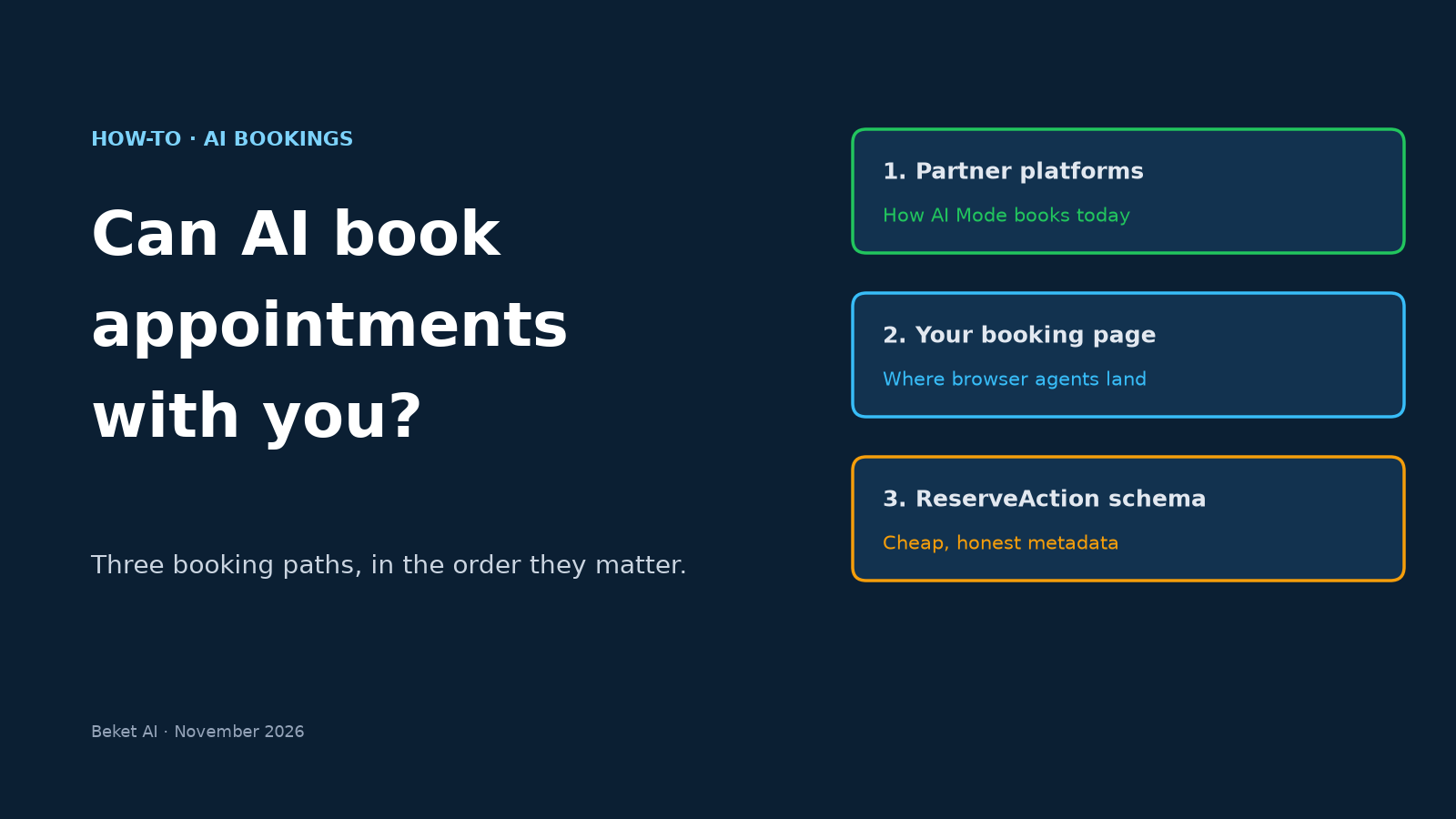
So yes, AI can book appointments. The harder question for a business owner is through what. An assistant that books a dentist, a roofer or a salon has three ways to get there: a booking partner it’s already wired into, your own booking page driven by a browser agent, or machine-readable hints on your site that point it to the right URL. Schema.org’s ReserveAction is the third one, and it’s the one most guides oversell.
This guide covers all three, in the order they matter today, with a copy-ready ReserveAction example and a test you can run this week.
What “AI booked it” actually means in 2026
| Path | Who does the booking | Examples today | What you control |
|---|---|---|---|
| 1. Partner integration | The AI hands off to a booking platform it’s connected to | Google AI Mode home-services links (Angi, Thumbtack, Housecall Pro, Jobber), Google’s Actions Center partners for appointments and dining | Whether you’re on those platforms, and how complete and well-reviewed your profile is |
| 2. Browser agent on your site | An agent opens your booking page and fills it in for a person | ChatGPT Work’s cloud browser, which OpenAI says can “find a DMV appointment and prepare a booking for your approval” | Whether your booking flow loads, works without a human-only step, and isn’t blocked |
| 3. Structured hints | Any agent or crawler reading your page learns that a booking action exists and where it lives | schema.org potentialAction with ReserveAction |
One JSON-LD block, kept accurate |
The order matters. Paths 1 and 2 are how bookings happen now. Path 3 is cheap insurance that helps any system reading your page find the right URL, but no major AI product has said it uses ReserveAction to decide who gets booked.
Path 1: Be bookable where AI already books
Google AI Mode (US, home services). The AI Mode links go through partner platforms. Google hasn’t said how providers are picked, or whether you must be on one of those partners to appear. What’s clear: if a homeowner books through AI Mode, the booking runs on Angi, Thumbtack, Housecall Pro or Jobber (Search Engine Roundtable). If you already use one of them, make sure your profile, service area, prices and reviews are complete there.
Google Search and Maps generally. Google’s own LocalBusiness documentation is blunt about this: if you want users to make a reservation or place an order directly in Search results, you use the Maps Booking API, not structured data (Google Search Central). In practice that means a scheduling provider that is a Google Actions Center partner, which lists Appointments, Dining Reservations, Things to do and more as integrations.
Your Google Business Profile booking link. Even without a partner, you can add booking links yourself: Google lets you add up to 10 links per category, including “Book an appointment” and “Make a reservation,” and mark one as “Business preferred” (Google Business Profile Help). Two cautions from the same page: links can’t be managed through the API or spreadsheet upload, and third-party booking links can’t be deleted from the profile. You have to ask the provider to opt you out.
ChatGPT. ChatGPT’s cloud browser “may use a connected app or plugin, cloud browser, or both,” and OpenAI tells users to prefer a connected app when one supports the task (OpenAI Help Center). For a business, that means if your booking platform has a connected app in ChatGPT, the booking may run through it instead of your website.
Path 2: Make your own booking page agent-friendly
Agents are already pressing booking buttons. Microsoft Clarity analyzed 5.2 million agentic sessions across 230,511 Clarity projects (August 13 to September 9, 2026). “Book appointment” showed up in 8.42% of them, the fourth most common action recorded (Microsoft Clarity).
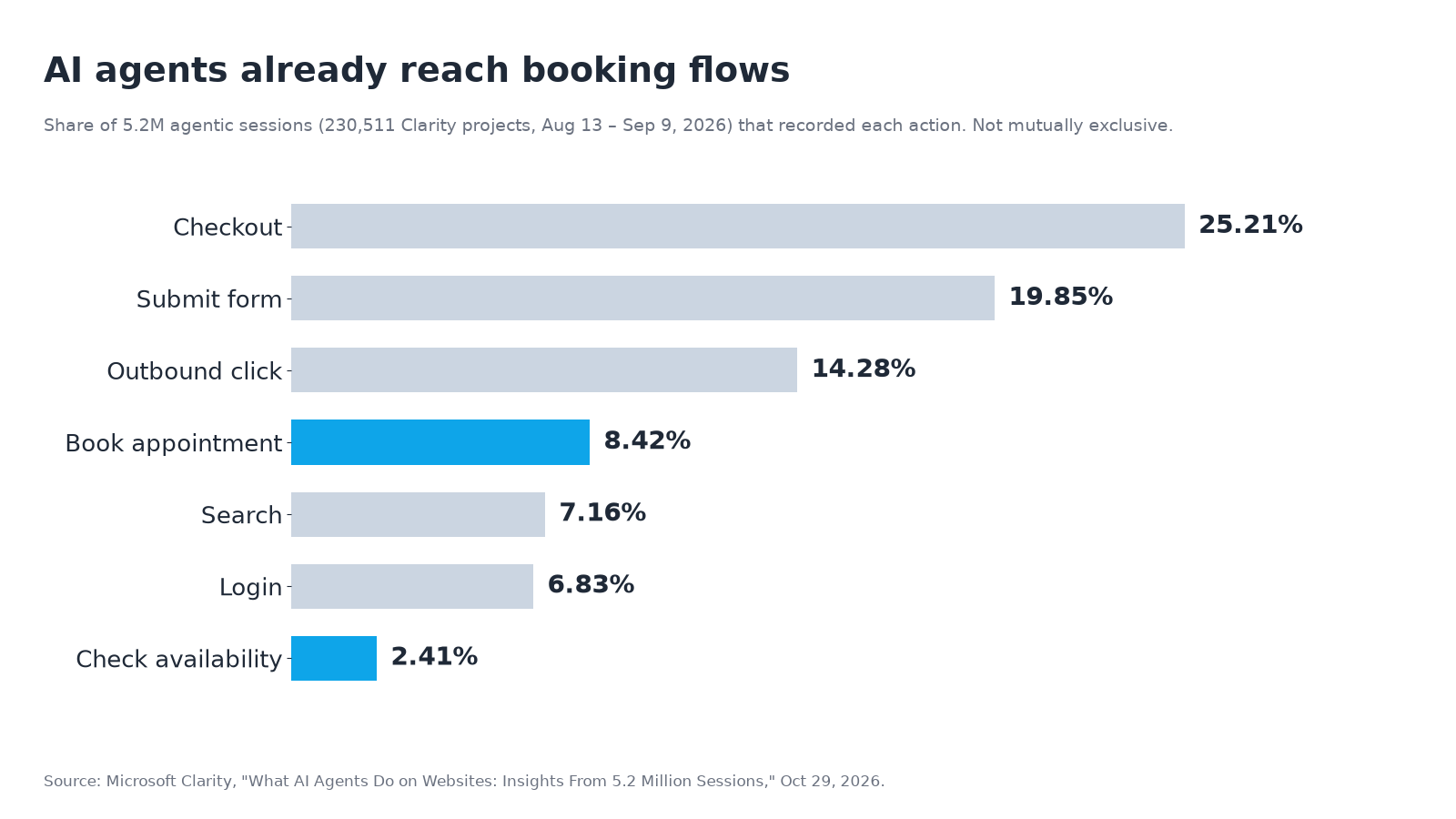
Clarity warns these are independent session counts that “should not be interpreted as… proof that an agent independently completed a task.” Still, they show agents reach booking flows often enough that a broken one costs you leads.
What tends to stop an agent, based on what OpenAI’s own help page lists:
- Bot protection. OpenAI says some websites “restrict access from automated browser agents” and may block the task “even if the same website works normally in your own browser.” If you use a CDN or bot-protection product, check how it treats verified agents. Our explainer on whether to block AI bots and agents walks through the choices.
- Unsupported steps. “A site may block automated access, a sign-in or transaction step may not be supported,” and the user may have to finish it themselves (OpenAI Help Center). When ChatGPT hits a sign-in page, it pauses and asks the person to sign in, so forcing account creation before showing times adds a hand-back.
- Confirmation by design. ChatGPT asks the user before “confirming a booking or making a payment.” That’s fine. It means your confirmation page and email need to state the service, date, time and location clearly, because a person is checking them.
A practical baseline for the booking page itself:
- Show available times as text on the page, not only inside an image or a canvas widget.
- Label every field (
<label for>oraria-label), so software filling in the form can tell which box is which. - Keep the booking URL stable, so links from your profile, schema and partner listings don’t break.
- Let people see availability before they create an account.
- Send a confirmation with the date, time, address and a cancel/reschedule link.
To see whether agents already reach your booking page and where they stop, use the method in our guide to seeing which AI agents visit your site.
Path 3: Add ReserveAction schema (and keep expectations honest)
Schema.org defines ReserveAction as “reserving a concrete object” and contrasts it with ScheduleAction: ReserveAction “reserves concrete objects (e.g. a table, a hotel) towards a time slot.” You attach it to your business through potentialAction, which “indicates a potential Action,” and point it at your booking page with target, which accepts a URL or an EntryPoint.
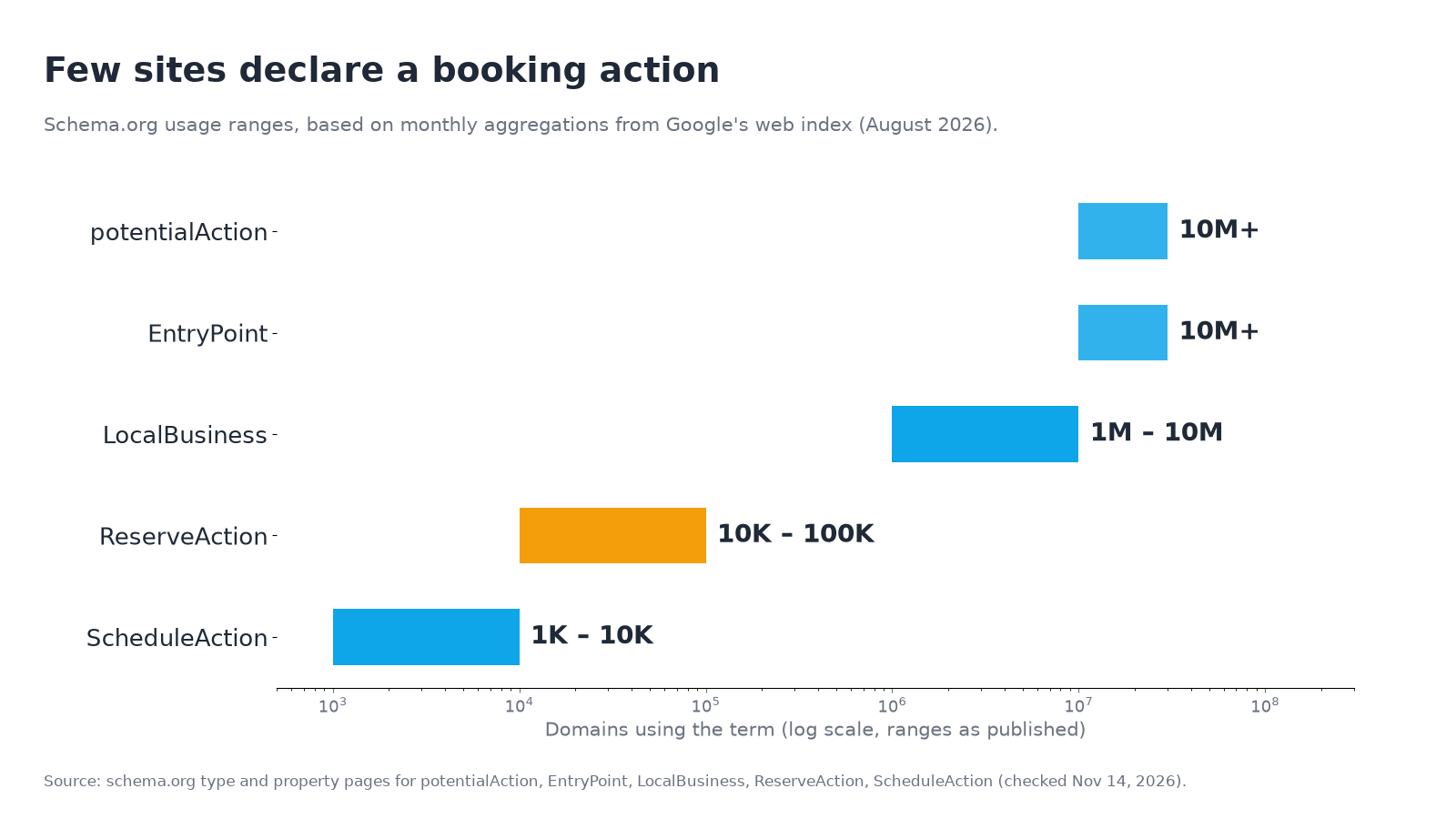
It’s rarely used. Schema.org’s usage counts, based on Google’s web index, put ReserveAction on 10K to 100K domains, while potentialAction and EntryPoint each appear on 10M+ domains (they’re shared by many action types, such as SearchAction) LocalBusiness on 1M to 10M, and its sibling ScheduleAction on just 1K to 10K.
There’s a reason to stay modest. Google already retired one popular potentialAction feature: it removed the sitelinks search box (built on SearchAction markup) from results starting November 21, 2024, because usage had dropped (Google Search Central). And Google’s current docs point bookings to the Maps Booking API, not markup. So add ReserveAction because it’s accurate, low-cost metadata that any agent or parser can read, not because it switches on a booking feature.
A copy-ready example
This example is for a dental clinic. Replace the business details and URLs with yours, and add it next to the LocalBusiness markup you already have. (If you don’t have that yet, start with our LocalBusiness schema markup guide.)
<script type="application/ld+json">
{
  "@context": "https://schema.org",
  "@type": "Dentist",
  "@id": "https://www.example-dental.com/#business",
  "name": "Example Dental Clinic",
  "url": "https://www.example-dental.com/",
  "telephone": "+1-604-555-0100",
  "address": {
    "@type": "PostalAddress",
    "streetAddress": "100 Example St",
    "addressLocality": "Vancouver",
    "addressRegion": "BC",
    "postalCode": "V6B 0A1",
    "addressCountry": "CA"
  },
  "potentialAction": {
    "@type": "ReserveAction",
    "name": "Book a dental appointment",
    "target": {
      "@type": "EntryPoint",
      "urlTemplate": "https://www.example-dental.com/book",
      "actionPlatform": [
        "https://schema.org/DesktopWebPlatform",
        "https://schema.org/MobileWebPlatform"
      ]
    },
    "result": {
      "@type": "Reservation",
      "name": "Dental appointment"
    }
  }
}
</script>
Rules that keep it honest:
- The target has to work. It should be the same page the “Book” button opens, return a 200 over HTTPS, and not redirect to a login wall.
- One action per real booking flow. If you book cleanings and emergencies on different pages, use two actions with clear names. Don’t add an action for a flow that’s really “call us.”
- Point to the platform if that’s where booking happens. If your bookings run on a third-party scheduler, the target can be that scheduler’s booking URL for your business.
- Validate it. Paste the page into the Schema Markup Validator. Google’s search gallery lists no rich result for this markup, so the Rich Results Test won’t show one.
A 30-minute test: can an AI book you today?
- Ask the engines like a customer. In ChatGPT, Perplexity and Google AI Mode, ask an unbranded question such as “book a dentist near downtown Vancouver this week.” Note whether you’re named, and whether the answer offers a booking link and to which platform.
- Check your Google Business Profile. Is there a booking link, is it marked “Business preferred,” and does it open the right page?
- Open your booking page with bot protection in mind. If your CDN challenges automated traffic, check whether that includes verified agents.
- Walk the flow as a stranger. Can you see times before signing up? Are fields labeled? Does the confirmation state the date, time and address?
- Add or fix ReserveAction and validate it.
- Run a technical pass. Beket AI’s free 9-point /ai-check checks crawl and readiness signals such as robots.txt, llms.txt and structured data. It doesn’t test whether an agent can complete your booking flow, so step 4 still matters.
The agent-ready website checklist puts ReserveAction alongside the other agent standards (llms.txt, AIPREF, UCP, NLWeb) if you want the full picture.
Where Beket AI fits
Booking only matters if the AI names you first. AI Mode compared prices and reviews before it offered a plumber, and ChatGPT and Perplexity shortlist businesses before anyone clicks “book.” Beket AI’s free audit runs 25 prompts across ChatGPT, Perplexity and Google AI Overview and shows which businesses each engine names for your services, and which sources it cites. Pro ($49/month) re-audits daily, starting at 50 prompts across the same three engines, so you can see whether your visibility changes after you fix your booking setup.
Related posts
Should You Block AI Bots? Crawlers, Agents and Signed Agents Explained (2026)
Should you block AI bots? Training crawlers, search crawlers, user fetchers and signed agents differ. Web Bot Auth and Cloudflare change the answer.
Digital PR vs Link Building: Which One Gets You Cited in AI Search?
Digital PR vs link building for AI search: what each does, what Ahrefs' mention studies show, where links still matter, and how to split the budget.
ChatGPT Wallet: Is Your Store Ready for AI Agents That Buy? OpenAI's 4-Step Checklist
OpenAI launched ChatGPT Wallet on Nov 13, 2026. How agent checkout works, who can use it today, and the 4-step Commerce Partner Playbook for stores.