
Should You Block AI Bots? Crawlers, Agents and Signed Agents Explained (2026)

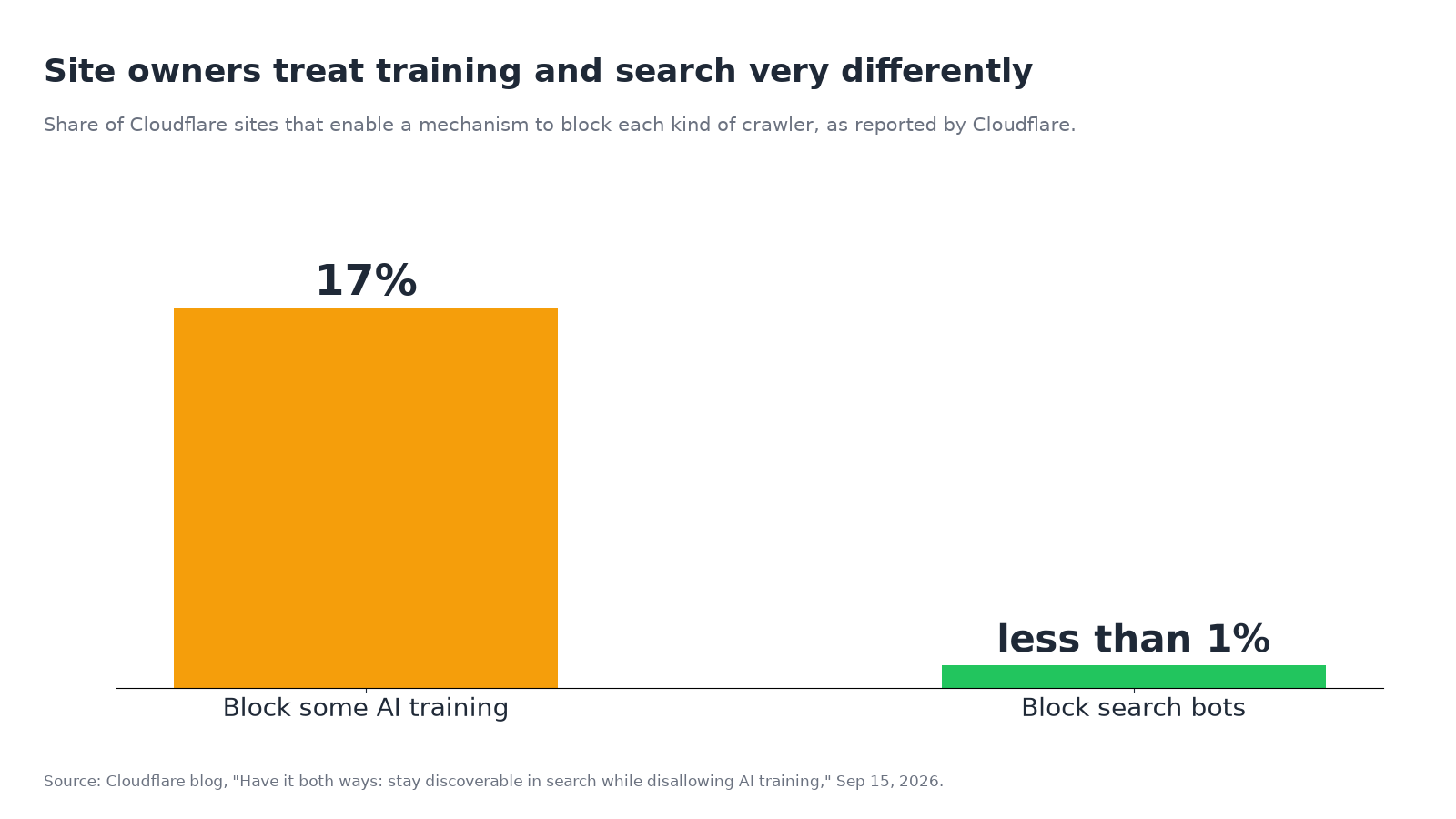
Cloudflare’s numbers on how its customers treat AI bots tell a clear story. Fewer than 1% of Cloudflare sites block search bots. 17% turn on some way to block AI training (Cloudflare, Sep 15, 2026). Most owners have already decided that being found is worth it and being trained on is negotiable.
That leaves a newer question most robots.txt guides skip. Some of today’s AI traffic isn’t a crawler at all. It’s an agent: software that opens your pages because one person asked it to compare prices, check opening hours or book an appointment. Blocking it doesn’t keep your content out of a model. It turns away a customer who sent a proxy.
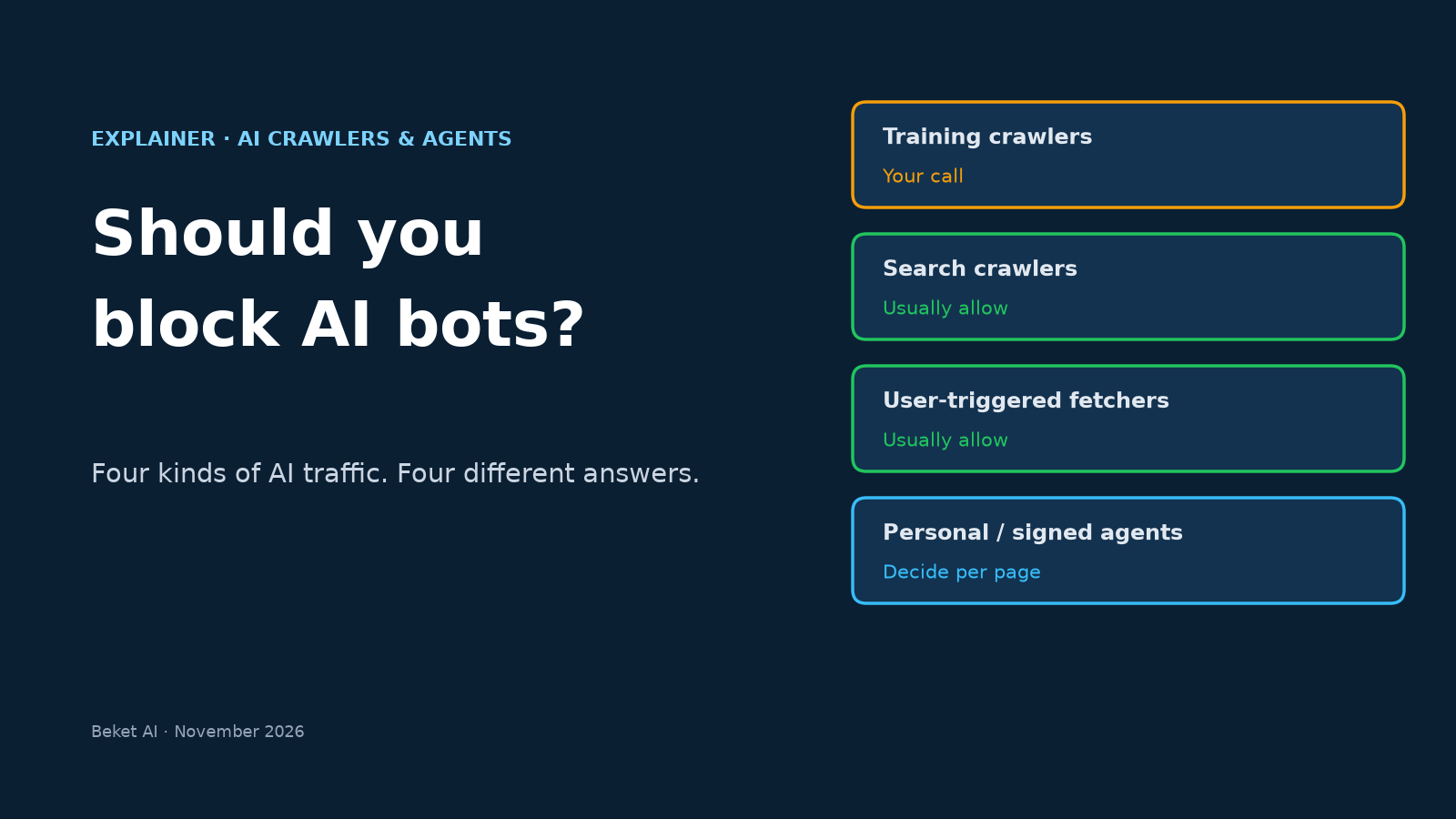
So “should I block AI bots?” has no single answer. This explainer splits AI traffic into four kinds, explains what “signed agents” and Web Bot Auth add, covers what changed in Cloudflare’s controls this fall, and ends with a decision table by business type.
The four kinds of AI traffic
Here’s what each kind does, whether robots.txt applies to it, and where you control it.
| Kind of traffic | What it does | Examples | Does robots.txt apply? | Where you control it |
|---|---|---|---|---|
| Training crawlers | Collects pages that may be used to train AI models | GPTBot; the Google-Extended robots.txt token | Yes, for crawlers that honor it | robots.txt, or your CDN/firewall |
| Search crawlers | Builds the index an AI search feature cites from | OAI-SearchBot, PerplexityBot, Googlebot | Yes | robots.txt, or your CDN/firewall |
| User-triggered fetchers | Opens a page in real time because a user asked a question | ChatGPT-User, Perplexity-User | Often not: these fetchers say robots.txt rules “may not apply” or that they “generally ignore” them | CDN/firewall rules |
| Personal / browser agents | Browses, clicks and fills in forms on a user’s behalf | ChatGPT agent, Google-Agent, Browserbase sessions | No agreed robots.txt directive yet | CDN/firewall, agent-level policies |
The first two rows are the familiar debate. OpenAI keeps them separate: blocking GPTBot tells it not to use your pages for training, while blocking OAI-SearchBot means your site “will not be shown in ChatGPT search answers,” except as a navigational link (OpenAI crawler docs). Our GPTBot vs OAI-SearchBot vs Google-Extended comparison covers the per-company tokens and copy-paste robots.txt setups.
The last two rows are where the rules get thin. OpenAI says ChatGPT-User visits happen “when users ask ChatGPT or a CustomGPT a question” and that “because these actions are initiated by a user, robots.txt rules may not apply” (OpenAI). Perplexity says the same about Perplexity-User: since a user requested the fetch, it “generally ignores robots.txt rules” (Perplexity). Google says its user-triggered fetchers “generally ignore robots.txt rules” too, and lists Google-Agent, used by “agents hosted on Google infrastructure to navigate the web and perform actions upon user request” (Google).
The practical upshot: a robots.txt line is a request to crawlers. If you really want to keep fetchers and agents out, that happens at the firewall or CDN. And if you want them in, the firewall is also where they tend to get blocked by accident.
What a “signed agent” is
A user-agent string is just text. Anyone can write “ChatGPT-User” into a request header, which is why careful sites verify bots by IP range or reverse DNS (our guide to verifying Googlebot, GPTBot and other AI crawlers walks through both). Agents make that harder. A shopping agent might run on a cloud browser platform shared by thousands of customers, so the IP address tells you little about who is behind it.
Web Bot Auth is the fix the industry is converging on. The bot signs each request with a private key, using HTTP Message Signatures (RFC 9421), and publishes the matching public key at a standard address on its own domain: /.well-known/http-message-signatures-directory. Your CDN checks the signature against that key. A scraper can copy the user-agent string. It can’t produce a valid signature without the private key. Cloudflare’s implementation follows two IETF drafts, one for the key directory and one for the signing protocol (Cloudflare docs).
A signed request carries three extra headers. In simplified form:
Signature-Agent: "https://chatgpt.com"
Signature-Input: sig1=("@authority" "signature-agent");created=...;expires=...;tag="web-bot-auth"
Signature: sig1=:...:
Signed agents is Cloudflare’s name for a class of verified traffic, introduced in August 2025. Cloudflare defines them as agents “generally directed by an end user instead of a single company,” whose infrastructure signs requests with Web Bot Auth, and that comply with its signed agent policy. The first group included ChatGPT agent, Goose from Block, Browserbase and Anchor Browser (Cloudflare, Aug 28, 2025).
Other companies are moving the same way. Google says it is “experimenting with the Web Bot Auth protocol” for Google-Agent, using the https://agent.bot.goog identity (Google). OpenAI’s guide for ChatGPT’s cloud browser says Akamai, Cloudflare, HUMAN and Vercel “verify ChatGPT request signatures automatically,” and gives manual steps for other providers (OpenAI).
Signing tells you who an agent is. It doesn’t tell you whether to let it in. That’s still your call.
What changed in Cloudflare’s controls this fall
If your site runs on Cloudflare, two changes since September affect what “block AI bots” actually does.
September 15: the single switch went away. Cloudflare retired its “Block AI Bots” toggle in favor of separate Search, Training and Agent controls. It also added a Disallow AI Training setting, which writes a no-training preference into your robots.txt while keeping “accountable” mixed-use crawlers (Applebot, Bingbot and Googlebot) allowed for search. The catch is that Block now really means block. Block and “Block on pages with ads” now apply to those mixed-use crawlers too, which means they affect search as well as training (Cloudflare).
Cloudflare migrated existing settings on its own. If you had never touched the newer controls, here’s where you ended up:
| Your old “Block AI Bots” setting | New Search | New Training | New Agent |
|---|---|---|---|
| Off | Allow | Allow | Allow |
| Block | Allow | Disallow AI Training | Block on pages with ads |
| Block on pages with ads | Allow | Disallow AI Training | Block on pages with ads |
Source: Cloudflare, Sep 15, 2026.
The bottom row is the one to watch. If you switched on the old block to stop AI training, your agent policy probably moved to “Block on pages with ads” without you choosing it. That’s harmless on a store with no ads. On a site where ad pages are also your service or product pages, it may not be what you want.
November 4: personal agents got their own controls. Cloudflare renamed the setting AI Crawler and Agent access policies and let you set Allow, Block on pages with ads, or Block for each supported personal agent, on top of the overall Agents policy. Security Analytics now shows a Personal Assistants category, plus a widget listing which agents visit, which paths they request and which status codes they get (Cloudflare, Nov 4, 2026; changelog). Cloudflare’s docs say personal agents inherit the Agents policy by default, and the company “recommends Allow (do not block) for Personal Agents” (Cloudflare docs).
For a dashboard walkthrough of the crawler side (which operators visit, what your site returns to them, which crawls turn into visits), see our Cloudflare AI Crawl Control guide.
Why the trade looks so lopsided
The usual argument for blocking is that AI platforms take far more than they give back. Cloudflare Radar measures this with a crawl-to-refer ratio: HTML pages a platform’s bots request, divided by HTML page visits that arrive with that platform in the Referer header (Cloudflare; live figures on Cloudflare Radar).
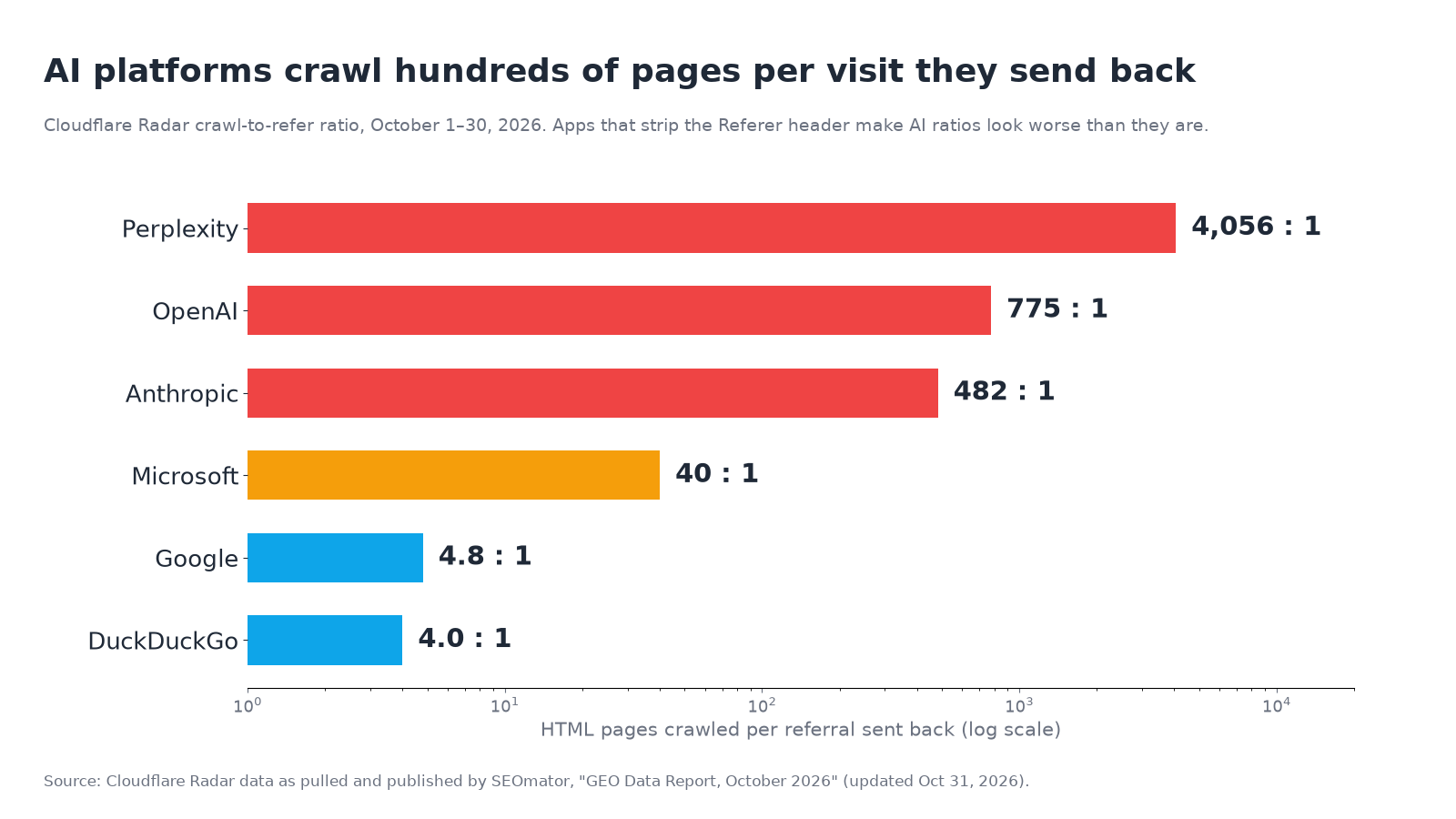
For October 1–30, 2026, SEOmator’s pull of Radar data shows Perplexity at 4,056 pages crawled per referral, OpenAI at 775, Anthropic at 482, Microsoft at 40 and Google at 4.8 (SEOmator, updated Oct 31, 2026). Three caveats before you act on those numbers:
- Referrals are undercounted. Visits from native apps often carry no Referer header, so they don’t count as referrals. Cloudflare’s own write-up says the ratios “may overstate” the imbalance, and SEOmator says OpenAI’s October jump came mostly from ChatGPT links no longer passing a referrer.
- The ratios move fast. In the same dataset Anthropic fell from 47,779:1 in January to 482:1 in October, while Perplexity rose from 112:1 to 4,056:1. A month’s figure is a snapshot.
- The ratio covers all of a platform’s bots. Cloudflare adds a platform’s crawlers and user-triggered fetchers together, so it doesn’t separate training crawls from the search crawls and live fetches that produce citations.
So the numbers back the most common choice: blocking training costs little, because training crawlers send no visits anyway. They don’t make a strong case for blocking search crawlers or user fetchers. Those are the bots that put your pages in front of people asking AI tools for a recommendation, even when the visit that follows doesn’t show up as a referral.
A decision table by business type
None of this is one-size-fits-all, and Cloudflare’s own defaults now depend on whether a site runs ads. For new domains, ad-supported sites are offered Disallow AI Training and Block on pages with ads for agents. Sites without ads get Allow across the board (Cloudflare). Here’s how we’d think about it by business model:
| Business type | Training crawlers | Search crawlers | User fetchers | Personal agents |
|---|---|---|---|---|
| Local service (dentist, plumber, law firm) | Your call; little traffic at stake | Allow | Allow | Allow, especially on booking and contact pages |
| Ecommerce store | Your call | Allow | Allow | Allow on product, cart and checkout; watch for scraping and fraud |
| SaaS / B2B | Your call | Allow | Allow | Allow on pricing, docs and signup; consider limits on logged-in app areas |
| Ad-supported publisher | Disallow or block is common | Allow, unless you’ve decided AI answers cannibalize visits | Case by case | Block on pages with ads is Cloudflare’s own preset |
| Paywalled / membership content | Disallow or block | Allow for public pages | Case by case | Decide per agent; agents can’t yet carry proof of subscription |
The last row reflects a gap Cloudflare names itself: a site may recognize the agent but still not know “whether they are an existing customer, what they authorized the agent to do, whether they have a subscription” (Cloudflare). Until that context travels with the agent, members-only areas are a reasonable place to stay cautious.
When blocking an agent does make sense
“Allow” isn’t the same as “allow everything.” There are good reasons to say no to some agent traffic:
- Account abuse. If an attacker is driving an agent against one customer’s login, Cloudflare’s Account Abuse Protection (early access) lets fraud teams act on that account with a WAF rule instead of blocking the agent for everyone else who relies on it (Cloudflare).
- Ad-funded pages. An agent that reads the page for its user means nobody sees the ads. That’s the reason Cloudflare’s ad-site preset exists.
- Unsigned traffic pretending to be an agent. A request that claims a big agent name but fails signature or IP checks isn’t that agent. Treat it like any unverified bot.
- Heavy load on expensive endpoints. Rate-limit search, inventory or quote endpoints instead of blocking whole agent categories.
The pattern in each case: narrow rules for a real problem, not a site-wide block on a category you haven’t looked at.
A 15-minute check of your current setup
- Read your robots.txt. Look for blanket
Disallow: /rules under AI user agents, and check that you aren’t blocking search crawlers (OAI-SearchBot, PerplexityBot) when you meant to block training (GPTBot, Google-Extended). - Open your CDN’s bot settings. On Cloudflare, go to Security → Settings → AI Crawler and Agent access policies and note your Search, Training and Agent settings, plus any per-agent overrides. If you used the old Block AI Bots toggle, check where the migration put your Agent setting.
- Check custom firewall rules. Old rules that challenge “automated” traffic or block data-center IPs can catch cloud-browser agents. Our guide on seeing which AI agents visit your site shows how to find agent visits and test booking and checkout flows.
- Look at what agents actually hit. In Cloudflare’s Personal Assistants view, or in your logs, check status codes on key pages. A run of 403s on checkout or booking pages is a decision you probably didn’t mean to make.
- Write the policy down. One line per traffic type, and the reason for it. The next “block AI” toggle will be easier to judge.
How Beket AI fits
Bot settings decide whether AI tools can read your site. They don’t show whether those tools recommend you. Beket AI’s free audit runs 25 prompts across ChatGPT, Perplexity and Google AI Overview and shows which businesses each engine names and which sources it cites. If you change a crawler or agent policy, Pro ($49/month) re-audits daily, starting at 50 prompts across the same three engines, so you can see whether your presence in those answers holds steady or drops after the change.
Related posts
ChatGPT Wallet: Is Your Store Ready for AI Agents That Buy? OpenAI's 4-Step Checklist
OpenAI launched ChatGPT Wallet on Nov 13, 2026. How agent checkout works, who can use it today, and the 4-step Commerce Partner Playbook for stores.
Can AI Book Appointments With Your Business? ReserveAction Schema and the Booking Paths That Matter (2026)
Can AI book appointments with you? Google AI Mode and ChatGPT book through partners, your booking page or ReserveAction schema. How to set up all three.
Google AI Overview Wrong About Your Business? How to Correct It (AI Mode Too)
Google AI Overview showing wrong information about your business? Find the source, fix your Business Profile and pages, report it to Google, and recheck.