
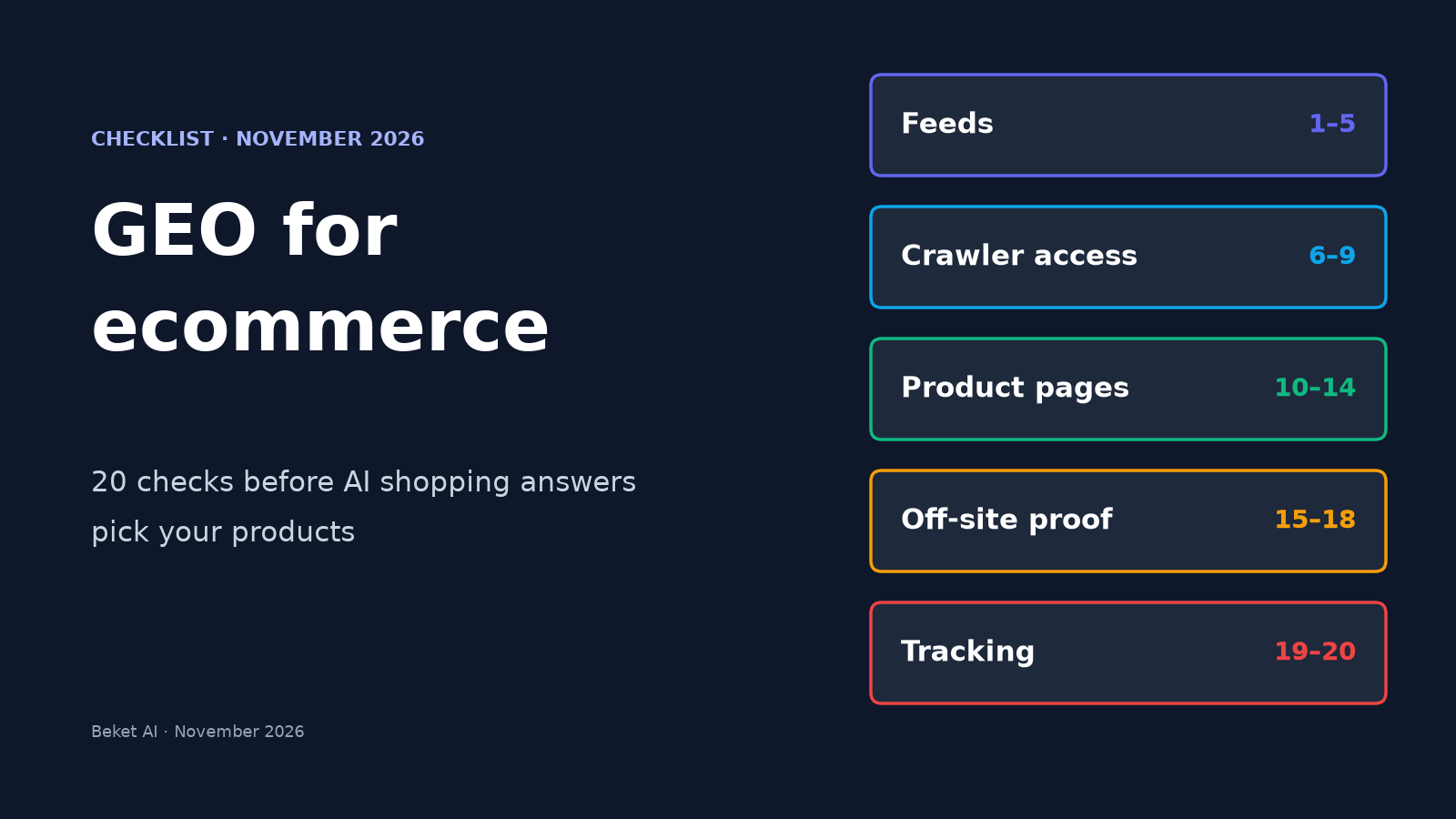
GEO Checklist for Ecommerce: 20 Checks Before AI Shopping Answers Pick Your Products (2026)

Most GEO advice is written for publishers and service businesses: get cited, earn mentions, write clear answers. A store has a harder job. When a shopper asks an AI engine for "a waterproof hiking jacket under $200," the answer is often a row of product cards with prices, review summaries and a list of stores. To land in that row, an engine has to find your product data, trust it, match it to the question and pick your store as a place to buy it.
That's what GEO for ecommerce comes down to: making your catalog easy for ChatGPT, Google AI Mode, Microsoft Copilot and Perplexity to read and hard for them to get wrong. Below are 20 checks, grouped into five areas, each tied to what the engines themselves have published. Work through them in order. The early ones are cheap and often broken.
Why stores need their own GEO checklist
Two numbers from this month frame it. In a US opt-in panel analyzed by SparkToro, only 6.9% of ChatGPT conversations showed purchase intent (Search Engine Journal). That is a small slice, but it is the slice a store cares about, and Adobe reports that visits to US retail sites from AI answers converted 90% better than other traffic in September 2026 (Adobe).
The other reason is that shopping answers don't run on web pages alone. Google says AI Mode shopping is powered by its Shopping Graph, which has "more than 50 billion product listings, 2 billion of which are updated every hour" (Google). OpenAI says ChatGPT picks products from structured metadata supplied by merchants and third parties, plus third-party content and what the model already knows before it searches (OpenAI Help Center). So a store's GEO work splits into feeds, pages and what the rest of the web says about its products.
The 20 checks at a glance
| # | Check | Area | Mainly helps |
|---|---|---|---|
| 1 | Google Merchant Center feed is complete and current | Feeds | AI Mode, AI Overviews, Gemini |
| 2 | Conversational attributes added (Q&A first) | Feeds | AI Mode, Gemini |
| 3 | ChatGPT gets your catalog (Shopify Catalog or a direct feed) | Feeds | ChatGPT |
| 4 | Microsoft Merchant Center feed set up | Feeds | Copilot, Bing |
| 5 | Feed prices and stock match the live page | Feeds | All |
| 6 | robots.txt allows the search crawlers | Access | All |
| 7 | CDN, firewall and bot rules don't block them | Access | All |
| 8 | Key product facts are in HTML text | Access | All |
| 9 | Agent and user-triggered fetchers aren't blocked by accident | Access | ChatGPT, Gemini, Perplexity |
| 10 | Product and Offer structured data match the visible page | Pages | Google, all crawlers |
| 11 | Titles name the product, not the campaign | Pages | All |
| 12 | Specs and fit facts are written out, not only in images | Pages | All |
| 13 | Each page answers the deciding buyer question | Pages | All |
| 14 | Shipping and returns are on the page and in your data | Pages | AI Mode, Copilot, ChatGPT |
| 15 | Reviews exist on public sites, not only your own widget | Off-site | ChatGPT, all |
| 16 | Your products appear in comparisons and roundups | Off-site | ChatGPT, all |
| 17 | Reddit and YouTube show real use | Off-site | All |
| 18 | Retailer and marketplace listings match your facts | Off-site | ChatGPT merchant list, AI Mode |
| 19 | You track unbranded shopping prompts per engine | Tracking | All |
| 20 | You re-check after feed changes and before peak dates | Tracking | All |
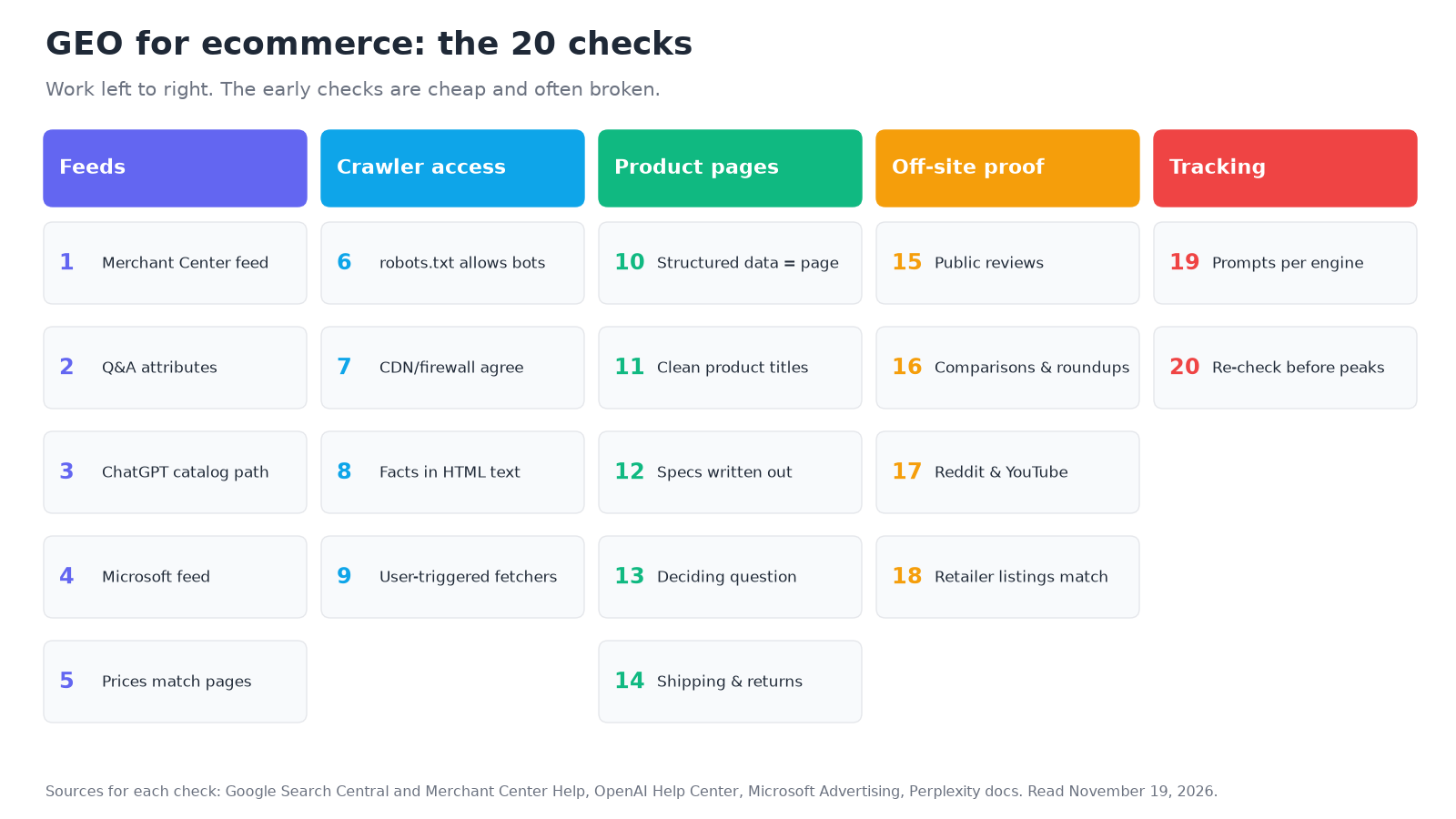
Feeds: checks 1 to 5
1. Your Google Merchant Center feed is complete and current. Google's own guide to AI features lists "checking that your Merchant Center and Business Profile information is up-to-date" among the basics for AI Overviews and AI Mode (Google Search Central). Fill the required fields properly (title, price, availability, image, brand, GTIN where one exists) and clear the disapprovals in the diagnostics tab. A product missing from Merchant Center is missing from the data AI Mode shops from.
2. You've added conversational attributes, starting with Q&A. Merchant Center now has six optional "conversational attributes": question and answer, document link, related product, item group title, variant option and popularity rank. Google says they don't affect approval and recommends adding them through a supplemental data source (Google Merchant Center Help). The Q&A attribute takes up to 30 pairs per product and is "primarily intended for use in conversational experiences such as AI mode" (Google Merchant Center Help). Google's rules: no prices, dates, shipping or keyword lists in it, only real product answers.
3. ChatGPT gets your catalog. OpenAI says Shopify merchants' product data "is already integrated into ChatGPT through Shopify Catalog," with no extra work, and that other merchants can apply to send a direct product feed (OpenAI Help Center). A feed is optional, since ChatGPT can also crawl your pages, but OpenAI's merchants page says feeds "give you greater control over how your products appear" (ChatGPT merchants page). Field by field, our guide on how to submit a product feed to ChatGPT covers the spec and the common mistakes.
4. You have a Microsoft Merchant Center feed. Microsoft calls an "AI-ready product feed in Microsoft Merchant Center" the first step to being found in AI shopping on Bing and Copilot (Microsoft Advertising). Many stores that run Google Shopping never set this one up, so it's worth checking.
5. Feed prices and stock match the live page. OpenAI notes there "may be some delay" before price and shipping changes show in ChatGPT (OpenAI Help Center). Every system that caches your data can repeat a stale sale price. Update feeds on the same schedule as your prices, and mark items out of stock rather than deleting them mid-sale.
Perplexity is the outlier here. It announced a free Merchant Program for large retailers in 2024 (Perplexity), but we couldn't find a current public application or feed spec. For most stores, Perplexity sees products through its crawler, which is the next group.
Crawler access: checks 6 to 9
6. robots.txt allows the search crawlers. Each engine says its search crawler is what gets you into answers. OpenAI: allow OAI-SearchBot to appear in ChatGPT search results, separate from GPTBot, which is for training (OpenAI). Perplexity: allow PerplexityBot and its published IP ranges (Perplexity docs). Google: AI features run on normal Googlebot crawling, and "robots.txt directives for Googlebot is the control" (Google Search Central). Blocking GPTBot for training is a separate choice and doesn't remove you from ChatGPT search.
7. Your CDN and firewall agree with robots.txt. Google's checklist says crawling has to be allowed "in robots.txt, and by any CDN or hosting infrastructure" (Google Search Central). Bot-fight modes and AI-bot block toggles are often switched on store-wide by default. Check your CDN's bot settings and its logs for 403s to the crawlers above.
8. Key product facts are in HTML text. Google lists "making sure that important content is available in textual form" as a basic (Google Search Central). Adobe found the average retail homepage was only 63% readable by AI (Adobe). Price, variants, size charts and stock that only load after a script runs, or live inside images, are the usual gaps. Load a product page with JavaScript off and see what's left.
9. Agent and user-triggered fetchers aren't blocked by accident. Besides crawlers, engines send fetchers when a user asks about a page: ChatGPT-User, Perplexity-User and Google's agent traffic. Perplexity, for example, says Perplexity-User "supports user actions" and visits pages to answer a user's question (Perplexity docs). Decide on purpose what to allow, rather than inheriting a blanket block.
Product pages: checks 10 to 14
10. Product and Offer structured data match the visible page. Google says there's no special schema for AI features, but asks that "your structured data matches the visible text on the page" (Google Search Central). Use Product with Offer (price, currency, availability) as described in Google's merchant listing documentation, and make sure a sale price in markup is the sale price a shopper sees.
11. Titles name the product, not the campaign. OpenAI says ChatGPT may rewrite product titles into simpler ones because "merchants often use varying titles and descriptions for the same product" (OpenAI Help Center). Give it a clean starting point: brand, product type, model and the key attribute ("Men's waterproof hiking jacket, 3-layer"), not "BLACK FRIDAY MEGA DEAL."
12. Specs and fit facts are written out. Shoppers ask AI with constraints: wide feet, under 2 lbs, fits a 15-inch laptop, safe for a dishwasher. If your answer to that constraint exists only in a spec image or a PDF, an engine may not use it. Put the facts in text, and link manuals with Merchant Center's document link attribute where it fits.
13. Each page answers the deciding question. Every considered purchase has one question that decides it. Put that answer near the top of the page, in plain words, and reuse it in the Merchant Center Q&A attribute from check 2 so your page and feed say the same thing.
14. Shipping and returns are on the page and in your data. Shoppers ask about delivery and returns before they buy, and Microsoft's UCP store setup asks for a return policy URL, a return window and any restocking fee (Microsoft Learn). Set shipping and return settings in Merchant Center too, so the policy isn't buried in a footer link.
Off-site proof: checks 15 to 18
15. Reviews exist on public sites. ChatGPT's review summaries "are based on reviews from public websites," and its labels such as "Budget-friendly" come from information that may include third-party data (OpenAI Help Center). Reviews locked inside a widget that crawlers can't read may not count. Make sure reviews also live on retailer pages and review sites, and that your own review text is in the page HTML.
16. Your products appear in comparisons and roundups. OpenAI lists "model responses generated by ChatGPT before it considers any new search results" as one input to product picks. In plain terms, what the model already knows about your category matters, and that comes from being covered in reviews, "best of" lists and comparisons. Our explainer on how ChatGPT shopping picks products goes through each input.
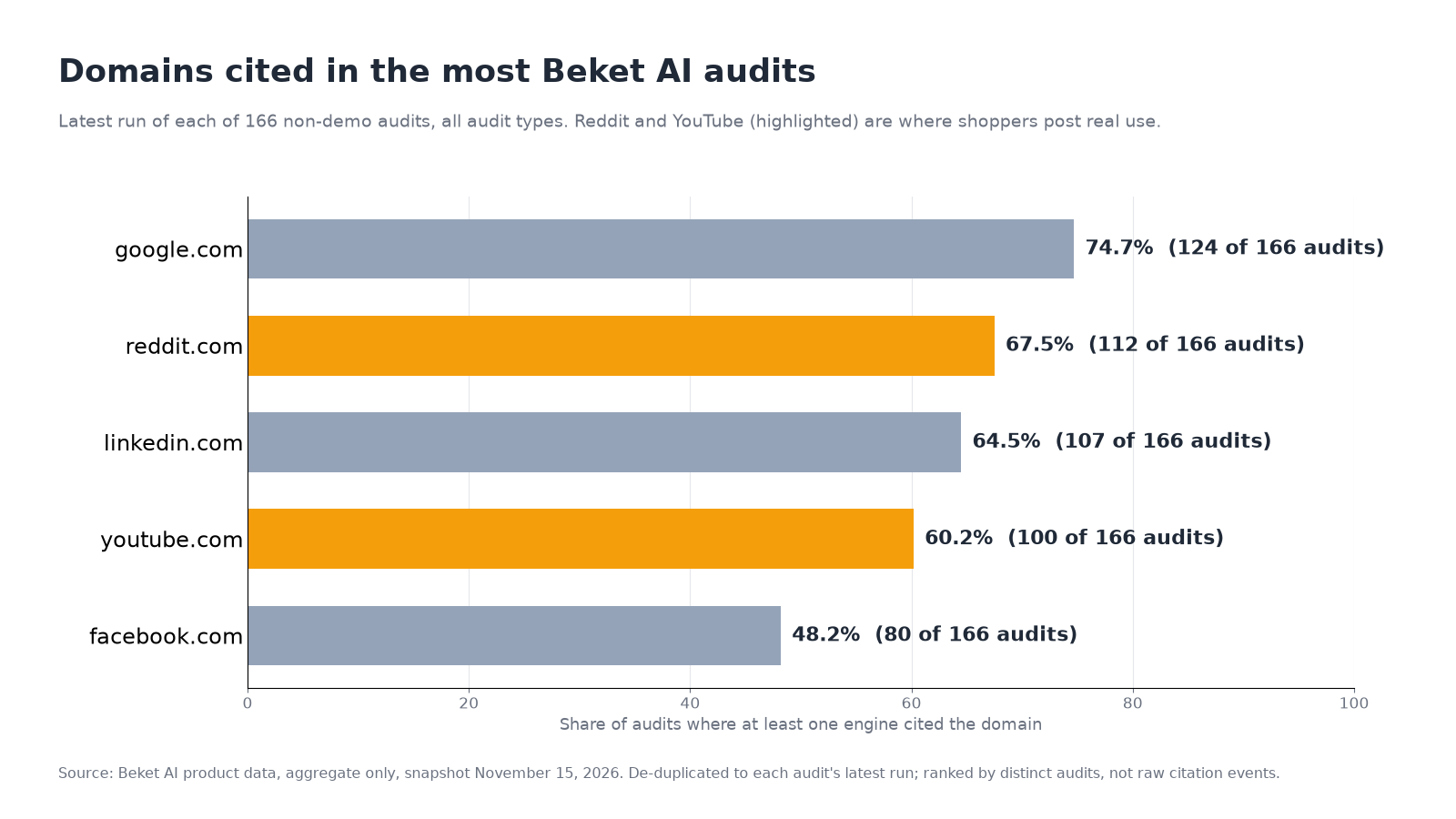
17. Reddit and YouTube show real use. In Beket AI's own data, de-duplicated to each audit's latest run, reddit.com was cited in 112 of 166 audits (67.5%) and youtube.com in 100 (60.2%). Only google.com was cited in more audits than Reddit, and linkedin.com sat between Reddit and YouTube. That snapshot covers all kinds of audits, not only stores, but it shows where engines go for proof. Details are in our study of which publications AI cites most. Don't seed fake threads. Do make it easy for real customers to post photos, videos and honest reviews.
18. Retailer and marketplace listings match your facts. When ChatGPT lists stores for a product, it ranks them by "availability, price, quality, and whether they are the maker or primary seller" (OpenAI Help Center). If you sell through retailers or marketplaces, mismatched titles, old prices or missing GTINs there can send the shopper elsewhere, or split your product into what look like several products. Use the same GTIN and core title everywhere.
Tracking: checks 19 and 20
19. You track unbranded shopping prompts on each engine. Write 10 to 25 questions a buyer would really ask, with budgets and constraints, and never include your brand name. Run them on each engine you care about, because AI Mode, ChatGPT and Copilot draw on different data. Record which products, brands and stores appear, and which sources are cited.
20. You re-check after feed changes and before peak dates. Answers move as prices, stock and coverage change. Re-run the same prompts after a feed fix and in the weeks before a big sale. Our AI Black Friday shopping study shows how differently engines named stores for the same holiday questions.
Beket AI runs this tracking for you. A free audit sends 25 prompts to any 3 of the 6 engines we track (ChatGPT, Gemini, Perplexity, Microsoft Copilot, Google AI Overviews and Google AI Mode) and shows whether you're named, which sources are cited and how you compare with competitors. Pro is $49 a month per site with daily re-runs. Beket AI shows the answers and citation gaps; making the feed and page changes above is still your team's job.
A one-week order of work
| Day | Do | Checks |
|---|---|---|
| 1 | Run 10 to 25 unbranded shopping prompts and save the answers as a baseline | 19 |
| 2 | Audit robots.txt, CDN bot rules and a no-JavaScript view of top products | 6, 7, 8, 9 |
| 3 | Fix Merchant Center errors, set shipping and returns, check prices match | 1, 5, 14 |
| 4 | Add Q&A attributes and on-page answers for your top 20 products | 2, 12, 13 |
| 5 | Set up Microsoft Merchant Center and confirm your ChatGPT path | 3, 4 |
| 6 | Clean titles and structured data; match retailer listings | 10, 11, 18 |
| 7 | Plan review and coverage work, then schedule the re-check | 15, 16, 17, 20 |
Caveats
- Based on public pages from Google, OpenAI, Microsoft and Perplexity, read on November 19, 2026. Shopping features change often, and none of these companies publish ranking weights.
- Doing all 20 checks doesn't guarantee a spot. OpenAI says plainly that not every relevant product is shown.
- ChatGPT shopping and many AI Mode shopping features are limited to certain countries. Check availability for your market.
- The Beket AI citation figures come from our own product data on November 15, 2026, de-duplicated to the latest run of each audit, across all audit types. AI answers change over time.
Related posts
Beket AI Changelog: What Shipped in October and November 2026
What shipped in Beket AI in October and November 2026: one headline number, market audits, public API docs at beket.ai/docs and stale page refresh.
How Often Do AI Answers Change? What Beket AI's Daily Audits Show
75% of AI answers changed overnight in a new study. Beket AI's daily audits show brands, cited domains and pages move too. Here's what to track instead.
25 Persona Prompt Examples for Tracking AI Visibility (Local Services, SaaS, Ecommerce, B2B)
25 persona prompt examples for AI visibility tracking, by vertical, each with an unbranded question, what it tests and a control, plus Beket AI data.